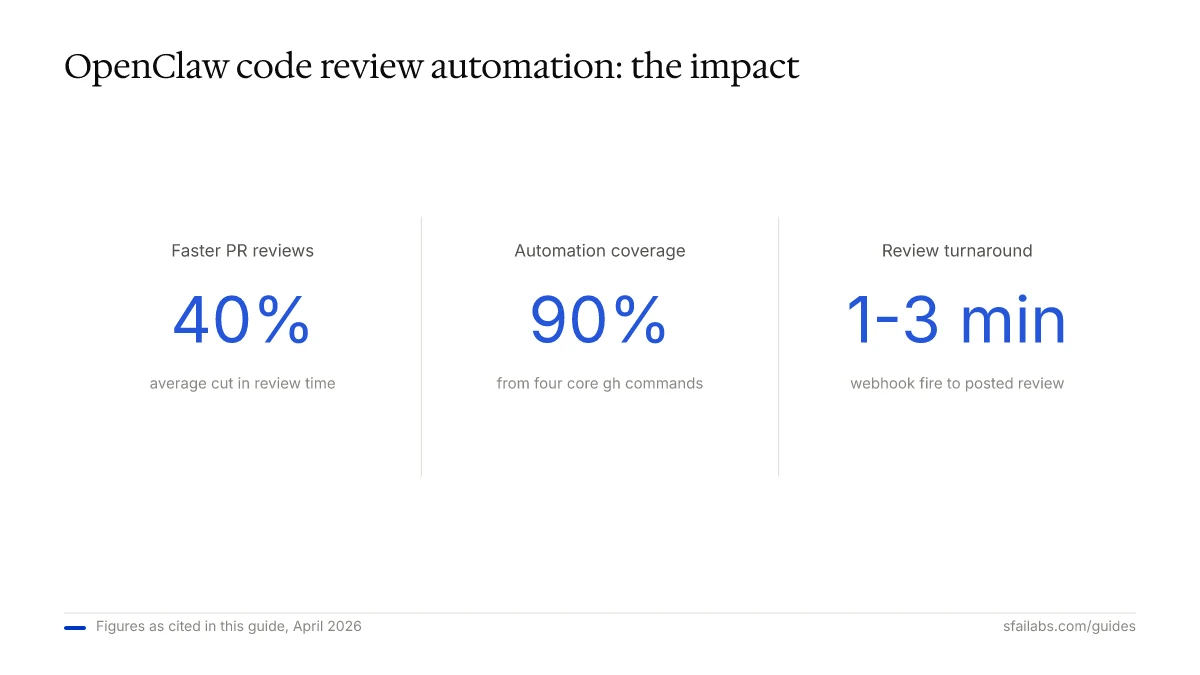
Most automated code review tools give you a wall of lint warnings and call it a day. OpenClaw takes a different approach: you write a skill that defines exactly what the agent should look for, wire it to a GitHub webhook, and it posts review comments on pull requests like a teammate who never sleeps. Teams using this approach can cut their average PR review time by 40% because the obvious issues (missing tests, security patterns, naming violations) are caught before a human ever opens the diff.
This guide walks through the full setup: connecting GitHub, configuring webhooks for PR events, writing a code review skill with real criteria, posting review comments, handling multiple programming languages, and plugging the whole thing into your CI/CD pipeline. By the end you will have an agent that reviews every PR within minutes of it being opened.
Prerequisites
Before you start, you need three things:
-
OpenClaw installed and running. Follow our OpenClaw setup guide if you have not done this yet. That covers installation, workspace config, memory, and model selection.
-
GitHub connected to OpenClaw. Our connect GitHub to OpenClaw guide walks through PAT creation, CLI authentication, and basic repo access. Complete that first.
-
A VPS or always-on machine. Code review automation only works if the agent is running when PRs are opened. If your laptop is closed at 2 AM, it misses the PR. Our Hostinger deployment guide covers setting up OpenClaw on a VPS for 24/7 operation.
If you already have all three, you are ready to build the review pipeline.
How the Review Pipeline Works
The workflow has four stages, and understanding them before you start building saves debugging time later:
-
Webhook fires. A developer opens a pull request on GitHub. A webhook sends a payload to your OpenClaw instance with the PR number, repo, and event type.
-
Agent fetches the diff. OpenClaw receives the webhook, runs
gh pr diffto get the changed files, and loads the diff into context. -
Skill analyzes the code. The code review skill you wrote evaluates the diff against your configured criteria: security patterns, naming conventions, test coverage, complexity.
-
Agent posts comments. OpenClaw uses
gh pr revieworgh pr commentto post findings directly on the pull request. Developers see the review inline, just like a human reviewer.
The whole loop takes 1-3 minutes depending on diff size and LLM response time. That matters. By the time a developer opens Slack after pushing, the review is already there.
Step 1: Set Up the Webhook Endpoint
OpenClaw needs to receive GitHub webhook events. If you are running OpenClaw on a VPS with a public IP or domain, you can point GitHub directly at it. If you are running locally, use a tunnel.
Enable the Webhook Listener
In your OpenClaw configuration, enable the webhook server:
# In your OpenClaw config
webhook:
  enabled: true
  port: 3001
  secret: "your-webhook-secret-here"
For local development, expose port 3001 using a tunnel:
ngrok http 3001Copy the HTTPS URL (something like https://abc123.ngrok.io) for the next step.
Create the GitHub Webhook
Go to your repository settings on GitHub:
- Navigate to Settings > Webhooks > Add webhook
- Set Payload URL to your OpenClaw webhook endpoint (e.g.,
https://your-vps.com:3001/webhookor your ngrok URL) - Set Content type to
application/json - Set Secret to the same value as your OpenClaw config
- Under Which events would you like to trigger this webhook?, select Let me select individual events and check:
- Pull requests
- Pull request reviews
- Check runs (if you want CI integration)
- Save the webhook
GitHub sends a ping event immediately. Check your OpenClaw logs to confirm it arrived.
Wire the Webhook to Your Agent
Create a webhook handler that filters for PR events and triggers the review skill:
# webhooks/pr-review.yaml
trigger:
  event: "pull_request"
  action: ["opened", "synchronize"]
agent:
  skill: "code-review"
  inputs:
    repo: "{{ event.repository.full_name }}"
    pr_number: "{{ event.pull_request.number }}"
The synchronize action fires when new commits are pushed to an existing PR, so the agent re-reviews after updates. This is important because developers frequently push fixes after the first review.
Step 2: Write the Code Review Skill
This is where the real value lives. A generic “review this code” prompt produces generic comments nobody reads. A well-defined skill with specific criteria produces actionable feedback.
The Skill Definition
Create a SKILL.md file for your code review skill:
---
name: code-review
description: Analyze pull request diffs against project coding standards
---

## Role
You are a senior code reviewer for this project.

## Task
Review the pull request diff and identify issues across these categories.

## Review Criteria

### Security (Critical)
- SQL injection patterns (string concatenation in queries)
- Hardcoded secrets, API keys, or tokens
- Unvalidated user input reaching database or shell commands
- Missing authentication checks on new endpoints

### Code Quality (Warning)
- Functions exceeding 50 lines
- Deeply nested conditionals (3+ levels)
- Duplicated logic that should be extracted
- Missing error handling on async operations

### Testing (Warning)
- New functions without corresponding test files
- Modified logic without updated tests
- Test files that only test the happy path

### Naming and Style (Info)
- Variables named `data`, `temp`, `result`, `item` without context
- Inconsistent naming conventions within the file
- Comments that restate what the code does instead of why

## Output Format
For each finding, provide:
- **File and line range**
- **Severity**: Critical, Warning, or Info
- **Category**: Security, Quality, Testing, or Style
- **Description**: What the issue is (one sentence)
- **Suggestion**: How to fix it (one sentence)
Why Specific Criteria Matter
The single biggest lesson with AI code review: vague instructions produce vague reviews. When you tell the agent to “review this code for quality,” you get comments like “consider adding error handling” on every function. When you specify “flag async operations without try/catch or .catch()” you get precise, actionable findings that developers fix.
The criteria above are a starting point. Customize them for your project. If your team uses a specific state management pattern, add it. If you have a policy about database migrations, include it.
Step 3: Fetch and Analyze the PR Diff
When the webhook fires, the agent needs to fetch the diff and pass it to the review skill. Here is the command sequence:
# Get the PR diff
gh pr diff 42 --repo owner/repo

# Get PR metadata (title, description, changed files)
gh pr view 42 --repo owner/repo --json title,body,files,additions,deletions

# List changed files
gh pr diff 42 --repo owner/repo --name-only
Four gh commands handle 90% of useful automation, according to Zen van Riel, who has built GitHub automation workflows for a large developer audience. The ones you need most are gh pr diff, gh pr view, gh pr list, and gh pr comment.
Handling Large Diffs
PRs over 400 lines of changes need special treatment. Dumping the entire diff into a single LLM prompt produces shallow analysis because the model spreads its attention across too many files.
A better approach:
- Use
gh pr diff --name-onlyto get the list of changed files - Group files by directory or module
- Review each group separately
- Summarize findings across all groups at the end
# Get changed file list
gh pr diff 42 --repo owner/repo --name-only > /tmp/changed-files.txt

# Review files in batches
while IFS= read -r file; do
  gh pr diff 42 --repo owner/repo -- "$file"
done < /tmp/changed-files.txt
This per-file approach catches issues that a full-diff review misses. Without this approach, agents consistently miss bugs in utility files because they are buried below 300 lines of React component changes.
Step 4: Post Review Comments
OpenClaw can post comments in two ways, and the choice matters more than you think.
Summary Comment
A single comment on the PR with all findings:
gh pr comment 42 --repo owner/repo --body "## Automated Code Review

### Critical
- **src/api/users.ts:45-52**: SQL injection risk. User input is concatenated into query string. Use parameterized queries instead.

### Warnings
- **src/utils/parser.ts:120**: Missing error handling on JSON.parse. Wrap in try/catch.
- **tests/**: No test updates for modified parser logic.

### Info
- **src/api/users.ts:12**: Variable 'data' could be more descriptive. Consider 'userRecord'.
"
Inline Review Comments
Comments attached to specific lines in the diff:
gh api repos/owner/repo/pulls/42/reviews \
  --method POST \
  --field body="Automated review complete. 3 findings." \
  --field event="COMMENT" \
  --field comments='[{"path":"src/api/users.ts","line":47,"body":"SQL injection risk: user input concatenated into query. Use parameterized queries."}]'
Which to Use
Start with summary comments. They are easier to implement, less noisy, and give you a single place to see all findings. Once the team is comfortable with the automated reviews, switch to inline comments for critical and warning findings while keeping info-level items in the summary.
The worst outcome is an agent that posts 15 inline comments on every PR. Developers start ignoring them within a week. Be selective about what gets an inline comment.
Step 5: Configure Review Criteria for Multiple Languages
If your team works across TypeScript, Python, and Go (or any polyglot stack), a single set of review criteria produces bad results. TypeScript needs checks for any types and missing null checks. Python needs checks for type hints and bare except clauses. Go needs checks for unchecked errors and goroutine leaks.
Language-Aware Review Configuration
Structure your skill to detect file extensions and apply the right criteria:
## Language-Specific Rules

### TypeScript (.ts, .tsx)
- Flag usage of `any` type
- Check for missing null/undefined checks on optional values
- Verify async functions have error boundaries
- Flag direct DOM manipulation in React components

### Python (.py)
- Flag bare `except:` without specific exception types
- Check for missing type hints on function signatures
- Verify f-strings are not used with user input for SQL
- Flag mutable default arguments

### Go (.go)
- Flag unchecked error returns (err != nil not checked)
- Check for goroutines without context cancellation
- Verify defer statements are placed immediately after resource acquisition
- Flag package-level variables that should be constants
This is a genuine gap in every competitor’s content. Nobody addresses how to handle a codebase where the same PR might touch TypeScript, Python, and YAML files. The agent needs to switch criteria based on what it is reading.
Step 6: Integrate with CI/CD
The review agent becomes significantly more valuable when it knows the CI status of the PR. A diff that looks clean might still break the build, and a passing build does not mean the code is good. Combining both signals gives developers complete information.
Monitor CI Status Alongside Reviews
# Check if CI has run on this PR
gh run list --repo owner/repo --branch feature-branch --limit 5

# Get details on a failing run
gh run view 12345 --repo owner/repo --log-failed
Combined Review Workflow
- Webhook fires on PR opened
- Agent fetches diff and runs code review skill
- Agent waits for CI to complete (poll
gh run listevery 60 seconds, timeout after 15 minutes) - If CI fails, agent adds failure context to the review comment
- Agent posts combined review: code findings + CI status
This combined approach is what separates a useful review agent from a toy. When a developer sees “3 code review findings + CI failed on test_user_auth.py line 42: assertion error,” they can fix everything in one pass instead of discovering issues serially.
Schedule Daily Review Digests
For teams that want a broader view, set up a heartbeat schedule that runs daily:
# heartbeat/daily-review-digest.yaml
schedule: "0 9 * * 1-5"  # 9 AM weekdays
task: |
  List all open PRs with no review.
  For each, run the code review skill.
  Post a summary to the team Slack channel.
This catches PRs that slipped through without review and gives engineering leads visibility into the review backlog.
Troubleshooting Common Issues
Webhook events not arriving: Verify the webhook secret matches between GitHub and OpenClaw config. Check GitHub’s webhook delivery log under Settings > Webhooks > Recent Deliveries. A 200 response means OpenClaw received it; a timeout means the endpoint is not reachable.
Review comments are generic or unhelpful: Your skill criteria are too vague. Replace “check for code quality” with specific patterns like “flag functions over 50 lines” or “flag async operations without error handling.” The more specific the instruction, the better the output.
Agent reviews take too long: Large diffs (500+ lines) push LLM response times past 2 minutes. Split the diff into per-file reviews as described in Step 3. Also check which model you are using. Claude Opus 4.6 gives the best review quality but is slower; Claude Sonnet 4.6 is faster for routine reviews.
Duplicate reviews on the same PR: If you trigger on both opened and synchronize events, the agent reviews on every push. Add deduplication logic: store the latest reviewed commit SHA and skip if it matches. LumaDock recommends a fingerprint-based approach where you hash the diff content and skip if the hash has not changed.
Permission errors when posting comments: Your GitHub PAT needs the repo scope (classic PAT) or pull_requests: write permission (fine-grained PAT). Read-only tokens cannot post review comments. See our GitHub PAT guide for scope details.
Frequently Asked Questions
How do I set up OpenClaw to automatically review pull requests?
Connect GitHub via CLI authentication, create a webhook pointing at your OpenClaw instance, and write a code review skill with specific criteria. The webhook triggers the skill whenever a PR is opened or updated. The full setup takes about 30 minutes if you already have OpenClaw and GitHub connected. Steps 1 and 2 of this guide cover the webhook and skill configuration.
Can OpenClaw review code in multiple programming languages?
Yes, but you need to configure language-specific review criteria. A single “review this code” prompt performs poorly on polyglot codebases. Structure your skill to detect file extensions (.ts, .py, .go) and apply different rules for each language. Step 5 above shows how to set this up.
How do I stop automated reviews from generating noisy or generic comments?
Replace vague criteria with specific patterns. Instead of “check for code quality,” write “flag functions exceeding 50 lines” and “flag async operations without try/catch.” Start with summary comments rather than inline comments, and limit inline comments to critical and warning severity only. Generic comments are always a prompt problem, not a tool problem.
Does OpenClaw code review work with GitLab or Bitbucket?
OpenClaw primarily integrates with GitHub through the gh CLI. GitLab and Bitbucket are not natively supported through the same command set. However, you can build custom skills that use the GitLab or Bitbucket APIs directly via shell commands or MCP integrations. The review logic stays the same; only the API calls change.
Can OpenClaw run tests as part of the review process?
OpenClaw can execute shell commands, so it can run your test suite locally if it has access to your codebase and dependencies. A more practical approach for most teams: monitor the CI pipeline via gh run list and include test results in the review comment. This avoids duplicating CI work and keeps the agent focused on code analysis rather than build execution.
Can multiple team members share one OpenClaw code review agent?
Yes. A single OpenClaw instance on a VPS can monitor multiple repositories and handle webhooks from all of them. Each developer benefits from the same automated reviews. The webhook approach is inherently multi-user because it triggers on repository events, not individual developer actions.
How do I integrate OpenClaw code review with my existing CI/CD pipeline?
Subscribe to check_run events in your GitHub webhook alongside pull request events. The agent can then correlate code review findings with CI results and post a combined review. Step 6 of this guide covers this integration pattern, including how to wait for CI completion before posting the final review.
What LLM should I use for code review with OpenClaw?
Claude Opus 4.6 produces the most thorough reviews but is slower and costs more per review. Claude Sonnet 4.6 handles routine reviews well at lower cost. Gemini 3.1 Pro is another strong option. For most teams, run Sonnet for day-to-day reviews and switch to Opus for critical PRs or security-sensitive changes.
Key Takeaways
- Wire GitHub webhooks to OpenClaw so every PR gets reviewed automatically within minutes of being opened
- Write specific review criteria (not “review this code”) to get actionable findings developers fix
- Start with summary comments, graduate to inline comments once the team trusts the agent
- Configure language-specific rules for polyglot codebases rather than using one-size-fits-all criteria
- Combine code review with CI status for a complete picture that lets developers fix everything in one pass
- Use a VPS for 24/7 operation so the agent catches PRs opened outside working hours
SFAI Labs


