GitHub is where your code lives. OpenClaw is an AI agent that can read diffs, summarize pull requests, triage issues, and send you a Telegram message when a build breaks at 2 AM. Connecting the two takes about 20 minutes, most of which is spent choosing the right PAT scopes.
This guide walks through the full setup: creating a Personal Access Token with the correct permissions, installing the GitHub skill, configuring OpenClaw to talk to your repos, and then wiring up webhooks so the agent reacts to PR events in real time. We also cover five practical use cases that go beyond basic code review.
Before You Start
You need three things in place before connecting GitHub to OpenClaw:
-
OpenClaw installed and running. If you have not done this yet, follow our OpenClaw setup guide. That guide covers installation, workspace configuration, memory, and model selection.
-
A GitHub account with access to the repositories you want to monitor. You do not need admin access to the organization, but you do need permission to create Personal Access Tokens for your account.
-
GitHub CLI (
gh) installed. OpenClaw usesghunder the hood for all GitHub operations. It handles authentication, pagination, and rate limiting cleanly. Install it from cli.github.com if you do not have it already.
If you want OpenClaw running 24/7 without keeping your laptop open, you also need it deployed on a VPS. Our Hostinger deployment guide covers that setup.
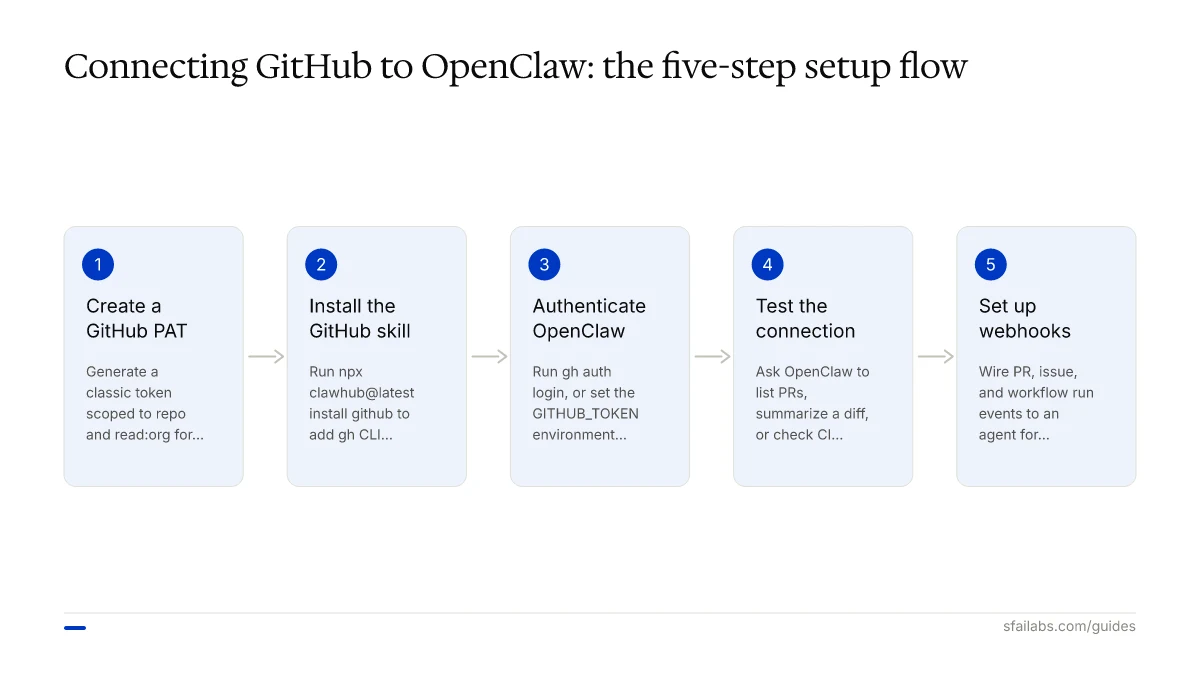
Step 1: Create a GitHub Personal Access Token
OpenClaw interacts with GitHub through the gh CLI, which needs an authenticated session. The simplest path is a Personal Access Token.
Classic PAT vs Fine-Grained PAT
GitHub offers two PAT types. Here is when each makes sense:
| Type | Best For | Trade-Off |
|---|---|---|
| Classic PAT | Quick setup, broad access | Scopes apply to all repos you can access |
| Fine-Grained PAT | Production use, locked-down permissions | Requires per-repository configuration |
For your first integration, a classic PAT is the faster option. Once you have the workflow running and validated, switch to a fine-grained token that targets only the repositories OpenClaw needs.
Required Scopes for a Classic PAT
| Scope | Required | What It Enables |
|---|---|---|
repo |
Yes | Read access to code, PRs, issues, and commits across your repos |
read:org |
Recommended | Read organization membership and team structure |
workflow |
Optional | Trigger and view GitHub Actions workflows |
read:project |
Optional | Read project board data |
Start with repo and read:org. Add workflow later if you want OpenClaw to monitor CI/CD runs. The principle is least privilege: grant only what you need right now.
Do not add admin:org, delete_repo, or write:packages. OpenClaw does not need any of these, and granting them creates unnecessary risk.
Generate the Token
- Go to github.com/settings/tokens
- Click Generate new token and select Generate new token (classic)
- Name it something descriptive:
openclaw-github-read - Set an expiration. 90 days is a reasonable default. You can rotate it before it expires.
- Check
repoandread:org - Click Generate token
- Copy the token immediately. GitHub will not show it again.
Store this token somewhere secure. A password manager like 1Password or Bitwarden works. You will need it in the next step.
Step 2: Install the GitHub Skill
OpenClaw uses skills to interact with external services. The GitHub skill wraps the gh CLI into a set of capabilities your agent can invoke through natural language.
Install it:
npx clawhub@latest install githubVerify the installation:
clawhub listYou should see github in the output. The skill gives your agent access to commands like gh pr view, gh issue list, gh run list, and gh api for anything not covered by the built-in commands.
If you want to explore what other skills are available, our OpenClaw skills development guide covers creating and customizing skills for your own workflows.
Step 3: Authenticate OpenClaw with GitHub
With the skill installed, your agent needs credentials. Two approaches work.
Option A: GitHub CLI Authentication (Recommended)
This is the simplest path. The gh CLI manages token storage, refresh, and rotation for you:
gh auth loginFollow the prompts:
- Select GitHub.com (or your GitHub Enterprise host)
- Choose HTTPS as the protocol
- Select Paste an authentication token
- Paste the PAT you generated in Step 1
Verify it worked:
gh auth statusYou should see your GitHub username and the scopes granted. If OpenClaw runs under a different user account on your server (common on VPS deployments), run gh auth login as that user too.
Option B: PAT via Environment Variable
If you prefer explicit token management, set the GITHUB_TOKEN environment variable:
# Add to ~/.bashrc, ~/.zshrc, or your server's env config
export GITHUB_TOKEN=ghp_your_token_here
The gh CLI picks up GITHUB_TOKEN automatically. This approach works well for Docker and systemd deployments where you manage environment variables through config files rather than interactive login.
Do not paste the token directly into OpenClaw config files, skill files, or any file your agent can read into context. Environment variables keep secrets out of the agent’s memory.
Step 4: Test the Connection
Before wiring up automation, confirm that OpenClaw can reach GitHub.
Open a conversation with your agent (Telegram, terminal, or whichever channel you use) and ask:
Show me the 5 most recent open pull requests in [owner/repo]Replace [owner/repo] with an actual repository. The agent should execute gh pr list and return a formatted list with PR titles, authors, and status.
Try a few more commands:
| Ask OpenClaw | What It Does |
|---|---|
| “Summarize PR #42 in myorg/myrepo” | Fetches the diff, description, and review comments for that PR |
“Show open issues labeled bug in myorg/myrepo” |
Lists bug-labeled issues with details |
| “What is the latest CI status on the main branch?” | Checks GitHub Actions run status |
| “List recent commits on main in myorg/myrepo” | Returns commit history with messages and authors |
If any of these fail, check the troubleshooting section below.
Step 5: Set Up Webhooks for Real-Time Events
The basic setup requires you to ask OpenClaw to check GitHub. Webhooks flip that: GitHub tells OpenClaw when something happens, and the agent reacts automatically.
This is the difference between “check my PRs every morning” and “alert me the moment someone opens a PR against main.”
Enable the OpenClaw Webhook Endpoint
First, expose the webhook listener in your OpenClaw config (~/.openclaw/openclaw.json):
{
  "hooks": {
    "enabled": true,
    "token": "a-long-random-secret-string-here",
    "path": "/hooks",
    "allowedAgentIds": ["github-watcher"]
  }
}
The token is a shared secret that GitHub will send with every webhook payload. Generate something random. A UUID or a 40-character hex string works. The allowedAgentIds field restricts which agents can be triggered by incoming hooks.
Restart the gateway:
openclaw gateway restartYour webhook endpoint is now live at https://your-server:port/hooks. If your OpenClaw instance runs behind a reverse proxy with TLS (recommended for production), the endpoint is accessible from the internet.
If you do not have a public URL, a tunnel service like Cloudflare Tunnel or ngrok can expose your local instance. Our OpenClaw webhook integration guide covers this in detail.
Create a GitHub Webhook
- Go to your repository on GitHub
- Navigate to Settings > Webhooks > Add webhook
- Set the Payload URL to
https://your-server/hooks/agent - Set Content type to
application/json - Set the Secret to the same token you used in the OpenClaw config
- Under Which events would you like to trigger this webhook?, select Let me select individual events and check:
- Pull requests (opened, closed, reopened, synchronize)
- Issues (opened, labeled, closed)
- Workflow runs (completed)
- Click Add webhook
GitHub will send a ping event immediately. Check your OpenClaw logs to confirm it arrived:
openclaw logs --followWire the Webhook to an Agent
Create a hook mapping that translates GitHub events into agent instructions. In your OpenClaw config:
{
  "hooks": {
    "enabled": true,
    "token": "your-secret-token",
    "path": "/hooks",
    "allowedAgentIds": ["github-watcher"],
    "mappings": {
      "github-pr": {
        "agentId": "github-watcher",
        "channel": "telegram",
        "deliver": true,
        "message": "A pull request event just occurred: {{text}}. Fetch the PR details using gh, analyze the diff for potential issues, and send me a summary."
      }
    }
  }
}
Now when a PR is opened, GitHub sends the event to OpenClaw, the github-watcher agent fetches the diff, analyzes it, and delivers a summary to your Telegram.
Five Use Cases Worth Building
Once the connection works, the question is what to automate. These five use cases deliver the most consistent value.
PR Review Summaries to Telegram
The highest-impact workflow. When a PR opens, OpenClaw fetches the diff via gh pr view --json files,body,title, analyzes the changes, and sends a structured summary to Telegram covering:
- What changed and why (based on the PR description and commit messages)
- Files modified, with a focus on database migrations, API route changes, and config file edits
- Potential issues: missing tests, large diffs over 400 lines, security-sensitive changes
The agent does not merge anything. It does not leave comments on the PR. It sends you a private summary so you can prioritize your review queue. This “read-only observer” pattern works best because it keeps the agent out of your team’s Git history.
Issue Triage and Labeling
For repositories with high issue volume, OpenClaw can read new issues, classify them by type (bug, feature request, question, documentation), and suggest labels. The agent executes gh issue view to get the full context, then sends a triage recommendation.
Teams that combine this with heartbeat scheduling can run triage on a schedule, say every 2 hours, catching new issues before they pile up.
Automated Release Notes
When you tag a release, OpenClaw can compile release notes from the commits and merged PRs since the last tag. It runs gh api repos/{owner}/{repo}/releases/generate-notes and formats the output into a clean changelog grouped by category (features, fixes, breaking changes).
This replaces the “copy-paste commit messages into a release draft” ritual that nobody on the team enjoys.
CI/CD Failure Alerts
OpenClaw monitors GitHub Actions runs via gh run list --status failure. When a workflow fails, the agent fetches the logs, identifies the failing step, and sends an alert to Telegram with the error message and a direct link to the failed run.
The alert arrives within minutes of the failure. Compare that to checking the Actions tab manually, which typically happens hours later when someone wonders why staging is broken.
Dependency Security Audit
A weekly scheduled task where OpenClaw clones the repo, runs npm audit (or the equivalent for your stack), and creates a GitHub issue if it finds high or critical vulnerabilities. The issue includes the CVE identifier, affected package, and recommended fix version.
This one is worth setting up even if you already use Dependabot, because OpenClaw can cross-reference the audit results with your actual import usage and tell you whether a vulnerable package is in your critical path or just a transitive dependency in a dev tool.
Troubleshooting Common Problems
| Symptom | Likely Cause | Fix |
|---|---|---|
| “gh: command not found” in agent logs | GitHub CLI not installed or not in PATH | Install gh from cli.github.com and verify with gh --version |
| 401 Unauthorized errors | PAT expired or wrong token | Run gh auth status to check. Regenerate the PAT if expired. |
| Agent cannot see private repos | PAT missing repo scope |
Generate a new PAT with the repo scope checked |
| Webhook events not arriving | Secret mismatch or firewall | Compare the token in GitHub webhook settings with your OpenClaw config. Check that your server accepts inbound connections on the webhook port. |
| Rate limiting (403 errors) | Too many API calls per hour | GitHub allows 5,000 requests/hour for authenticated users. Reduce polling frequency or batch operations using gh api with GraphQL. |
| OAuth token revoked unexpectedly | Agent running from multiple IPs | Pin your OpenClaw instance to a static IP, or switch to a GitHub App with installation tokens that handle IP rotation gracefully. |
| Agent responds slowly to webhook events | LLM inference latency | Check your model configuration. A faster model for triage tasks can cut response time significantly. |
If you hit rate limiting consistently, the fix is switching from REST to GraphQL for bulk operations. A single GraphQL call can fetch data that would take 10-15 REST calls. The gh api graphql command supports this directly.
Frequently Asked Questions
Does OpenClaw need write access to my GitHub repos?
No. The recommended setup uses read-only access. OpenClaw fetches diffs, reads issues, and checks CI status, but it does not push code, merge PRs, or modify your repository. The repo scope on a classic PAT grants read access to private repos. If you want the agent to create issues or leave PR comments, you can add write permissions later, but start read-only and validate the workflow first.
Can OpenClaw auto-merge pull requests?
It can, but we recommend against it for most teams. Auto-merge requires write access to the repository and bypasses the human review step that catches context a code analyzer misses. If you still want this, enable branch protection rules requiring status checks and approvals as an independent safety net. That way the agent can only merge PRs that already passed CI and received a human approval.
How do I connect OpenClaw to a private GitHub repository?
The same way as a public one. The repo scope on your PAT grants access to all repositories you can see, including private ones. If you are using a fine-grained PAT, you need to explicitly select which repositories the token can access during creation. No additional OpenClaw configuration is needed.
What happens if my GitHub PAT expires while OpenClaw is running?
The agent’s GitHub commands start failing with 401 errors. OpenClaw does not crash, it just cannot complete GitHub-related tasks. Generate a new PAT, run gh auth login with the new token, and the agent picks up the fresh credentials immediately. Set a calendar reminder 7 days before expiration. Or use gh auth login with an OAuth flow instead of a PAT, which handles refresh tokens automatically.
Can OpenClaw monitor multiple GitHub repositories at once?
Yes. The gh CLI works across all repos your token has access to. You can ask the agent to watch specific repos by name, or use gh search prs --state open --author @me to find your open PRs across all repos. For webhook-based monitoring, add a webhook to each repository you want real-time events from, all pointing to the same OpenClaw endpoint.
Is my source code sent to OpenAI or Anthropic when OpenClaw reviews PRs?
It depends on your model configuration. If OpenClaw uses a cloud LLM (like OpenAI’s API or Anthropic’s API), the diff content is sent to that provider for analysis. If you use a local model (Ollama, llama.cpp), everything stays on your machine. For sensitive codebases, run a local model for code review tasks and use a cloud model for non-code tasks. OpenClaw’s multi-model configuration supports this split.
How do I set up OpenClaw to notify me on Telegram when a PR is opened?
Follow the webhook setup in Step 5 of this guide. You need: (1) OpenClaw’s webhook endpoint enabled and publicly accessible, (2) a GitHub webhook on your repo pointing to that endpoint with the “Pull requests” event selected, and (3) a hook mapping in your OpenClaw config that routes the event to an agent delivering via Telegram. The agent receives the PR event, fetches the details, and sends the summary to your Telegram chat.
Does this work with GitHub Enterprise?
Yes. Run gh auth login --hostname your-enterprise-host.com instead of the standard login. The gh CLI routes all subsequent operations through your Enterprise instance. No changes to the OpenClaw configuration are needed beyond this authentication step.
Key Takeaways
- Start with read-only access. The
repoandread:orgPAT scopes cover PR review, issue triage, and CI monitoring without touching your codebase. - Use
gh auth loginfor authentication rather than hardcoding tokens. It handles storage, refresh, and rotation. - Install the GitHub skill with
npx clawhub@latest install githuband test basic commands before adding webhook automation. - Webhooks make the integration reactive instead of polling-based. Set them up for pull request, issue, and workflow run events.
- The highest-value use case is PR review summaries delivered to Telegram. It gives you a private, AI-generated triage of every PR without the agent writing to your repo.
- If you hit rate limits, switch from REST to GraphQL via
gh api graphqlfor bulk operations.
SFAI Labs


