You need an OpenAI API key to connect any external tool or app to OpenAI’s models. The whole process takes about three minutes: create an account, add a payment method, and generate the key. This guide walks through each step so you can get your key and start using it right away.
One thing worth clarifying upfront: your ChatGPT Plus subscription and the OpenAI API are separate systems. Paying $20/month for ChatGPT Plus does not give you API access. The API lives at platform.openai.com and uses its own pay-as-you-go billing. Many people discover this the hard way after assuming their existing login covers everything.
Step 1: Create Your OpenAI Platform Account
Go to platform.openai.com and click Sign up. You can register with an email address or use Google, Microsoft, or Apple single sign-on.
If you already have a ChatGPT account, your login credentials work here too. The accounts are linked, but the billing is separate. After signing in, OpenAI may ask you to verify your email and phone number.
Once you are in, you will land on the API dashboard. This is your home base for managing keys, checking usage, and adjusting billing.
Step 2: Add a Payment Method
Before your API key will work, you need billing set up. Navigate to Settings in the left sidebar, then click Billing.
Click Add payment method and enter your credit or debit card details. OpenAI uses a prepaid credit system: you load funds onto your account, and API calls draw from that balance.
Start with $5. That is enough for hundreds of calls to GPT-4o mini ($0.15 per million input tokens) or dozens of calls to GPT-4o ($2.50 per million input tokens). You can always add more later.
Set a monthly spending limit while you are here. This prevents surprises if you leave a script running or a tool makes more calls than expected. Developers regularly rack up unexpected charges during testing because they skip this step.
Step 3: Generate Your API Key
Now for the actual key. Go to Settings then API Keys (or navigate directly to platform.openai.com/api-keys).
Click Create new secret key. You will see a dialog asking you to:
- Name your key (use something descriptive like “Openclaw Agent” or “Dev Testing”)
- Choose permissions (for most use cases, “All” works fine)
- Select a project (if you have multiple projects set up)
Click Create secret key and your key appears.
Copy it immediately. OpenAI shows the full key exactly once. After you close this dialog, the key is masked and you cannot retrieve it. If you lose it, you will need to create a new one.
Store the key in a password manager, a .env file, or your platform’s secrets manager. Never paste it directly into code that gets pushed to GitHub or any public repository.
Step 4: Verify Your Key Works
The fastest way to confirm your key is active: open a terminal and run this curl command (replace your-key-here with the actual key):
curl https://api.openai.com/v1/chat/completions \
  -H "Authorization: Bearer your-key-here" \
  -H "Content-Type: application/json" \
  -d '{"model": "gpt-4o-mini", "messages": [{"role": "user", "content": "Say hello"}]}'
If you get a JSON response with a message, your key is working. If you see a 401 Unauthorized error, double-check that you copied the key correctly and that billing is set up.
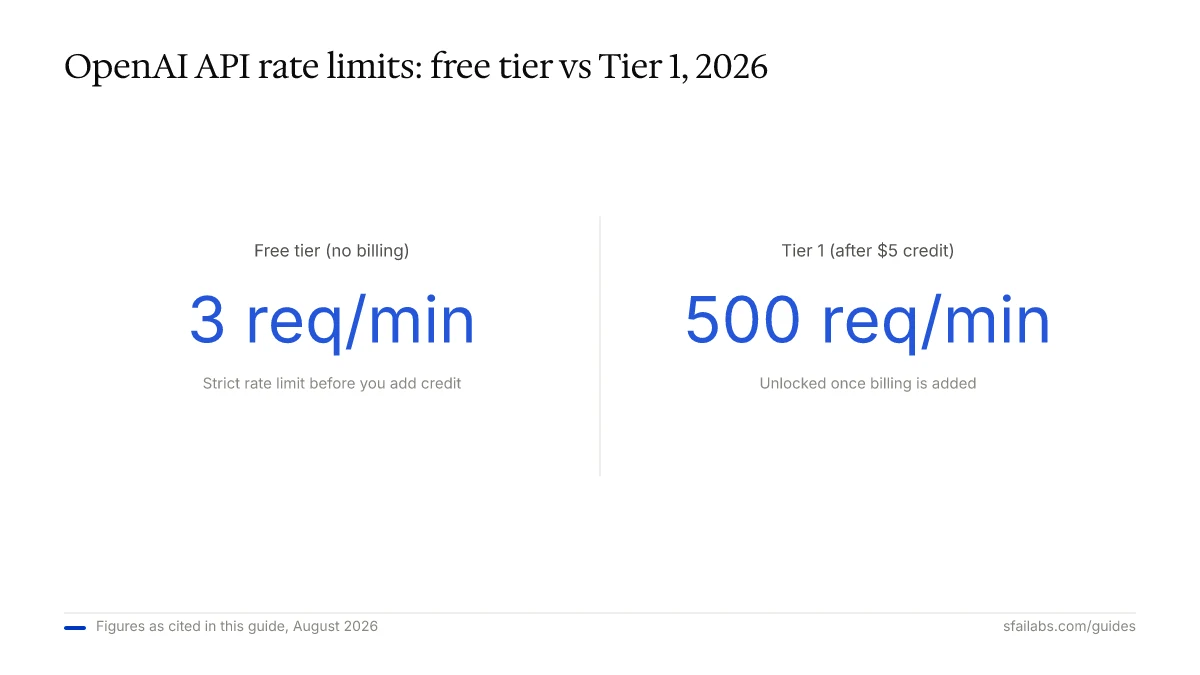
A common gotcha: brand-new keys on accounts with no billing will fail. The free tier exists but has strict rate limits (3 requests per minute). Adding even $5 in credit bumps you to Tier 1, which allows 500 requests per minute and makes the experience dramatically smoother.
What Your API Key Costs in Practice
OpenAI API pricing is pay-as-you-go. There is no monthly fee for having a key. You pay per token (roughly per word) based on which model you use.
| Model | Input Cost | Output Cost | Good For |
|---|---|---|---|
| GPT-4o mini | $0.15 / 1M tokens | $0.60 / 1M tokens | Quick tasks, high volume, chatbots |
| GPT-4o | $2.50 / 1M tokens | $10.00 / 1M tokens | Complex reasoning, analysis |
To put this in real terms: sending 100 short prompts and responses through GPT-4o mini costs less than a penny. The same volume through GPT-4o runs under $0.50. For most personal projects and small automations, a $5 prepaid balance lasts weeks.
What to Do With Your Key Next
Having the key is step one. The value comes from connecting it to something.
If you are a developer, install the OpenAI SDK for Python (pip install openai) or Node.js (npm install openai) and start making API calls directly.
If you want an AI agent that works autonomously, connect your key to Openclaw. Openclaw is a personal AI agent that runs on your machine, talks to you through Telegram or WhatsApp, and handles tasks proactively. It uses your OpenAI API key under the hood to power its conversations and actions.
We have a full walkthrough for getting Openclaw running:
- How to Set Up Openclaw: 10-Step Guide covers workspace configuration, memory, Telegram connection, and model selection
- Deploy Openclaw on Hostinger VPS if you want it running 24/7 without keeping your laptop open
Your API key is what powers all of this. Once Openclaw is configured, you paste the key into your environment file and the agent handles the rest.
Keeping Your Key Secure
Three rules that prevent most problems:
-
Never commit your key to version control. Add
.envto your.gitignorefile. If you accidentally push a key to GitHub, revoke it immediately at platform.openai.com/api-keys and generate a new one. GitHub scans for exposed keys, and so do bad actors. -
Use environment variables, not hardcoded strings. Store the key in a
.envfile and load it at runtime. Every modern framework supports this pattern. -
Create separate keys for separate projects. If one key gets compromised, you can revoke it without breaking everything else. OpenAI lets you create as many keys as you need.
Frequently Asked Questions
Is the OpenAI API key free?
Creating an account and generating a key costs nothing. Using the API costs money on a pay-as-you-go basis. New accounts may receive a small introductory credit, but after that, you need to add funds. A $5 balance is enough to get started with most projects.
Do I need ChatGPT Plus to use the API?
No. ChatGPT Plus ($20/month) gives you access to ChatGPT’s web interface with priority features. The API is a completely separate product with its own billing. You can use the API without any ChatGPT subscription.
How much does the OpenAI API cost per month?
There is no monthly fee. You pay only for what you use. GPT-4o mini costs $0.15 per million input tokens, making it affordable for most personal and small-business use cases. Heavy production usage with GPT-4o runs higher, but most developers spend less than $10/month during development.
What do I do if my API key stops working?
Check three things: your billing balance (it may have run out), your rate limits (free tier caps at 3 requests/minute), and whether the key was accidentally revoked. Go to platform.openai.com/api-keys to verify your key is still active, then check Settings > Billing to confirm funds are available.
Can I use one API key across multiple apps?
You can, but you should not. If one app leaks the key, all your apps are exposed. Create a dedicated key for each project or tool. It takes 10 seconds and gives you granular control over revocation and usage tracking.
Key Takeaways
- The OpenAI API and ChatGPT Plus are separate products with separate billing. Go to platform.openai.com for API access.
- Add at least $5 in billing credit before generating your key. This unlocks Tier 1 rate limits and prevents most “key not working” errors.
- Copy your key the moment it appears. OpenAI shows it exactly once.
- Connect your key to tools like Openclaw to get actual work done, not just raw API calls.
SFAI Labs


