Perplexity is the only major AI API where every response comes grounded in live web search results, with source citations included automatically. That makes it fundamentally different from OpenAI, Anthropic, or Google’s APIs, which generate responses from training data alone unless you bolt on separate search tooling. If you need an AI that can answer “What happened today?” or “What’s the current price of X?” without hallucinating, Perplexity’s Sonar API is purpose-built for that.
Getting your API key takes about three minutes. The part that trips people up is billing: Perplexity Pro (the $20/month chat subscription) and the Perplexity API are billed separately. A Pro subscription does not give you API access, and API credits do not give you Pro features. They are independent products that happen to share an account.
Step 1: Create Your Perplexity Account
Go to perplexity.ai and sign up. You can use email, Google, Apple, or SSO. If you already have an account for Perplexity’s chat product, that same account works for API access.
No special account tier is required. Free accounts can generate API keys and buy credits.
Step 2: Navigate to the API Console
There are two ways to reach the API settings:
- Click your profile icon in the top-right corner, then select API from the dropdown menu
- Go directly to perplexity.ai/settings/api or console.perplexity.ai
The API console is where you manage keys, add credits, and monitor usage. It is separate from the chat interface you may already be familiar with.
Step 3: Add Credits
Before generating a key, you need to add a payment method and purchase credits. Perplexity uses a prepaid credit system rather than post-paid billing like OpenAI or Anthropic.
Click Add Credits and enter your payment details. You choose how much to load. There is no minimum, but we recommend starting with $5, which gives you enough to test extensively with the Sonar model.
One thing we have noticed across client projects: the prepaid model catches developers off guard when they are used to OpenAI’s “use now, pay later” approach. If your API calls start returning 402 errors, check your credit balance first. It is almost always the issue.
Step 4: Generate Your API Key
In the API Keys section, click + Generate. Give your key a descriptive name (e.g., “openclaw-production” or “dev-testing”) so you can identify it later if you create multiple keys.
Your key appears once. It starts with pplx- followed by a long alphanumeric string. Copy it immediately and store it in a password manager or .env file.
Unlike Google’s Gemini API, Perplexity does not let you view the full key again after this screen. If you lose it, you revoke the old key and generate a new one.
Step 5: Set Your Key as an Environment Variable
Store your key as an environment variable rather than hardcoding it in source files.
macOS / Linux:
export PERPLEXITY_API_KEY="pplx-your-key-here"Add this to your ~/.zshrc or ~/.bashrc to persist across sessions.
Windows:
Open System Settings, search for “Environment Variables,” and create a new user variable named PERPLEXITY_API_KEY.
Step 6: Verify Your Key Works
Run this curl command to confirm everything is connected:
curl -X POST "https://api.perplexity.ai/chat/completions" \
  -H "Authorization: Bearer pplx-your-key-here" \
  -H "Content-Type: application/json" \
  -d '{
    "model": "sonar",
    "messages": [
      {"role": "user", "content": "What is the current weather in San Francisco?"}
    ]
  }'
If you get a JSON response with a choices array containing generated text and a citations array with source URLs, your key is working. The citations array is what makes Perplexity different from other providers. Every response includes the web sources it drew from.
A practical note: Perplexity’s API follows the OpenAI Chat Completions format. If you have an existing app that calls the OpenAI API, you can point it at Perplexity by changing the base URL to https://api.perplexity.ai and swapping the model name. The request and response structures are compatible.
Sonar Models and Pricing
Perplexity offers four Sonar models through its API, each designed for different use cases. Here is the current pricing as of April 2026:
| Model | Input | Output | Best For |
|---|---|---|---|
| Sonar | $1 / 1M tokens | $1 / 1M tokens | Quick factual queries, search-grounded answers |
| Sonar Pro | $3 / 1M tokens | $15 / 1M tokens | Complex research, 200K context window |
| Sonar Reasoning Pro | $2 / 1M tokens | $8 / 1M tokens | Chain-of-thought analysis, multi-step reasoning |
| Sonar Deep Research | $2 / 1M tokens | $8 / 1M tokens | Long-form reports, asynchronous research tasks |
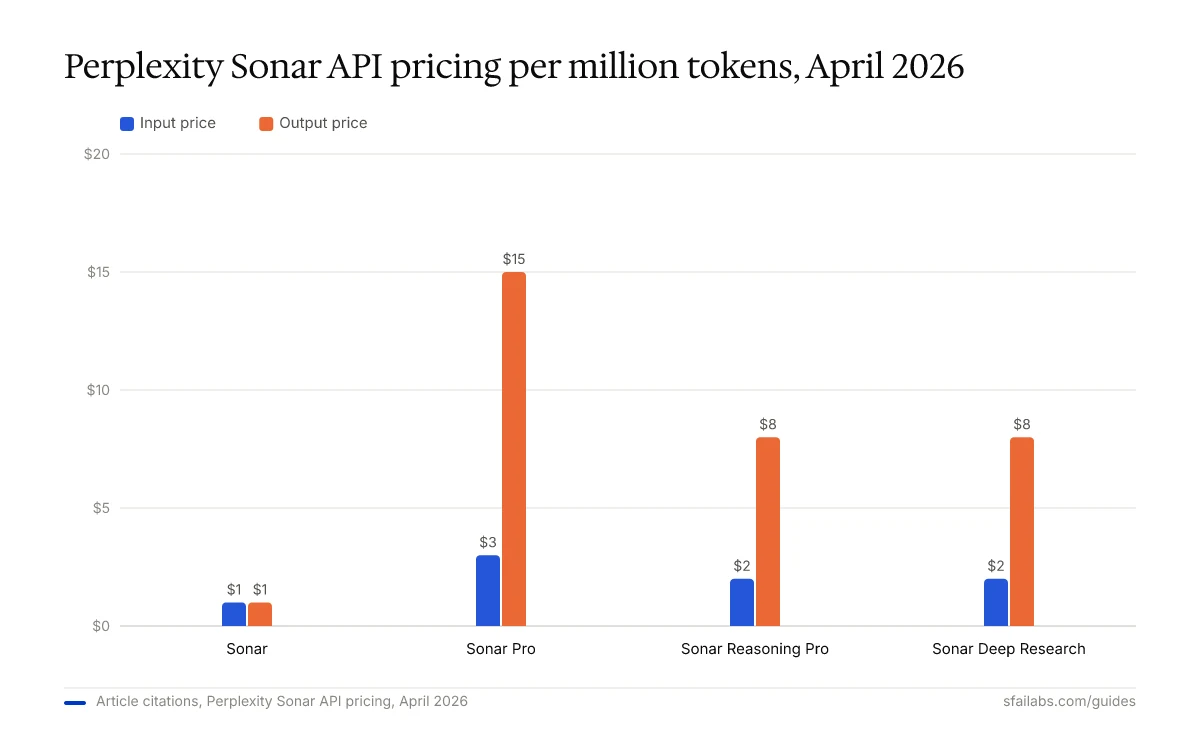
On top of token costs, Perplexity charges per-request fees based on search context size. These range from $5 to $14 per 1,000 requests depending on the model and whether you select low, medium, or high search context.
For comparison: Sonar at $1 per million input tokens is cheaper than Claude Sonnet 4.6 ($3) and comparable to GPT-5.4’s lower tiers. But you are getting web search baked into every call, which would cost extra with other providers.
If your use case requires fresh, cited information, Perplexity’s effective cost is lower than running a separate search API alongside OpenAI or Anthropic.
Perplexity also offers a Search API at a flat $5 per 1,000 requests (no token costs) for applications that need ranked web results without a conversational AI response, and an Agent API that proxies third-party models (GPT-5.4, Claude Opus 4.6, Gemini 3.1 Pro) with web search tools at $0.005 per search invocation.
What to Do With Your Key Next
The key unlocks search-grounded AI. Where you plug it in determines what you get out of it.
For developers building applications, install the Perplexity SDK. Python:
pip install openaiSince Perplexity follows the OpenAI format, you use the standard OpenAI Python client with a different base URL:
from openai import OpenAI

client = OpenAI(
    api_key="pplx-your-key-here",
    base_url="https://api.perplexity.ai"
)

response = client.chat.completions.create(
    model="sonar",
    messages=[{"role": "user", "content": "What are the latest AI regulations in the EU?"}]
)
print(response.choices[0].message.content)
For an AI agent with real-time web search, connect your key to Openclaw. Openclaw is a personal AI agent that runs locally and connects through Telegram or WhatsApp. Adding a Perplexity key gives it the ability to search the web in real time and return answers with source citations, something that standard OpenAI or Anthropic keys alone cannot do.
We have guides for getting started:
- How to Set Up Openclaw: 10-Step Guide covers workspace configuration and model selection
- Deploy Openclaw on Hostinger VPS for always-on operation
- How to Get Your OpenAI API Key and How to Get Your Anthropic API Key for setting up a multi-provider fallback system
- How to Get Your Google Gemini API Key to add Google’s models to the mix
Your Perplexity key slots into the environment configuration alongside these other providers.
Keeping Your Key Secure
Perplexity API keys are bearer tokens. Anyone with the key can make requests charged to your account.
Three practices that prevent problems:
-
Never commit keys to version control. Add
.envto your.gitignore. This applies to every API key, but prepaid-credit systems like Perplexity make it especially painful because stolen keys drain credits you already paid for. -
Use descriptive key names and rotate every 90 days. Perplexity supports programmatic key management through
/generate_auth_tokenand/revoke_auth_tokenendpoints. The rotation process is zero-downtime: generate a new key, deploy it, verify, then revoke the old one. -
Create separate keys per project. If one key is compromised, you revoke it without disrupting your other applications. Perplexity supports API groups for organizing keys across environments (staging, production, CI/CD).
Frequently Asked Questions
Is the Perplexity API free?
No. Perplexity does not currently offer a free API tier. You need to purchase credits before making API calls. The minimum credit purchase is flexible, and even $5 gives you thousands of Sonar API calls. This is different from Google’s Gemini API, which offers a generous free tier, and from OpenAI, which provides initial free credits for new accounts.
What is the difference between Perplexity Pro and the Perplexity API?
Perplexity Pro is a $20/month subscription for the chat interface at perplexity.ai. The API is a separate product with prepaid credit billing for programmatic access. A Pro subscription does not include API credits, and API credits do not unlock Pro features. You can use one without the other.
Which Perplexity model should I use?
Start with Sonar. At $1 per million input tokens, it handles most search-grounded queries well and is the cheapest option. Move to Sonar Pro ($3 input / $15 output) when you need a larger 200K context window or more complex multi-source synthesis. Use Sonar Reasoning Pro for tasks that benefit from chain-of-thought processing, like analyzing conflicting information across sources.
Why is my Perplexity API key not working?
Check these four things in order: your credit balance is positive (402 errors mean empty credits), the key starts with pplx- and was copied completely, you are using Bearer token authentication in the header (not a URL parameter like Google’s API), and the model name is spelled correctly (e.g., sonar, not sonar-small-online which is deprecated).
Does every Perplexity API response include web search?
Sonar models include web search by default. Every response comes with a citations array listing the URLs the model referenced. You do not need to enable this separately. If you specifically do not want web search, the Agent API lets you use third-party models without search, or you can use the Embeddings API for non-search use cases.
How does Perplexity API pricing compare to OpenAI and Anthropic?
Sonar at $1 per million input tokens is cheaper than GPT-5.4 and Claude Sonnet 4.6 for tasks where you need web-grounded answers. The real comparison is cost-inclusive: using OpenAI plus a separate search API (like Brave or Tavily) often costs more than Perplexity’s all-in-one pricing. For pure language tasks without search needs, OpenAI and Anthropic remain competitive or cheaper at their lower model tiers.
Key Takeaways
- Perplexity Pro and the Perplexity API are separate products with separate billing. Go to perplexity.ai/settings/api for API access.
- The API uses prepaid credits, not post-paid billing. Buy credits before making your first call.
- Start with the Sonar model at $1 per million input tokens. Every response includes web search and source citations automatically.
- Perplexity follows the OpenAI Chat Completions format. You can swap it into existing OpenAI-compatible apps by changing the base URL.
- Connect your key to Openclaw for an AI agent with real-time web search capability.
SFAI Labs


