You need a Google Gemini API key to use Google’s AI models outside of the Gemini chat app. The process takes about five minutes through Google AI Studio, and Google offers a generous free tier that lets you start building without entering a credit card. This guide walks through each step, covers the current model lineup and pricing, and points out the gotchas that trip up most developers.
A common source of confusion: the Gemini Advanced subscription and the Gemini API are separate products. Paying $20/month for Google One AI Premium gives you access to Gemini Advanced in the browser and mobile apps. It does not give you API access. The API lives at aistudio.google.com and has its own billing, including a free tier that requires no payment method at all.
Step 1: Sign In to Google AI Studio
Go to aistudio.google.com and sign in with your Google account. Any standard Gmail or Google Workspace account works.
On your first visit, Google asks you to accept the Generative AI Additional Terms of Service and confirm your region. The region matters because certain countries are excluded from Gemini API access. If you are in a supported region, accept the terms and you land on the AI Studio dashboard.
Google automatically creates a Google Cloud project for you behind the scenes. You do not need an existing Google Cloud account or any cloud setup to get started.
Step 2: Generate Your API Key
In the left sidebar, click Get API key. This takes you to the API key management page.
Click Create API key. You get two options:
- Create API key in a new project (recommended if you are starting fresh)
- Create API key in an existing project (if you already have a Google Cloud project you want to use)
Select the first option for the simplest setup. Google creates a new Cloud project and generates a key in one step.
Your key appears on screen. It starts with AIza followed by a long alphanumeric string.
Copy it immediately. Unlike OpenAI and Anthropic, Google does let you view the key again later from the API keys page. But the habit of copying it right away and storing it in a password manager or .env file will save you time.
Step 3: Set Your Key as an Environment Variable
The Gemini SDKs automatically detect your key from environment variables. This is the recommended approach over hardcoding the key in your source code.
macOS / Linux (Zsh or Bash):
export GEMINI_API_KEY="your-key-here"Add this line to your ~/.zshrc or ~/.bashrc file to persist it across terminal sessions.
Windows:
Search for “Environment Variables” in System Settings, create a new user variable named GEMINI_API_KEY, and paste your key as the value.
Google’s SDK checks for two variable names: GEMINI_API_KEY and GOOGLE_API_KEY. If both are set, GOOGLE_API_KEY takes precedence. We recommend using GEMINI_API_KEY to keep things explicit.
Step 4: Verify Your Key Works
Open a terminal and run this curl command (replace your-key-here with the actual key):
curl "https://generativelanguage.googleapis.com/v1beta/models/gemini-2.5-flash:generateContent?key=your-key-here" \
  -H "Content-Type: application/json" \
  -d '{"contents": [{"parts": [{"text": "Say hello"}]}]}'
If you get a JSON response with generated text, your key is active.
One difference from OpenAI and Anthropic: Google passes the API key as a URL query parameter, not a header. The official SDKs handle this automatically, but if you are making raw HTTP calls, this is the format to use. Passing it as an Authorization: Bearer header (the OpenAI pattern) will fail silently or return an authentication error.
Gemini Models and What They Cost
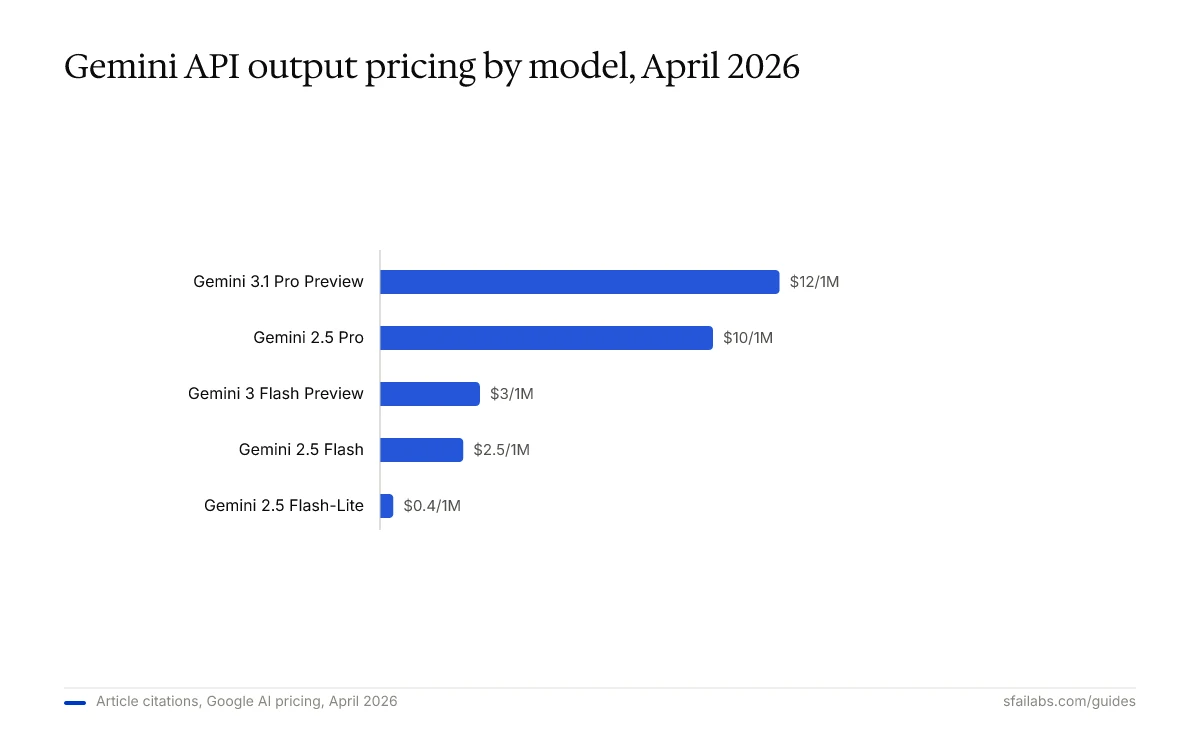
Google offers a free tier with no credit card required, plus a paid tier for production workloads. Here are the current models and pricing as of April 2026:
| Model | Input Cost | Output Cost | Free Tier |
|---|---|---|---|
| Gemini 2.5 Flash-Lite | $0.10 / 1M tokens | $0.40 / 1M tokens | Yes |
| Gemini 2.5 Flash | $0.30 / 1M tokens | $2.50 / 1M tokens | Yes |
| Gemini 2.5 Pro | $1.25 / 1M tokens | $10.00 / 1M tokens | Yes |
| Gemini 3 Flash Preview | $0.50 / 1M tokens | $3.00 / 1M tokens | Yes |
| Gemini 3.1 Pro Preview | $2.00 / 1M tokens | $12.00 / 1M tokens | No |
The free tier is more generous than what OpenAI or Anthropic offer. Gemini 2.5 Flash gives you 10 requests per minute and 250 requests per day at no cost. Gemini 2.5 Pro is available for free at 5 requests per minute and 100 requests per day. For prototyping and personal projects, many developers never need to enter payment information.
When you do need higher rate limits, Google uses a tier system similar to other providers. Adding a payment method and funding your account moves you to Tier 1, which substantially increases your requests-per-minute and tokens-per-minute limits.
What to Do With Your Key Next
The key unlocks the Gemini API. What matters is what you connect it to.
If you are a developer, install the Google Gen AI SDK. Python requires version 3.9 or higher:
pip install -U google-genaiFor Node.js (v18+):
npm install @google/genaiGoogle also provides SDKs for Go, Java, C#, Dart, Swift, and Apps Script. The full list is at ai.google.dev/gemini-api/docs/quickstart.
If you want an AI agent that works autonomously, connect your key to Openclaw. Openclaw is a personal AI agent that runs on your machine and connects through Telegram or WhatsApp. It supports multiple model providers, so your Gemini key works alongside OpenAI and Anthropic keys in a multi-model fallback system. If one provider hits rate limits or goes down, Openclaw switches to the next available model.
We have guides for getting Openclaw running:
- How to Set Up Openclaw: 10-Step Guide covers workspace configuration, memory, and model selection
- Deploy Openclaw on Hostinger VPS for 24/7 uptime without keeping your laptop open
- How to Get Your OpenAI API Key and How to Get Your Anthropic API Key if you want to set up multiple providers
Your Gemini API key plugs into the environment file, and the agent handles model routing from there.
Keeping Your Key Secure
In February 2026, a solo developer had a Gemini API key stolen and racked up $82,314 in unauthorized charges over two days. Google did not forgive the charges. This is not a theoretical risk.
Three rules that prevent most problems:
-
Never commit your key to version control. Add
.envto your.gitignorefile. Researchers found 2,863 live Google API keys in publicly crawled web pages that could access Gemini endpoints. If your key is public, someone will find it. -
Restrict your key in Google Cloud Console. By default, new API keys are unrestricted and work with every enabled API in your project. Go to console.cloud.google.com/apis/credentials, select your key, and restrict it to only the Generative Language API. This limits the damage if the key leaks.
-
Set a billing budget alert. In Google Cloud Console, go to Billing and create a budget alert that notifies you when spending exceeds a threshold. A $10 alert would have caught that $82K incident on day one.
Frequently Asked Questions
Is the Google Gemini API key free?
Generating a key costs nothing, and the free tier lets you make API calls without adding a payment method. Gemini 2.5 Flash allows 10 requests per minute and 250 requests per day on the free plan. For prototyping and light usage, you may never need to pay. Production workloads with higher rate limits require a paid tier.
What is the difference between Gemini Advanced and the Gemini API?
Gemini Advanced is Google’s premium chat interface, bundled with the Google One AI Premium plan at $20/month. It gives you access to the latest models through a browser and mobile app. The Gemini API is a programmatic interface for developers to integrate Gemini into their own applications. They have separate billing and separate rate limits. You do not need one to use the other.
Which Gemini model should I use with my API key?
For most use cases, start with Gemini 2.5 Flash. It is fast, cheap ($0.30 per million input tokens), and available on the free tier. Use Gemini 2.5 Pro when you need stronger reasoning or coding capabilities. Gemini 3.1 Pro Preview is the most capable model in the lineup but is paid-only and costs $2.00 per million input tokens.
Why is my Gemini API key not working?
Check four things: your region is supported (some countries are excluded), you accepted the Terms of Service in AI Studio, the key is not restricted to APIs that do not include the Generative Language API, and you are passing the key as a URL parameter (not a Bearer token header). If you are on the free tier, you may also be hitting daily request limits.
Can I use one Gemini API key for multiple apps?
You can, but creating separate keys per project is better practice. Google allows up to 100 API keys per project. Separate keys give you granular control: if one app leaks a key, you revoke that key without disrupting your other projects. Pair this with API restrictions so each key only accesses the services it needs.
How does the Gemini API compare to OpenAI and Anthropic on pricing?
Gemini is the most affordable option for lightweight tasks. Gemini 2.5 Flash-Lite at $0.10 per million input tokens undercuts both GPT-4o mini ($0.15) and Claude Haiku 4.5 ($1.00). At the top end, Gemini 3.1 Pro Preview ($2.00 input) sits between GPT-5.4 and Claude Opus 4.6 on price. The free tier with no credit card required is unique to Google among the major providers.
Key Takeaways
- The Gemini API and Gemini Advanced are separate products. Go to aistudio.google.com for API access.
- Google offers a free tier with no credit card required. Gemini 2.5 Flash gives you 10 requests per minute and 250 requests per day at zero cost.
- Pass the API key as a URL query parameter, not a Bearer token header. This is the most common gotcha for developers coming from OpenAI or Anthropic.
- Restrict your key to the Generative Language API in Google Cloud Console. The default “unrestricted” setting is a security risk.
- Connect your key to tools like Openclaw to use Gemini alongside OpenAI and Anthropic in a multi-model setup.
SFAI Labs


