
OpenClaw is a free, open-source AI agent that runs on your own computer or server, connects to you through Telegram or WhatsApp, and wakes up every 30 minutes to handle tasks without being asked. With over 160,000 GitHub stars and 430,000 lines of code, it is the largest open-source agent framework available today.
That description is accurate but abstract. What does “AI agent” mean in practice? It means you text your Telegram chat “reschedule my Thursday meeting to Friday afternoon” and OpenClaw checks your calendar, finds a slot, sends the update, and confirms back. It means waking up to a morning briefing you never requested because the heartbeat timer fired at 6 AM, scanned your inbox, and compiled what matters. It means invoices going out on schedule, overdue payment reminders sending themselves, and expense reports assembling while you sleep.
This article explains OpenClaw in plain language for anyone who has heard the name and wants to understand what it is, how it works, and whether it makes sense for them.
How OpenClaw Works
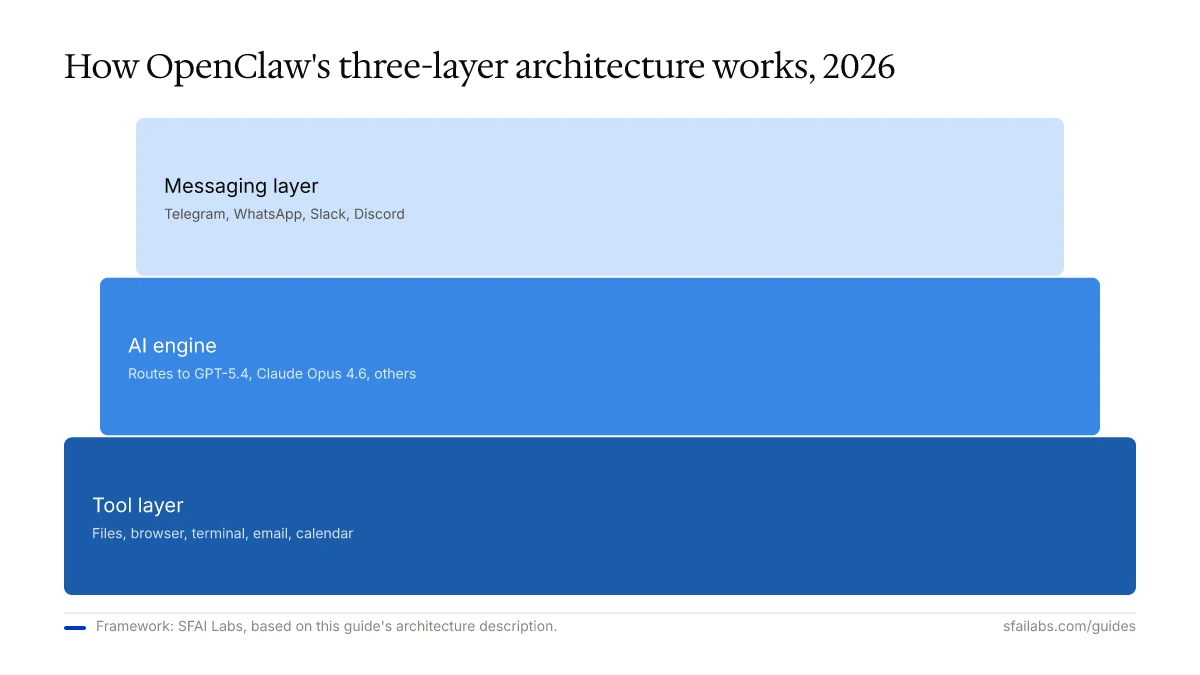
OpenClaw sits between you and the AI models that power it. You talk to OpenClaw through a messaging app. OpenClaw translates your request into actions: calling an AI model (GPT-5.4, Claude Opus 4.6, or others) to think, then using tools like your file system, browser, email, or calendar to act.
Three components make the system work:
The messaging layer. You interact with OpenClaw through Telegram, WhatsApp, Slack, Discord, or other chat apps. There is no separate interface to learn. You text it the way you would text a colleague.
The AI engine. Under the hood, OpenClaw routes your requests to whichever language model you configure. It supports multiple models simultaneously and can use a cheaper model for routine tasks while reserving a premium model for complex reasoning. This is called model routing, and it is how experienced users keep costs manageable.
The tool layer. OpenClaw can read and write files on your machine, browse the web, run terminal commands, send emails, manage calendar events, and trigger automations through webhooks. It does not just talk. It does things.
The entire system runs on your hardware. Nothing goes through OpenClaw’s servers. Your data, conversations, and files stay on the machine you control.
The Three Features That Define OpenClaw
Dozens of AI tools exist. OpenClaw is distinct because of three capabilities that most alternatives lack.
The Heartbeat: An Agent That Acts Without Being Asked
Every 30 minutes, OpenClaw wakes up on its own. It checks for new information, processes pending tasks, and takes action based on standing instructions you have given it. This is the heartbeat, and it is the single feature that separates OpenClaw from tools like ChatGPT, which only respond when you talk to them.
A practical example: you tell OpenClaw “monitor my inbox and flag anything from investors.” From that point forward, every 30 minutes OpenClaw checks your email, identifies messages from your investor list, and sends you a Telegram notification with a summary. You never have to ask again.
The heartbeat also handles recurring tasks: daily standup summaries, weekly report generation, social media posting on a schedule. Anything that should happen repeatedly without manual triggering is a heartbeat candidate. For details on configuring this, see our heartbeat scheduling guide.
Persistent Memory: It Gets Smarter Over Time
ChatGPT starts every conversation from scratch (or with a thin memory layer). OpenClaw remembers everything. It stores context in local files, maintains daily logs, and runs a compacting process that distills long-running conversations into durable knowledge.
Tell OpenClaw your client list, your billing rates, your meeting preferences, and your project deadlines once. It retains all of it. Three months later, when you say “draft an invoice for the Acme project,” it already knows the rate, the hours tracked, and the contact to send it to.
This persistent memory is what turns OpenClaw from a clever chatbot into something that feels like a long-term assistant. The catch: you need to invest time teaching it. The first week requires more effort than a simple ChatGPT subscription. But by week three, the payoff compounds. Our memory configuration guide covers how to set this up properly.
Chat App Integration: Your Phone Is the Interface
Most AI tools require you to open a specific website or application. OpenClaw lives inside the apps you already have open all day. Send it a Telegram message from your phone while walking to lunch. Get a WhatsApp notification when a scheduled task completes. Reply to it from your watch.
This matters more than it sounds. A tool you have to remember to open is a tool you stop using. A tool that lives in your existing messaging habits becomes invisible infrastructure — it is just another conversation thread that happens to be with an AI that can do things.
What People Use OpenClaw For
The “what can it do” question is better answered with concrete examples than feature lists.
Personal productivity. Morning briefings, email triage, calendar management, to-do list maintenance, travel booking research. The heartbeat handles the repetitive scanning; you handle the decisions.
Freelance business operations. Time tracking reconciliation, automated invoicing, payment follow-up reminders on a 7-14-21 day cadence, expense categorization for tax prep. A freelancer automating invoices, payment reminders, and expense tracking through OpenClaw can realistically reclaim several hours per week from admin work. See our OpenClaw for freelancers guide for the full workflow.
Sales and lead research. Enriching prospect lists with company data, monitoring competitor activity, drafting personalized outreach, summarizing call notes. Our lead research guide covers the setup.
Content operations. Social media scheduling, newsletter curation, SEO monitoring, content brief generation. The heartbeat is well-suited to scanning multiple sources on a schedule and consolidating what it finds.
Small team coordination. Meeting note distribution, project status updates, Slack channel summaries, client communication drafts. OpenClaw bridges the gap between “we should automate this” and doing it, without needing a developer to build a custom integration.
OpenClaw vs. ChatGPT vs. Claude: What Is Different
If you already use ChatGPT or Claude, the natural question is: why would I need something else?
| ChatGPT | Claude | OpenClaw | |
|---|---|---|---|
| Where it runs | Cloud (OpenAI servers) | Cloud (Anthropic servers) | Your machine |
| How you talk to it | Browser or mobile app | Browser or desktop app | Telegram, WhatsApp, Slack, any messaging app |
| Memory | Limited cloud memory | Context window only | Persistent local files, daily logs |
| Proactive actions | No | No | Yes — heartbeat every 30 minutes |
| Scheduling | No | No | Built-in cron jobs |
| File access | No | Limited (Claude Code) | Full file system access |
| Browser control | No | Yes (Computer Use beta) | Yes — built-in browser mode |
| Cost model | $20/month subscription | $20/month subscription | Free software + hosting ($7-15/mo) + API tokens ($1-50/mo) |
| Data ownership | On OpenAI servers | On Anthropic servers | On your machine |
The short version: ChatGPT and Claude are smart conversational tools. OpenClaw is a resident assistant that lives on your infrastructure, acts without being prompted, and connects to the tools and services you already use. Based on our experience testing all three, the comparison is less “which is better” and more “these serve different purposes.” We recommend keeping a ChatGPT or Claude subscription for ad-hoc conversations while using OpenClaw for the recurring work that should happen automatically.
For a deeper comparison with more alternatives, see our OpenClaw alternatives analysis.
What It Costs
OpenClaw itself is free. It is open-source under the MIT license. There is no subscription, no per-seat pricing, no feature gating.
The costs come from two places: the server it runs on and the AI models it calls.
Hosting ranges from $0 (running on your laptop) to $7-15/month for a VPS that keeps OpenClaw running 24/7. Hostinger’s KVM 1 plan at $6.99/month with a one-click OpenClaw installer is the most common choice. Our Hostinger setup guide walks through the full process.
AI model API costs depend on which models you use and how active the agent is. A personal user running a mix of affordable and premium models spends $5-20/month on API tokens. A power user letting premium models handle everything, including the 30-minute heartbeat, can spend $50-150/month. Model routing — using cheaper models for routine tasks — is the standard way to control this. Our pricing breakdown covers every cost component with real numbers.
Typical total: $12-35/month for personal use. $40-80/month for a small team pushing harder workflows.
Who OpenClaw Is Not For
Honest assessment matters more than hype. OpenClaw is not the right fit for everyone.
If you are not comfortable with a terminal, OpenClaw will frustrate you. Setup requires running commands, editing configuration files, and managing API keys. The Hostinger one-click installer reduces this significantly, but troubleshooting still demands some technical comfort. If “open Terminal” is an unfamiliar instruction, start with ChatGPT or Claude instead.
If you need enterprise-grade reliability, OpenClaw is not there yet. It is a community-driven open-source project. There is no SLA, no guaranteed uptime, no enterprise support team. For mission-critical workflows at scale, managed platforms like OpenAI’s agent infrastructure or Anthropic’s Dispatch offer more reliability guarantees.
If you are uncomfortable with pay-per-use API billing, the cost model may stress you. Unlike a flat $20/month ChatGPT subscription, OpenClaw’s costs vary with usage. Leaving defaults unconfigured can result in unexpected bills. This is manageable with model routing and heartbeat tuning, but it requires attention.
If you want a polished consumer product, this is not that. OpenClaw is powerful but rough. The configuration is manual, the documentation assumes technical readers, and the interface is a chat window — not a dashboard with buttons and graphs.
Getting Started
If OpenClaw sounds like what you need, here is the fastest path to a working setup:
- Read the setup guide. Our 10-step OpenClaw setup guide walks through installation, workspace configuration, memory, model selection, and Telegram connection.
- Choose your hosting. Run it locally for testing, or deploy to a VPS for 24/7 operation. The Hostinger VPS guide covers the hosted path.
- Configure model routing. Use a cheaper model for heartbeat and routine tasks, a premium model for complex reasoning. This keeps costs in the $12-35/month range.
- Teach it about you. Spend the first week actively interacting — sharing preferences, client details, project context. The memory system compounds from there.
Frequently Asked Questions
What is OpenClaw used for?
OpenClaw automates recurring tasks that normally require human judgment: email triage, calendar management, invoice generation, lead research, content scheduling, and project status updates. It handles these through a 30-minute heartbeat cycle, proactively completing work without being asked. The most popular use cases are personal productivity and freelance business operations.
Is OpenClaw free?
The software is free and open-source under the MIT license. You pay for hosting ($0-15/month depending on whether you self-host or use a VPS) and AI model API calls ($1-50/month depending on usage). Typical total cost for a personal user is $12-35/month.
How does OpenClaw compare to ChatGPT?
ChatGPT is a conversational AI that responds when you ask it questions through a browser or app. OpenClaw is an autonomous agent that runs on your own machine, connects through Telegram or WhatsApp, and acts proactively every 30 minutes. ChatGPT is better for ad-hoc conversations and research. OpenClaw is better for recurring automation, scheduled tasks, and workflows that should run without your involvement.
Is OpenClaw safe to use?
OpenClaw runs entirely on your hardware, so your data never leaves your machine unless you configure external integrations. The codebase is open-source and auditable. Palo Alto Networks researchers have flagged the large codebase (430,000+ lines) as a potential attack surface, which is worth considering. Standard security practices apply: keep it updated, restrict file system access to what the agent needs, and review permissions for any integrations you enable.
Do I need to be technical to use OpenClaw?
You need basic comfort with running terminal commands and editing configuration files. The Hostinger one-click installer simplifies deployment significantly, but initial setup and troubleshooting still require technical confidence. If you have never used a command line, start with a guided tool like ChatGPT and revisit OpenClaw once you are more comfortable with technical setup.
Key Takeaways
- OpenClaw is a free, open-source AI agent that runs on your machine, connects through messaging apps, and acts autonomously every 30 minutes via a heartbeat timer.
- It differs from ChatGPT and Claude by being self-hosted, proactive, and deeply integrated with your local tools and files.
- Typical cost is $12-35/month for personal use (hosting + API tokens), with the software itself costing nothing.
- Setup requires technical comfort — terminal commands, config files, API keys — but guides and one-click installers reduce the friction.
- OpenClaw is best suited for people who want a persistent AI assistant that handles recurring tasks without being prompted, and who are comfortable managing their own infrastructure.
SFAI Labs


