Most “OpenClaw alternatives” articles pad a top-ten list with security-focused forks and recycle the same marketing copy. That is useful if you want another copy of OpenClaw, but it is unhelpful if you want to understand what you actually gain by switching. This roundup takes a different approach. We only list tools we can verify, we explain what each one is actually for, and we tell you when OpenClaw is still the better choice.
The target audience is technical buyers: engineering leads and senior developers weighing OpenClaw against coding agents and agent frameworks. If you are looking at OpenClaw mainly for autonomous coding, the honest alternatives are mature coding agents — not OpenClaw look-alikes. If you want OpenClaw’s messaging-first, scheduled personal-agent behavior, very few tools compete, and we will say so.
Why People Look for OpenClaw Alternatives
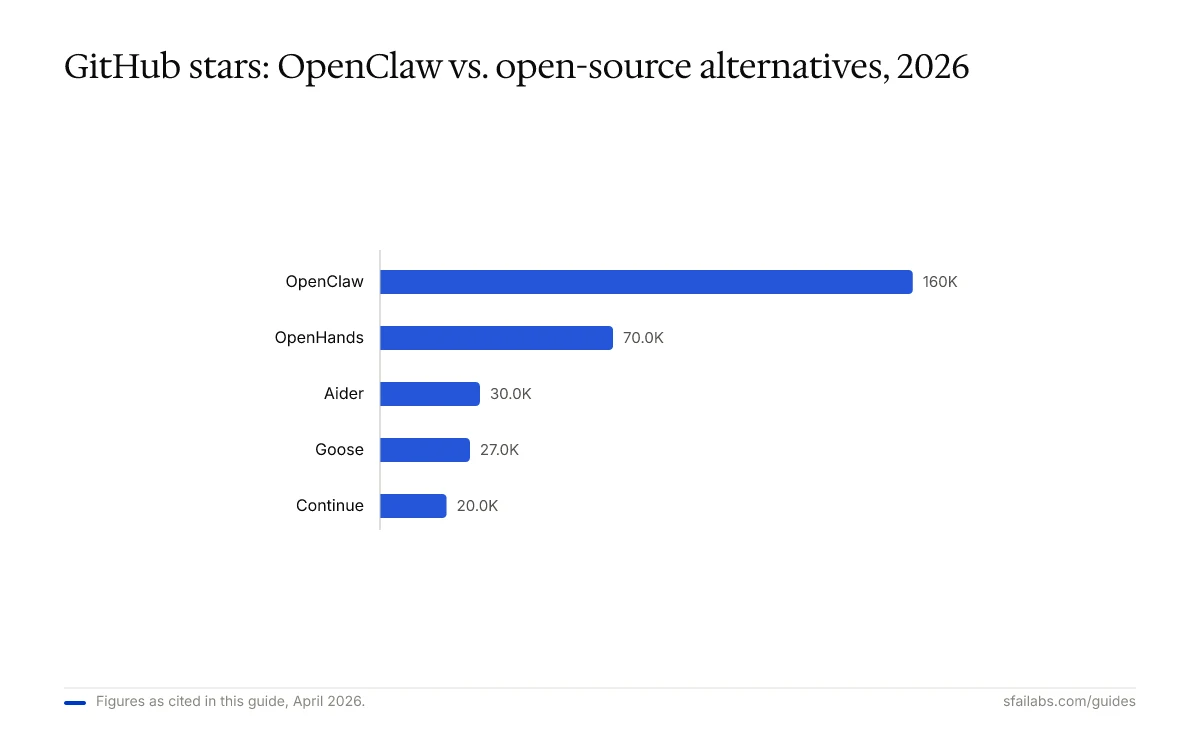
OpenClaw is a large, opinionated project. With 160,000+ GitHub stars and 430,000+ lines of code it is by far the biggest open-source AI agent repo on GitHub, but the same scale that makes it powerful is why developers start shopping for alternatives. The most common reasons we hear:
- Setup friction. OAuth flows for messaging integrations, heartbeat tuning, and multi-model configuration take hours to get right. Our OpenClaw setup guide walks through it, but “five minutes to Hello World” it is not.
- Security surface. An always-on agent with web, file, and message permissions is a big attack surface, especially when loading community skills. Palo Alto Networks researchers have flagged the permission model more than once.
- Wrong shape for coding. OpenClaw is a general-purpose personal agent. If your real goal is autonomous pull requests, repository-scale refactoring, or IDE-integrated pair programming, a dedicated coding agent will do the job better with less configuration.
- Self-hosting overhead. You own the VPS, the updates, the backups, and the uptime. Some teams want that; many do not.
None of these are fatal. Our OpenClaw AI agent framework piece argues it is a genuine category-of-one for proactive, messaging-first personal agents. But “category of one” cuts both ways: when you need something different, the real alternatives rarely look like OpenClaw.
Who Should Actually Switch (and Who Should Not)
Before the roundup, a blunt filter. Skipping this step is how readers end up migrating to the wrong tool.
Stay with OpenClaw if you need:
- Proactive, scheduled behavior that wakes up every 30 minutes and acts without being prompted
- Messaging-app interface (Telegram, WhatsApp, Discord) as the primary way you talk to the agent
- A single long-running agent that covers coding, email, research, and personal errands
- Full ownership of the runtime, the memory, and the infrastructure
Switch to a coding agent if you need:
- Autonomous code changes, PRs, and CI-aware workflows
- Repository-scale context (hundreds of files or monorepos)
- IDE-native pair programming or inline completion
- A setup measured in minutes, not hours
Only the second group is the real audience for the rest of this article. The first group is better served by tuning OpenClaw or choosing a narrow fork — topics we cover elsewhere on the blog.
Open-Source Coding Agents
These are the tools worth evaluating if you want to replace OpenClaw with something licensed permissively and runnable on your own hardware. Every feature below is sourced from the project’s own docs or public GitHub data as of April 2026.
Cline
Cline is an autonomous coding agent that runs as a VS Code extension. It is free and open-source under Apache 2.0. You bring your own API key, so it works with Anthropic, OpenAI, Google, or any OpenAI-compatible endpoint — including local models.
What stands out is its Plan/Act architecture: a Plan mode gathers repository context and drafts an approach before any changes are written; Act mode executes the plan with explicit approval at each file edit or terminal command. It also supports MCP (Model Context Protocol) servers for custom tool integrations.
Best for: developers who want a transparent, step-by-step coding agent that lives inside VS Code and defers to the human at every branch point.
Choose Cline over OpenClaw if: your primary use case is coding and you want approval-gated automation without building your own skill layer.
Aider
Aider is a terminal-native, git-first coding assistant. It sits at roughly 30,000 GitHub stars and has been in active development since early 2023, which makes it one of the most battle-tested tools in this category. It is Apache 2.0 licensed and supports any OpenAI-compatible API, Anthropic models, and local LLMs.
Aider’s defining behavior is auto-commit. Every AI-generated change is staged and committed with a meaningful message, so your git log doubles as an audit trail. It also builds an internal repo map for context and runs your linter and test suite automatically, looping back if either fails.
Best for: developers who live in the terminal and want git to be the source of truth for every change an agent makes.
Choose Aider over OpenClaw if: you want a focused coding tool that treats version control as a first-class citizen and does not need a messaging interface.
Continue
Continue is an open-source coding assistant for VS Code, JetBrains, and a standalone CLI. It has over 20,000 GitHub stars and is Apache 2.0 licensed. BYOM support is comprehensive — you can point it at Ollama, Llama, Mistral, CodeLlama, OpenAI, Anthropic, or anything you self-host.
Its strongest angle is source-controlled AI behavior. Prompts, rules, and integrations are defined as checked-in configuration “blocks,” and the CLI can run headlessly in CI so the same agent behavior applies on a developer laptop and on a pipeline runner. That combination is what makes it attractive to regulated teams.
Best for: engineering orgs that want a fully configurable coding assistant with serious support for local and self-hosted models.
Choose Continue over OpenClaw if: you need consistent AI behavior across developer environments and CI, and you want first-class support for running entirely on-premise.
Goose
Goose is Block’s open-source AI agent — released under Apache 2.0 and hovering around 27,000 GitHub stars. It ships as both a desktop app and a CLI, and it is the closest tool in this list to a true general-purpose local agent in the spirit of OpenClaw.
Goose uses MCP as its extension mechanism and integrates with roughly 70 MCP servers covering databases, GitHub, Google Drive, browsers, and more. With a local model through Ollama, your code and context never leave the machine. It executes code, debugs failures, and orchestrates multi-step tasks — not only coding tasks, but general engineering workflows.
Best for: developers who want a local, model-agnostic agent that can handle coding plus adjacent workflows (data, infra, documentation) through MCP.
Choose Goose over OpenClaw if: you want the “personal agent” feel — a local runtime, no vendor lock-in, and a plugin ecosystem — but prefer a coding-first surface area over messaging apps.
OpenHands
OpenHands is the project formerly known as OpenDevin. It is MIT-licensed, has more than 70,000 GitHub stars, and is developed by All-Hands-AI, which raised an $18.8M Series A. It is the most ambitious of the fully open-source agents: an SDK for building custom agents, a CLI for terminal workflows, and a cloud platform for team collaboration all share the same core.
Its headline number is SWE-bench Verified performance — OpenHands resolves 53%+ of real-world GitHub issues when paired with Claude 4.5. Execution is sandboxed via Docker, and the v1.6.0 release on March 30, 2026 added Kubernetes support plus a Planning Mode beta. Safety is taken seriously: agent actions are isolated from the host.
Best for: teams that need a production-grade autonomous coding platform with sandboxed execution and horizontal scaling.
Choose OpenHands over OpenClaw if: you want benchmarked autonomous coding with proper isolation and the option to deploy at team scale on Kubernetes.
Commercial Coding Platforms
Open-source is not the only reason to leave OpenClaw. Two commercial platforms dominate the paid coding-agent market and neither gets fair coverage in the typical “OpenClaw alternatives” listicle.
Claude Code
Claude Code is Anthropic’s official CLI. It runs in your terminal, connects to the Claude API, and is billed through whatever plan you already have. There is no separate Claude Code price — Pro at $20 per month, Max at $100 or $200 per month, or API usage-based billing cover it. It provides access to Sonnet 4.6 and Opus 4.6 and carries a 1M-token usable context window, which is enough to hold entire monorepos in memory.
Unlike the open-source tools, Claude Code is proprietary. You cannot self-host it or run it fully offline. What you get in exchange is a mature, well-integrated experience with Anthropic’s latest models and a single bill for your whole team.
Best for: teams already standardized on Claude that want an official, supported CLI with large-context reasoning.
Choose Claude Code over OpenClaw if: you want a polished, hosted coding CLI rather than a DIY agent you run yourself — and you are fine with a proprietary tool from a single model provider.
Cursor
Cursor is a VS Code fork built around AI. It reached $2B in annualized revenue by February 2026 and serves roughly one million daily active users, so it is the largest commercial coding-agent platform by usage. Plans start with a free Hobby tier and scale through Pro ($20/month), Pro+ ($60/month), Ultra ($200/month), and Teams ($40/seat/month). In June 2025, Cursor moved from request-based pricing to credit-based pricing, so the cost depends on which models you use.
The agentic feature is Background Agents. You can kick off an agent from the IDE, Slack, GitHub, Linear, or the API, and it will work in an isolated VM on your repository. Up to eight agents can run in parallel, and when each one is done you get a pull request to review. This is the closest commercial analog to OpenClaw’s “run autonomously while I do something else” model, but scoped to coding.
Best for: teams that want a full IDE experience with autonomous background coding and are comfortable paying for a managed platform.
Choose Cursor over OpenClaw if: the job is “write code autonomously and open PRs” and you do not need an agent that also handles messaging or non-coding work.
Comparison Matrix
A condensed view of the alternatives against the dimensions that matter for replacing OpenClaw:
| Tool | License | Open Source | Surface | BYOM | Runs Locally | Pricing |
|---|---|---|---|---|---|---|
| OpenClaw | MIT | Yes | Messaging apps, CLI | Yes | Yes | Free + infra |
| Cline | Apache 2.0 | Yes | VS Code | Yes | Yes (local models) | Free + API |
| Aider | Apache 2.0 | Yes | Terminal/CLI | Yes | Yes (local models) | Free + API |
| Continue | Apache 2.0 | Yes | VS Code, JetBrains, CLI | Yes | Yes (Ollama, etc.) | Free + API |
| Goose | Apache 2.0 | Yes | Desktop app, CLI | Yes | Yes (local models) | Free + API |
| OpenHands | MIT | Yes | SDK, CLI, cloud | Yes | Yes (sandboxed) | Free + API |
| Claude Code | Proprietary | No | Terminal | No (Anthropic only) | No | From $20/mo |
| Cursor | Proprietary | No | IDE | Partial | No | Free to $200/mo |
Two notes on this matrix. First, “runs locally” means the runtime itself can execute on your machine — you still pay an API provider unless you are also running a local model. Second, “BYOM” on Cursor is partial because while you can configure some providers, billing still flows through Cursor’s credit system.
How to Choose
A short decision framework, no hedging:
- You want autonomous coding in an IDE: start with Cursor if you want a managed experience, or Cline if you want the same pattern open-source.
- You want a terminal-first agent with git discipline: Aider.
- You want to run everything on local models and enforce AI behavior in CI: Continue.
- You want a local, general-purpose agent with a coding bias and an MCP plugin ecosystem: Goose.
- You want benchmarked autonomy and sandboxed execution at team scale: OpenHands.
- You are already on Claude and want the official CLI with a 1M-token context: Claude Code.
- You specifically need proactive scheduling and messaging-app integration: stay with OpenClaw. Nothing on this list replicates that combination well.
If you are still unsure, pick two options — one open-source, one commercial — and try them for a week on a real task. A weekend of actual use beats any comparison matrix, including this one.
Frequently Asked Questions
What is the best open-source alternative to OpenClaw for coding?
There is no single winner. Cline is the strongest for in-IDE coding, Aider is the most mature terminal-based option, OpenHands has the highest SWE-bench score when paired with Claude 4.5, and Goose is the closest “general local agent” substitute. Choose by surface — IDE, terminal, or desktop — and by how much autonomy you want.
Can Claude Code replace OpenClaw?
Only for coding. Claude Code is a terminal CLI for Claude. It does not run on a heartbeat, does not integrate with messaging apps, and is not self-hosted. If your OpenClaw use case was autonomous pull requests or repository-scale refactoring, Claude Code is a clean swap. If it was Telegram-based personal assistance, Claude Code is not the answer.
Is Cursor a true alternative to OpenClaw?
Cursor’s Background Agents are the closest commercial analog to OpenClaw’s “run autonomously” behavior, but they are scoped to coding inside a repo and gated by pull request review. OpenClaw executes on a 30-minute cycle across any task you have given it. The two tools share a pattern but aim at different jobs.
Which OpenClaw alternative runs fully locally?
All five open-source options — Cline, Aider, Continue, Goose, OpenHands — can run entirely on local hardware if you also use a local LLM through something like Ollama. Goose and Continue have the cleanest documentation for an end-to-end local setup. Claude Code and Cursor cannot run fully offline because they depend on their respective hosted services.
How are OpenHands and OpenClaw different?
They are different species. OpenHands is an autonomous coding platform built around sandboxed execution and SWE-bench-style evaluation. OpenClaw is a messaging-first personal agent with a heartbeat scheduler. OpenHands has better coding autonomy and isolation. OpenClaw has proactive, non-coding behavior out of the box. Neither replaces the other cleanly.
What is the cheapest way to get OpenClaw-style autonomy for coding?
Aider or Cline with a cheap API key. Both are free, both work with OpenAI-compatible providers, and both are production-ready for a single developer. If you want to go fully free, run them against a local model through Ollama and accept the reduced model quality.
Key Takeaways
- The honest OpenClaw alternative depends on what you were using OpenClaw for. If it was coding, the real options are dedicated coding agents. If it was personal messaging with scheduled behavior, there is no clean substitute.
- Five open-source coding agents are worth evaluating: Cline, Aider, Continue, Goose, and OpenHands. Each occupies a distinct niche — IDE, terminal, regulated org, general local agent, and team-scale platform respectively.
- Claude Code and Cursor are the two commercial platforms worth considering. Both are proprietary, both carry real monthly cost, and both deliver a more polished experience in exchange.
- Verified features and honest trade-offs matter more than a long list. We deliberately kept the roundup to seven tools because a longer list would require inventing distinctions.
- Stay with OpenClaw if you need heartbeat scheduling, messaging integration, and a general-purpose personal agent. Switch only if the workload is coding-first and the setup cost of OpenClaw is outweighing its benefits.
SFAI Labs


