A multi-step research agent on OpenClaw with a nightly cron job can burn through an entire Anthropic Tier 1 quota in 40 minutes. The agent makes 12 web searches, each triggering a summarization call, each summary feeding into a longer synthesis prompt. By the next morning, OpenClaw has been in cooldown for 6 hours, and nothing else has run. A single cron job consuming an entire day’s budget is a common surprise for new OpenClaw operators.
Rate limits are the most common operational issue in production OpenClaw deployments. This guide covers how to detect 429 errors, understand the rate limits each provider enforces, configure fallback chains that keep your agent running, and set up monitoring so you catch throttling before it stalls your workflows.
What a 429 Error Means in OpenClaw
When your OpenClaw agent sends a request to a model provider and that provider has received too many requests within its time window, it returns HTTP 429 (Too Many Requests). OpenClaw intercepts this response and places the provider into a cooldown state. During cooldown, no new requests are routed to that provider.
The cooldown escalates with repeated hits. OpenClaw’s documented schedule is:
- First 429: 1 minute cooldown
- Second 429: 5 minutes
- Third 429: 25 minutes
- Fourth and beyond: 60 minutes
One important caveat: GitHub Issue #5159 documents that the actual retry behavior sometimes differs from the documented intervals, with some users observing retries as short as 1 to 27 seconds. If you notice your agent retrying faster than expected, this is a known inconsistency.
The distinction that trips people up: a 429 error is not a configuration problem. Your API key is valid, your setup is correct. You have simply exceeded the number of requests your provider allows in a given time window. The fix is not in your credentials. It is in your request patterns, tier level, or fallback architecture.
Rate Limits by Provider
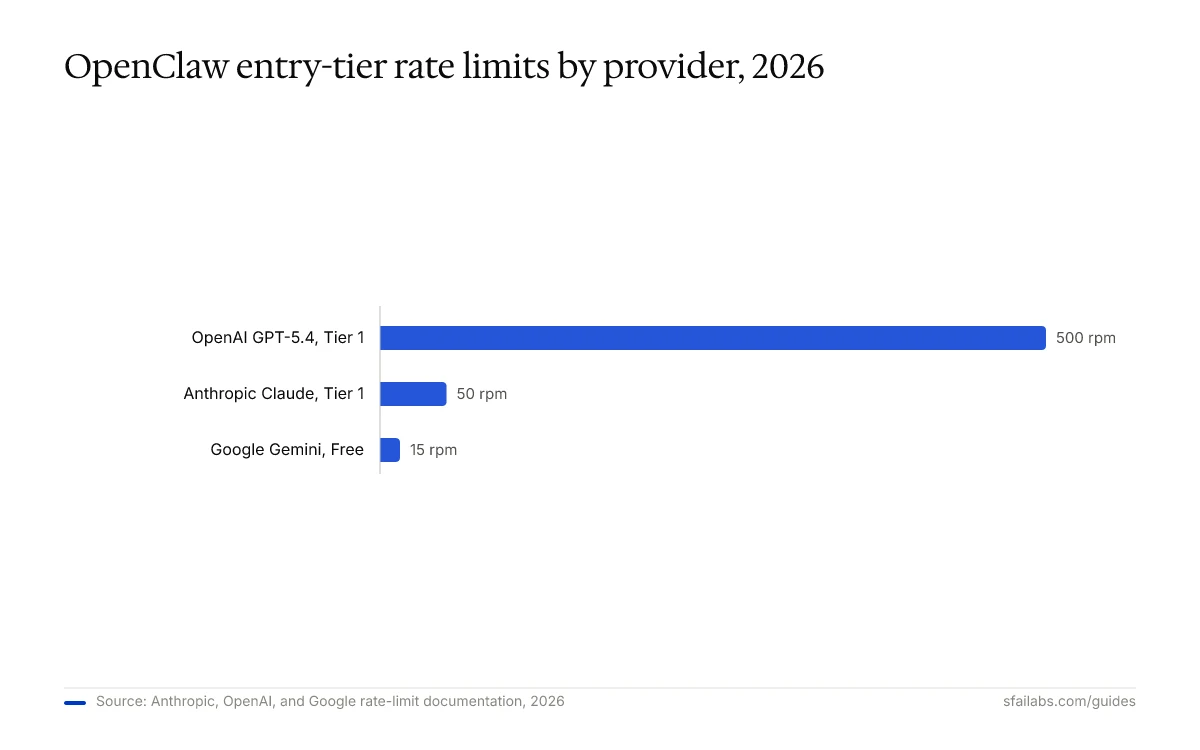
Each AI provider enforces different limits based on your account tier. These numbers matter because they determine how aggressively you can use each model before hitting throttling.
Anthropic (Claude)
| Tier | Monthly Spend | Requests/Min | Input Tokens/Min |
|---|---|---|---|
| Tier 1 | $5+ | 50 | 30,000 |
| Tier 2 | $40+ | 60 | 60,000 |
| Tier 3 | $200+ | 300 | 300,000 |
| Tier 4 | $400+ | 4,000 | 2,000,000 |
The jump from Tier 1 to Tier 4 is an 80x increase in request capacity. For most OpenClaw users running a few daily cron jobs and occasional interactive sessions, Tier 1 is adequate. If you are running multiple agents concurrently or have heavy heartbeat schedules, Tier 2 or Tier 3 becomes necessary.
OpenAI (GPT-5.4)
| Tier | Cost Threshold | Requests/Min | Tokens/Min |
|---|---|---|---|
| Free | $0 | 3 | 40,000 |
| Tier 1 | $5 | 500 | 600,000 |
| Tier 2 | $50 | 5,000 | 5,000,000 |
OpenAI’s free tier is effectively unusable for OpenClaw. Three requests per minute means a single multi-step agent call can exhaust your entire minute’s budget. Tier 1 at $5 is the minimum for any real workload.
Google (Gemini 3.1 Pro)
| Tier | Requests/Min | Daily Limit |
|---|---|---|
| Free | 15 | 1,500 |
| Paid | 2,000 | Unlimited |
Google’s free tier is generous enough for a fallback provider. Fifteen requests per minute covers most agent tasks, and 1,500 daily requests handles light-to-moderate usage. Gemini works well as a third-tier fallback. The free quota absorbs overflow from Claude and GPT without adding cost.
Detecting Rate Limit Errors
Before you can fix rate limiting, you need to identify which provider is throttled and why.
Check Provider Status
Run this in your terminal:
openclaw models statusThis shows the current state of each configured provider, including whether any are in cooldown and how long until they become available again.
Watch Logs in Real Time
For active debugging during an agent run:
openclaw logs --follow | grep "429\|rate.limit\|cooldown"This filters the log stream to only show rate-limit-related events. You will see which provider triggered the 429, the cooldown duration applied, and whether the request was retried or routed to a fallback.
Distinguish 429 from Other Errors
Not every error is a rate limit. Here is how to tell:
- 429 Too Many Requests: Rate limit. Your setup works; you just sent too many requests.
- 401 Unauthorized: Authentication failure. Your API key is invalid or expired. See our OAuth troubleshooting guide.
- 529 Overloaded: The provider’s servers are at capacity. This is not your fault and is not related to your rate limit tier. Issue #58561 notes that OpenClaw sometimes displays 529 errors as “rate limit reached,” which is misleading.
Configuring Model Fallback
The most effective defense against rate limits is a fallback chain. When your primary model hits a 429, OpenClaw routes the request to the next model in the chain instead of waiting for cooldown.
Add this to your openclaw.json:
{
  "models": {
    "primary": "claude-opus-4.6",
    "fallback": [
      "gpt-5.4",
      "gemini-3.1-pro"
    ]
  }
}
With this configuration, if Claude hits a rate limit, OpenClaw sends the request to GPT-5.4. If GPT-5.4 is also throttled, it tries Gemini 3.1 Pro. Only if all three providers are in cooldown does the request queue.
When to Fall Back vs. When to Queue
This is where most guides stop. They show you the fallback config and move on. In practice, the choice between falling back to a different model and waiting in a queue depends on what the agent is doing.
For routine tasks like web searches, summarization, and data formatting, falling back to a cheaper model is fine. The output quality difference between Claude Opus 4.6 and Gemini 3.1 Pro on a summarization task is negligible.
For high-stakes tasks like code review, client-facing content, or complex reasoning chains, falling back to a weaker model can degrade output quality enough to cause problems downstream. In those cases, queuing the request and waiting 60 seconds for the primary model’s cooldown to expire is the better choice.
You can implement this by configuring task-specific model assignments in your OpenClaw skills rather than relying on global fallback. Set your critical skills to use a specific model with "fallback": false, and let your routine skills use the fallback chain.
Hidden Rate Limit Consumers
The rate limit math that catches most OpenClaw operators by surprise is not the requests they initiate. It is the requests running in the background.
Cron Jobs
A nightly research cron that runs 5 web searches, each followed by a summarization call, generates 10 API requests in a burst. If you have three cron jobs running at 2 AM, that is 30 requests hitting the same provider within minutes. On Anthropic Tier 1 (50 requests/minute), this alone consumes 60% of your minute’s budget.
Stagger your cron jobs. Instead of scheduling everything at 0 2 * * *, spread them across the hour: 0 2 * * *, 20 2 * * *, 40 2 * * *. This distributes the load and avoids burst patterns. See our cron job configuration guide for scheduling strategies.
Heartbeats
If your heartbeat schedule runs every 5 minutes and each heartbeat makes 2 to 3 model calls (checking status, summarizing updates, deciding on actions), that is 24 to 36 requests per hour just from the heartbeat. On a free Google Gemini tier, that is nearly half your hourly budget.
Route heartbeat calls to your cheapest provider. Heartbeats are status checks, not complex reasoning tasks. Gemini 3.1 Pro on the free tier handles them well.
Parallel Tool Calls
When an OpenClaw agent runs multiple tools simultaneously, each tool call is a separate API request. An agent that browses 5 URLs in parallel generates 5 concurrent requests. If you are on a low-tier plan, parallel tool calls can trigger a 429 within a single agent turn.
Limit concurrency in your agent configuration. For Tier 1 accounts, capping parallel tool calls at 3 prevents burst-related throttling while still allowing reasonable parallelism.
Retry Strategies
When a request fails with 429 and no fallback is available (or fallback is disabled for that task), you need retry logic.
Exponential Backoff with Jitter
The standard retry pattern doubles the wait time after each failure and adds random jitter to prevent synchronized retries:
# Base delay: 1 second
# Max delay: 60 seconds
# Max retries: 5
# Jitter: random 0-1 second added to each delay
OpenClaw handles retries internally for model requests, but if you are calling external APIs from custom tools, implement backoff in your tool code. The key parameters are:
- Base delay: 1 second
- Maximum delay cap: 60 seconds
- Maximum retries: 5
- Jitter: Add a random component (0 to 1 second) to prevent retry storms when multiple agents hit the same limit simultaneously
When Not to Retry
If you receive a 429 with a Retry-After header, respect the value. Retrying before the specified time wastes requests and can extend your cooldown. OpenClaw reads this header when present, but some providers do not include it consistently.
Also, do not retry if you have already exhausted your daily quota (distinct from per-minute limits). Retrying a daily quota exhaustion just generates more 429s and extends your cooldown unnecessarily. Check your provider dashboard to determine whether you have hit a per-minute or per-day limit.
Monitoring Your Rate Limit Usage
Reactive troubleshooting is fine when rate limits are occasional. If you are running production workloads on OpenClaw, you need to catch throttling before it stalls your workflows.
Simple Log-Based Monitoring
Create a monitoring script that counts rate limit events per provider:
#!/bin/bash
# Save as monitor-rate-limits.sh
# Run via cron every hour: 0 * * * * /path/to/monitor-rate-limits.sh

LOG_FILE="/var/log/openclaw/gateway.log"
HOUR_AGO=$(date -d '1 hour ago' '+%Y-%m-%dT%H' 2>/dev/null || date -v-1H '+%Y-%m-%dT%H')

echo "=== Rate Limit Report: $(date) ==="
echo "429 events in the last hour:"
grep "$HOUR_AGO" "$LOG_FILE" | grep -c "429" | xargs -I{} echo "  Total: {}"
grep "$HOUR_AGO" "$LOG_FILE" | grep "429" | grep -oP 'provider=\K\w+' | sort | uniq -c | sort -rn
This gives you a per-hour, per-provider breakdown of rate limit events. When a provider starts showing frequent 429s, you know to either upgrade your tier, adjust your request patterns, or add it as a topic in your next capacity planning review.
For more comprehensive log analysis, see our logging and debugging guide.
Provider Dashboard Checks
Each provider offers a usage dashboard:
- Anthropic: console.anthropic.com shows current tier, usage, and remaining quota
- OpenAI: platform.openai.com/usage shows request counts and token consumption
- Google: Cloud Console AI Platform section shows Gemini API usage
Check these weekly if you are running production workloads. Your tier auto-upgrades on some providers (Anthropic) based on cumulative spend, which means your rate limits may improve over time without explicit action.
Frequently Asked Questions
How long do I wait after hitting a 429 rate limit in OpenClaw?
For per-minute limits, 60 seconds is usually enough. Most providers use a token bucket system that continuously refills, so waiting one minute restores capacity. If you have triggered OpenClaw’s escalating cooldown (1, 5, 25, 60 minutes), the wait depends on how many consecutive 429s occurred. Run openclaw models status to see the remaining cooldown time for each provider.
Why does OpenClaw show rate limit errors on all models at once?
This usually means either all configured providers are simultaneously throttled (common if a burst of requests hit during a heavy cron window), or OpenClaw is misreporting a 529 (provider overload) as a rate limit error. Issue #32828 documents this false-positive behavior. Restart the gateway with openclaw restart to clear stuck cooldown states.
Should I upgrade my API tier or add a second API key?
It depends on your volume. A second Anthropic API key on Tier 1 gives you 100 RPM (2 x 50) for $10/month in minimum spend. Upgrading to Tier 2 gives you 60 RPM for $40/month cumulative spend. If raw request volume is your bottleneck, dual Tier 1 keys are cheaper. If token throughput matters (Tier 2 doubles your input token limit), the upgrade is worth it. See our API costs breakdown for detailed pricing analysis.
Does OpenClaw automatically switch models when one hits a rate limit?
Only if you have configured a fallback chain in openclaw.json. Without explicit fallback configuration, OpenClaw places the throttled provider in cooldown and waits. It does not automatically discover or switch to other configured providers. Set up your fallback chain as described in the configuring model fallback section above.
How do I stop cron jobs and heartbeats from consuming my rate limit?
Three approaches: stagger cron schedules to avoid burst patterns, route heartbeat calls to your cheapest provider (Gemini free tier handles status checks well), and cap parallel tool calls in agent configurations. Our heartbeat scheduling guide covers this in detail.
Can OpenRouter help me avoid rate limits?
Yes. OpenRouter aggregates multiple providers behind a single API endpoint and handles rate limit routing automatically. Configure it as a fallback in openclaw.json and OpenRouter distributes requests across providers when one is throttled. You pay a small markup on per-token pricing, which may or may not matter depending on your volume. See our API gateway guide for configuration details.
What is the difference between RPM and TPM rate limits?
RPM (requests per minute) limits how many API calls you can make regardless of size. TPM (tokens per minute) limits the total tokens across all requests. You can hit either limit independently. A single request with a 100,000-token context window could exhaust your TPM limit while only counting as 1 RPM. For OpenClaw agents that process large documents, TPM is usually the binding constraint.
How do I monitor rate limit usage in OpenClaw?
Use openclaw logs --follow | grep 429 for real-time monitoring, or set up the hourly monitoring script described in the monitoring section above. For dashboard-level visibility, check your provider consoles weekly: console.anthropic.com, platform.openai.com/usage, and Google Cloud Console.
Key Takeaways
- Rate limits are per-provider, per-tier. Know your tier’s RPM and TPM limits for each configured provider before deploying production workloads.
- Configure a fallback chain in
openclaw.jsonso throttling on one provider does not halt your agent entirely. Use task-specific model assignments for high-stakes work where fallback quality matters. - Background tasks (cron jobs, heartbeats, parallel tool calls) are the primary source of unexpected rate limit hits. Stagger schedules, route low-priority calls to cheap providers, and cap concurrency.
- Monitor proactively. A simple log-grep script running hourly catches rate limit patterns before they become outages.
- When choosing between tier upgrades and multi-key rotation, do the cost math for your specific usage pattern. Dual Tier 1 keys are often cheaper than a single Tier 2 account.
SFAI Labs


