Your OpenClaw agent stops responding mid-task, and the logs show a 401 authentication error. The openclaw models status command reports everything as “ok” with “expires in 0m,” which tells you nothing useful. The root cause is almost always an expired OAuth access token paired with a stale or used refresh token. The fix takes under two minutes once you know where to look.
This guide walks through detecting expired tokens, executing the refresh flow correctly, setting up automatic refresh to prevent future downtime, and handling the edge cases that catch most teams off guard.
Detecting an Expired OAuth Token
The first step is confirming that your problem is a token expiry rather than a network issue, rate limit, or misconfigured API key. Run this command:
openclaw models statusLook at the output for your provider’s auth profile. A healthy profile shows a future expiration timestamp. An expired profile shows one of these patterns:
- “expires in 0m” with status “ok” (this is a known bug where the status display masks expired tokens when a refresh token exists)
- “expired” or “unauthorized” status
- Empty expiration field with recent 401 errors in logs
If openclaw models status looks fine but your agent still fails, run the deeper diagnostic:
openclaw status --allThis produces a complete, token-safe report of your configuration state. Check the credentials section for your provider. The exit code matters too: exit code 1 means expired or missing credentials, exit code 2 means credentials are expiring soon.
For Anthropic specifically, verify whether OpenClaw is treating your OAuth token as an API key:
openclaw config get authIf you see type: api_key when you expected OAuth, that mismatch causes persistent 401 errors. The OpenClaw help docs identify four root causes: token expiration, session revocation from a password change, billing or subscription issues, and corrupted local token storage.
The Token Refresh Flow
OAuth in OpenClaw uses the standard OAuth 2.0 refresh token grant. When your access token expires, OpenClaw should automatically exchange the refresh token for a new access token behind the scenes. When that automatic exchange fails, you need to intervene manually.
Manual Token Refresh
The fastest path back to a working state:
openclaw auth add <provider>Replace <provider> with anthropic, openai, google, or whichever provider token has expired. This triggers a new OAuth flow in your browser, generates fresh access and refresh tokens, and writes them to ~/.openclaw/credentials/oauth.json.
If the standard re-auth does not work, do a full credential reset:
openclaw auth remove <provider>
openclaw auth add <provider>
After re-authentication, verify the fix:
openclaw models status --probeThe --probe flag sends a live test request to the provider rather than just checking stored token metadata.
When the Refresh Token Itself Expires
Access tokens are short-lived (typically 1 hour). Refresh tokens last longer but are not permanent. When the refresh token expires, OpenClaw enters a failure loop: it keeps trying to refresh, gets rejected, and never prompts you to re-authenticate. This is the scenario that causes the most confusion because the error is silent until you check logs.
The openclaw doctor --fix command can detect and resolve this automatically:
openclaw doctor --fixThis inspects all auth profiles, identifies expired refresh tokens, and walks you through re-authentication for each affected provider.
Provider-Specific Token Expiry Times
Not all OAuth providers use the same token lifetimes. Based on data from OpenClaw’s GitHub issue tracker and community reports, here are the approximate expiry windows:
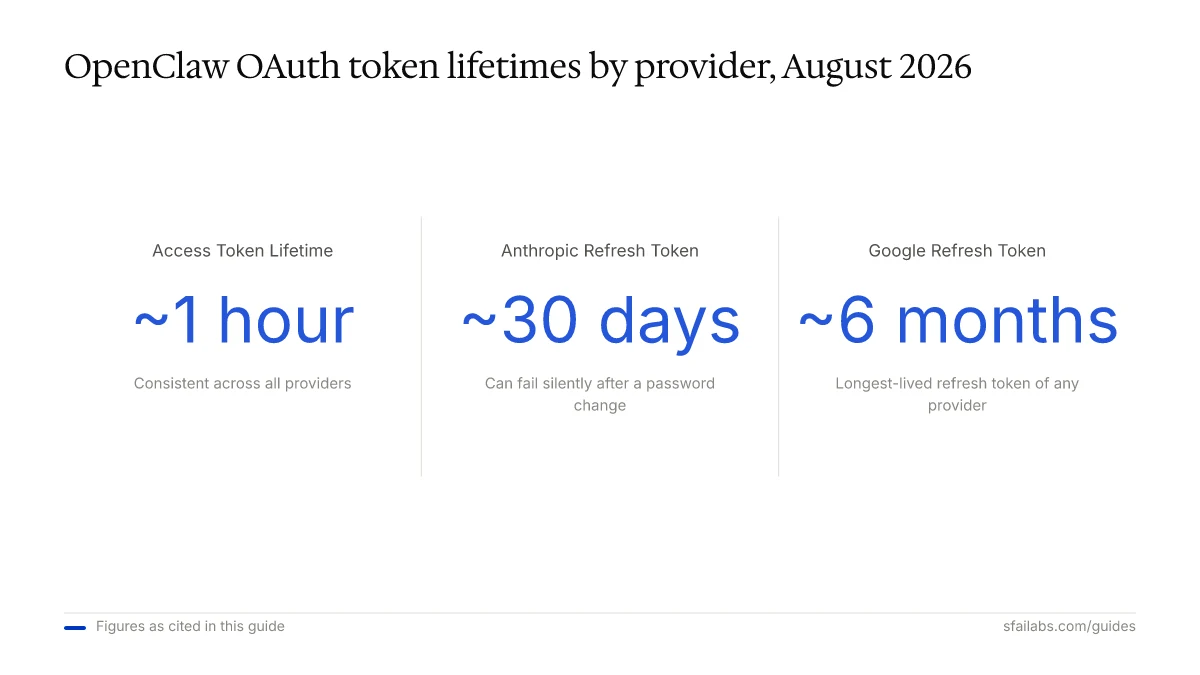
| Provider | Access Token Lifetime | Refresh Token Lifetime | Notes |
|---|---|---|---|
| Anthropic | ~1 hour | ~30 days | Refresh can fail silently after password change |
| OpenAI (Codex) | ~1 hour | 10-30 days | Token refresh not persisted to disk in some versions |
| ~1 hour | ~6 months | Re-auth forced every hour if refresh fails (Issue #7549) | |
| Qwen | ~1 hour | Shorter since v2026.3.2 | Frequent re-auth required on recent versions |
These values are approximate and can change with provider policy updates. The access token lifetime is fairly consistent at around 1 hour across providers. The refresh token lifetime is where the real variance sits, and it is where silent failures originate.
Setting Up Automatic Token Refresh
Manual re-authentication every time a token expires is not sustainable for production agents. Here are three approaches to keep tokens fresh without manual intervention.
Approach 1: OpenClaw’s Built-In Refresh
OpenClaw attempts automatic refresh by default. When it works, you never notice token expiry. When it fails, the most common culprits are:
- Stale
auth-profiles.json: The refreshed token is not written back to disk. Restart the gateway to force a disk write, or upgrade to a version that fixes Issue #52037. - Race conditions in multi-agent setups: Multiple agents sharing one auth profile attempt concurrent refreshes, and the second request fails with “refresh_token_reused.” This injects roughly 120 failed HTTP cycles per hour into your gateway event loop.
- Cooldown interference: After repeated auth failures, OpenClaw blocks the provider for 30-60 minutes. Restarting the gateway clears the cooldown state.
Approach 2: Cron-Based Token Health Check
Set up a cron job that runs openclaw models status and re-authenticates if tokens are expiring:
# Check token health every 30 minutes
*/30 * * * * /usr/local/bin/openclaw models status --json | /usr/local/bin/check-token-health.sh
A minimal health check script:
#!/bin/bash
STATUS=$(openclaw models status --json)
EXIT_CODE=$?

if [ $EXIT_CODE -eq 1 ]; then
  echo "Token expired, triggering re-auth" | logger -t openclaw-token
  openclaw doctor --fix --non-interactive
elif [ $EXIT_CODE -eq 2 ]; then
  echo "Token expiring soon, scheduling refresh" | logger -t openclaw-token
  openclaw auth refresh --all
fi
Approach 3: Separate Auth Profiles per Agent
For teams running multiple agents, the single biggest improvement is giving each agent its own auth profile. This eliminates the refresh token race condition entirely.
Per-agent auth profiles live at ~/.openclaw/agents/<agentId>/auth-profiles.json. Configure each agent to use its own credential set rather than sharing the gateway-level profile. This approach uses more API quota (each agent authenticates independently) but eliminates the failure mode where one agent’s refresh invalidates another agent’s token.
Handling Refresh Failures Gracefully
Even with automatic refresh, tokens will occasionally expire in ways you cannot predict. Production setups need a fallback strategy.
Configure Fallback Models
In your OpenClaw configuration, set up fallback providers so that a single expired token does not halt all agent activity:
{
  "models": {
    "primary": "anthropic/claude-opus-4-6",
    "fallback": ["openai/gpt-5.4", "google/gemini-3.1-pro"]
  }
}
When the primary provider returns a 401, OpenClaw automatically routes to the next available fallback. See our multi-model configuration guide for the full setup.
Switch to API Keys for Headless Environments
If you are running OpenClaw in a Docker container, on a VPS, or anywhere without a browser for the OAuth redirect, API keys are more reliable than OAuth. API keys do not expire unless you revoke them, which eliminates the token refresh problem entirely.
openclaw auth add anthropic --type api_keyAPI keys require a paid API plan rather than using your existing Claude Pro or Max subscription credits. For most production deployments, the cost is worth the reliability. See our full breakdown of the API cost differences for a detailed comparison.
Monitor Token Health in Production
Add token status to your existing monitoring. The openclaw models status --json output can be parsed by any monitoring system. Alert on exit code 2 (expiring soon) so you can refresh proactively rather than reacting to failures.
Frequently Asked Questions
How do I tell if my OpenClaw OAuth token is expired?
Run openclaw models status and check the expiration timestamp for your provider. Be aware that a known bug can show “ok” with “expires in 0m” when the token is already expired. If you suspect the display is wrong, run openclaw models status --probe to send a live test request instead of trusting cached metadata.
Can I switch from OAuth to API keys to avoid this problem entirely?
Yes, and for headless or production deployments this is the recommended approach. Run openclaw auth add <provider> --type api_key and paste your API key. API keys do not expire unless manually revoked, so you eliminate token refresh issues. You pay per-token through the provider’s API pricing rather than using subscription credits.
What is the “refresh_token_reused” error?
This happens when multiple OpenClaw agents share a single auth profile and try to refresh the token at the same time. The first refresh succeeds and invalidates the old refresh token. The second agent tries to use the now-invalid refresh token and gets rejected. Fix it by giving each agent its own auth profile or by upgrading to a version with the race condition fix.
What happens to a running task when the token expires mid-execution?
OpenClaw queues the failed request and attempts a token refresh. If the refresh succeeds, the request retries automatically. If the refresh fails and you have fallback models configured, the request routes to the next available provider. If no fallback exists and refresh fails, the task errors out and you see a 401 in the agent’s logs.
How often should I check token health?
Every 30 minutes is a reasonable default. Access tokens typically last about 1 hour, so checking twice per token lifetime gives you a window to refresh before expiry. In high-availability setups, check every 15 minutes and alert on exit code 2 (expiring soon) from openclaw models status.
Does openclaw doctor --fix handle all token problems?
It handles most of them, including expired access tokens, expired refresh tokens, and corrupted local storage. It does not fix race conditions in multi-agent setups (those require architectural changes to auth profiles) or provider-side issues like revoked credentials from a password change on the provider’s platform.
Key Takeaways
- Run
openclaw models status --probe(not juststatus) to get accurate token health, since the display can mask expired tokens - Token lifetimes vary by provider: access tokens last about 1 hour universally, but refresh tokens range from 10 days (OpenAI Codex) to 6 months (Google)
- For production agents, either set up per-agent auth profiles to avoid refresh race conditions, or switch to API keys to eliminate token expiry entirely
- Use
openclaw doctor --fixas the first-line fix for most token problems, and add cron-based health checks for proactive monitoring - Configure fallback models so a single expired token never takes down your entire agent fleet
SFAI Labs


