Searchers who type “openclaw pricing” usually expect a SaaS-style plan comparison page. That page does not exist, because OpenClaw is MIT-licensed open-source software. The software itself costs zero. Your real bill comes from three places the marketing pages rarely add up together: the model API calls, the infrastructure you run it on, and the time you spend keeping both healthy.
This article is the honest overview. It names every cost bucket, anchors the model numbers to Anthropic’s current April 2026 Claude 4.6 pricing, and explains when the paid SFAI Labs Mission Control layer actually earns its keep versus pure do-it-yourself. If you want the fully numeric deep-dive with monthly scenarios, read the companion OpenClaw pricing breakdown after this.
The Short Answer: There Is No Subscription
OpenClaw has no license fee, no seat-based plan, no freemium gating. You can clone the repository right now and run the full feature set on your laptop for the price of the electricity it draws. That is what “openclaw pricing plans” amounts to: there are none.
The word “pricing” still matters, though, because running an autonomous agent 24 hours a day is not free. An agent that browses the web, reads your email, and runs scheduled tasks burns tokens and server time. Ignoring those costs is how personal users end up with surprise $200 months and why teams underestimate the rollout budget by half.
The Four Buckets of OpenClaw TCO
Every real cost breaks into one of four buckets:
| Bucket | What You Pay For | Typical Range |
|---|---|---|
| License | The software itself | $0 |
| Infrastructure | VPS, bandwidth, storage | $5-$50/month |
| Models | LLM API tokens | $5-$200/month |
| Time | Setup, maintenance, skill authoring | 2-10 hours/month |
A personal user sticking to sane defaults lands around $15-$40 all-in, not counting their own time. A small team running heavy workflows on Claude Opus 4.6 can cross $250 without effort. The rest of this article explains what drives the spread.
Bucket 1: License — Zero
OpenClaw ships under the MIT license. No usage caps, no telemetry phone-home, no per-seat charges. You get the whole codebase, including every integration and every built-in tool. This is not a loss leader for a paid upsell; the project is genuinely open source.
If a blog post tries to sell you an “OpenClaw subscription,” it is either talking about a managed host (infra, not software) or a third-party value-add like our own Mission Control layer. The core agent itself remains free forever under the current license.
Bucket 2: Infrastructure — Five to Fifty Dollars a Month
OpenClaw runs as a Node.js process. It needs a machine that stays on. Your choices:
- Local laptop or home server. Zero incremental cost beyond electricity. Works for personal use but your agent stops when your laptop sleeps.
- Entry VPS. Hostinger’s one-click OpenClaw installer starts at $6.99/month. That gets you a shared KVM instance sized for a single-user agent.
- Production-grade VPS. A KVM 2 plan (2 vCPU, 8 GB RAM, 100 GB NVMe) is $8.99/month on a two-year term and handles most team workloads without strain.
- Higher tiers. Teams running multiple concurrent skills, browser automation, or high-frequency heartbeats move to KVM 3 or KVM 4, which land between $15 and $40/month.
Most single-user deployments sit under $10/month for infrastructure. Our OpenClaw hosting costs guide walks through the sizing math if you want to pick a plan deliberately instead of guessing.
Bucket 3: Model API Costs — The Real Variable
This is where budgets break. Every message you send OpenClaw, every heartbeat cycle, every skill execution calls an LLM and spends tokens. Unlike infra, this bucket scales with use, and the default settings are not the cheapest configuration.
Current Anthropic Claude 4.6 Pricing
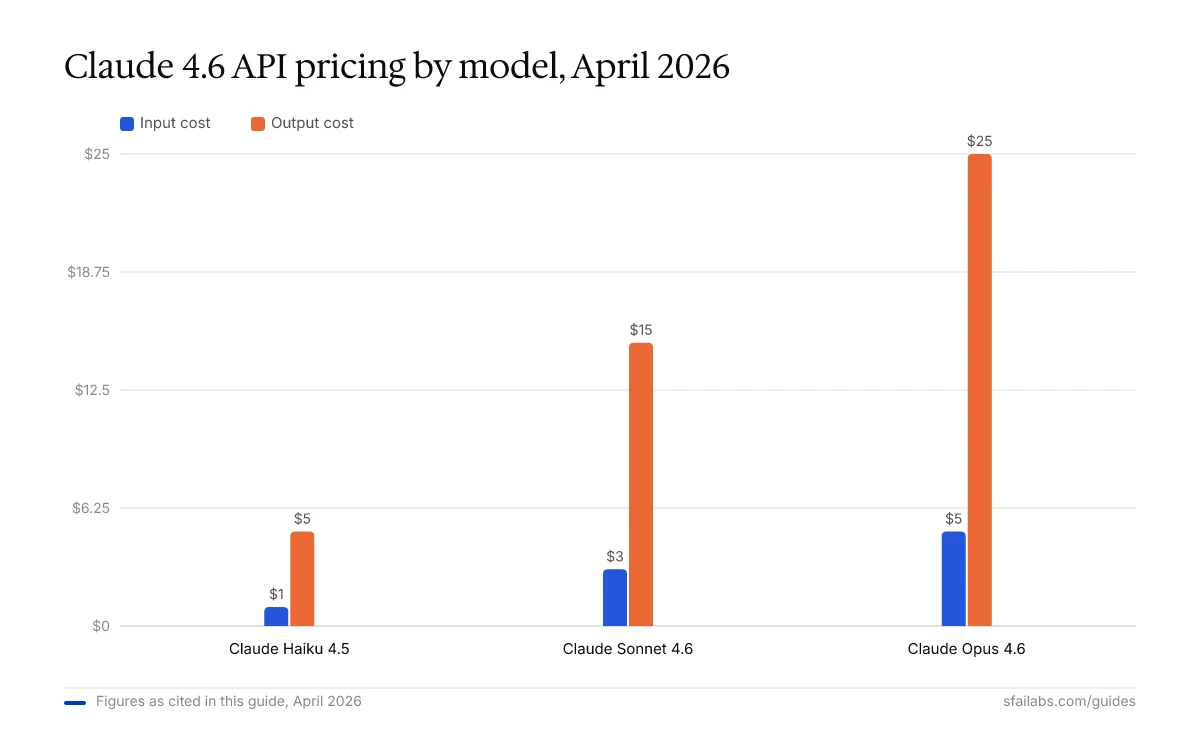
Anthropic’s published rates, pulled from the official pricing page in April 2026:
| Model | Input ($/million tokens) | Output ($/million tokens) |
|---|---|---|
| Claude Haiku 4.5 | $1.00 | $5.00 |
| Claude Sonnet 4.6 | $3.00 | $15.00 |
| Claude Opus 4.6 | $5.00 | $25.00 |
Source: Anthropic pricing page, April 2026. The full 1M-token context window is included at standard rates. Batch API requests run at a 50% discount. Prompt caching hits cost 10% of input price.
A few things to notice. First, the Claude 4.6 generation dropped Opus pricing dramatically compared to Opus 4.1 ($15/$75), so articles quoting older numbers are now 3x too high. Second, the gap between Haiku and Sonnet is much smaller than many people assume — Sonnet is only 3x the input cost and 3x the output cost, not 10x. Third, Opus is no longer the runaway-expensive option it used to be.
What a Real Workload Costs
A typical personal OpenClaw user generates 200,000 to 500,000 input tokens and 30,000 to 80,000 output tokens per day across heartbeats, messages, and skills. On Sonnet 4.6, that works out to roughly:
- Low end: 200K input × $3/M + 30K output × $15/M = $0.60 + $0.45 = $1.05/day (~$32/month)
- High end: 500K input × $3/M + 80K output × $15/M = $1.50 + $1.20 = $2.70/day (~$81/month)
Swap in Haiku 4.5 for routine tasks and the same workload drops to around $11-$27/month. Swap in Opus 4.6 for everything and you land in the $55-$135/month range. These are estimates — your actual number depends on how much you chat with the agent, how many skills fire on the heartbeat, and how long your system prompt is.
Three Levers That Cut the Bill
- Model routing. Send routine formatting and retrieval tasks to Haiku. Keep Sonnet as the default reasoning model. Reserve Opus for genuinely hard work. A sensible routing policy cuts the bill 40-70% versus always-Opus.
- Prompt caching. OpenClaw’s system prompt is long and repeats on every heartbeat. Cached input tokens cost 10% of the standard input price. With a typical 40-60% cache hit rate, this alone saves 30-50% of input spend.
- Batch API. Any skill that can wait 24 hours (digests, reports, overnight research) runs at 50% off via Anthropic’s Batch API. Most users never configure this and leave the discount on the table.
For a deeper treatment of each lever and the numbers behind them, our OpenClaw API costs guide goes line-by-line, and reducing OpenClaw costs compiles the tactical playbook.
Bucket 4: Time — The Cost Nobody Prices
Self-hosting open-source software is not zero-cost, it is just differently-costed. Budget for:
- Initial setup. Two to five hours for a competent developer following a guide. Longer if this is your first time with Docker or OAuth.
- Skill authoring. Thirty minutes to several hours per custom skill, depending on complexity. Most users write three to ten skills in the first month.
- Maintenance. One to three hours per month chasing OAuth token expirations, updating the codebase, tuning the heartbeat, and debugging the occasional skill failure.
- Model migrations. Every time Anthropic or OpenAI ships a new model, you decide whether to switch defaults. Expect an hour of testing per migration.
If you bill your time at $100/hour, five hours of monthly maintenance is $500 — more than the software and infrastructure combined. That math is what makes the self-host versus managed decision sharp.
Self-Host vs. Managed: When SFAI Mission Control Adds Value
SFAI Labs Mission Control is our managed layer on top of OpenClaw. It handles VPS provisioning, heartbeat health, OAuth token rotation, model routing, audit logging, and team multi-tenancy. It is a paid product and it is genuinely not for everyone.
A quick decision rule:
- Self-host if you are a developer running a personal agent, your workload is light, you enjoy tinkering, and your time is not expensive enough to price.
- Consider Mission Control if your team has more than three users, you need audit logs for compliance, your agent runs business-critical workflows, or your engineering time is billed at a rate where five maintenance hours a month costs more than a managed subscription.
The break-even point is rarely about the dollar cost of the managed layer itself. It is about whether you would rather write skills and ship work, or debug OAuth refresh tokens at 11 p.m. on a Tuesday. Our OpenClaw Mission Control overview covers what is included, and the self-hosted versus managed comparison walks through the trade-off in detail.
Hidden Costs to Budget For
Four line items regularly surprise new users:
- The heartbeat. Default settings wake the agent every 30 minutes. Each wake-up consumes tokens even when nothing is pending. If you set the heartbeat to five minutes and route it through Opus, you can burn through $100 a month doing nothing.
- Browser automation skills. Skills that open a Chromium instance to scrape websites consume both memory (pushing you to a larger VPS) and tokens (long HTML pages are expensive inputs).
- Vendor model price changes. Your budget should assume rates move. Anthropic has adjusted pricing multiple times in the Claude 4.x line; tying workflows to a single provider with no fallback is a risk.
- Rate limit overages. Hitting rate limits on a personal tier silently degrades agent quality. Upgrading your Anthropic tier for higher throughput is not free.
Build these into your first-month estimate. It is easier to over-budget by 30% and come in under than to defend a surprise invoice to a skeptical finance team.
Frequently Asked Questions
Is OpenClaw free?
OpenClaw is free and open source under the MIT license. The software itself has no cost, no subscription, and no usage cap. You pay only for the LLM API calls it makes and the infrastructure you run it on.
What does OpenClaw actually cost to run per month?
A typical personal user pays $15 to $40 per month all-in: roughly $7-$15 for a VPS and $10-$30 for Claude Sonnet 4.6 API usage at moderate load. Small teams running heavier workflows commonly land between $60 and $150 per month. Leaving defaults untouched and routing everything through Claude Opus 4.6 can push usage past $200.
Which Claude model is most cost-effective for OpenClaw?
Claude Sonnet 4.6 at $3/$15 per million tokens is the best default for most OpenClaw workloads as of April 2026. Route routine tasks to Haiku 4.5 ($1/$5) and reserve Opus 4.6 ($5/$25) for genuinely hard reasoning. A sensible routing policy cuts the model bill 40-70% versus always using Opus.
Should I self-host OpenClaw or use a managed option?
Self-host if you are a developer running a personal agent, your workload is light, and you enjoy the tinkering. Consider a managed option like SFAI Labs Mission Control if you have team users, compliance requirements, or your engineering time would cost more to spend on maintenance than a managed subscription would.
What hidden costs should I budget for?
The four common surprises are heartbeat-driven token spend (especially if you shorten the interval or route heartbeats through Opus), memory-heavy browser automation skills, Anthropic rate-limit tier upgrades, and vendor model-price changes. Budget 30% over your first estimate.
Key Takeaways
- OpenClaw is MIT-licensed and has no subscription or license cost. “Pricing” means models plus infrastructure plus your time.
- Infrastructure runs $5-$50 per month. Model API costs are the variable that swings total spend.
- Current Anthropic pricing (April 2026): Haiku 4.5 at $1/$5, Sonnet 4.6 at $3/$15, Opus 4.6 at $5/$25 per million tokens. Articles quoting Opus 4.1 at $15/$75 are out of date.
- Model routing, prompt caching, and the Batch API together cut model spend 50-80% versus lazy defaults.
- Self-host when your time is cheap and the workload is simple. Consider SFAI Mission Control when team size, compliance, or engineering-hour costs change the math.
- For the numeric deep-dive with scenarios, continue to the OpenClaw pricing breakdown.
SFAI Labs


