
Imagine a freelance designer who connects Openclaw to her bank’s transaction feed and Gmail inbox. She wants one thing: to stop spending Sunday afternoons categorizing expenses in a spreadsheet. Three weeks later, the agent has auto-categorized 94% of her transactions correctly, flagged a forgotten $47/month SaaS subscription she had not used since January, and generated her first monthly spending summary without her lifting a finger.
Personal finance is one of the highest-ROI use cases for a self-hosted AI agent. The data is structured, the tasks are repetitive, and the privacy stakes are high enough that running everything locally matters.
This guide walks through six personal finance use cases you can build with Openclaw: expense tracking, budget alerts, monthly spending summaries, bill reminders, savings goal tracking, and tax preparation support. Each section includes the skill configuration logic so you can replicate it.
Why Openclaw Fits Personal Finance Better Than Budgeting Apps
Eighty percent of people who download a budgeting app abandon it within three weeks. The reason is not lack of motivation. It is friction. Manual categorization, daily check-ins, and reconciliation against bank statements create enough resistance that most people give up.
Openclaw removes that friction by automating the grunt work. It connects to your bank transaction data (read-only), categorizes spending using an LLM, and delivers insights through the messaging app you already use: WhatsApp, Telegram, Slack, or email. You do not open a separate finance app. The information comes to you.
The privacy argument is the other half. Cloud-based finance apps like Mint (now Credit Karma) and Monarch Money route your transaction data through their servers. Openclaw runs on your own hardware. Your bank data never leaves infrastructure you control. For anyone uncomfortable with a third party seeing every purchase they make, self-hosting is not a nice-to-have. It is the point.
The Cost Comparison
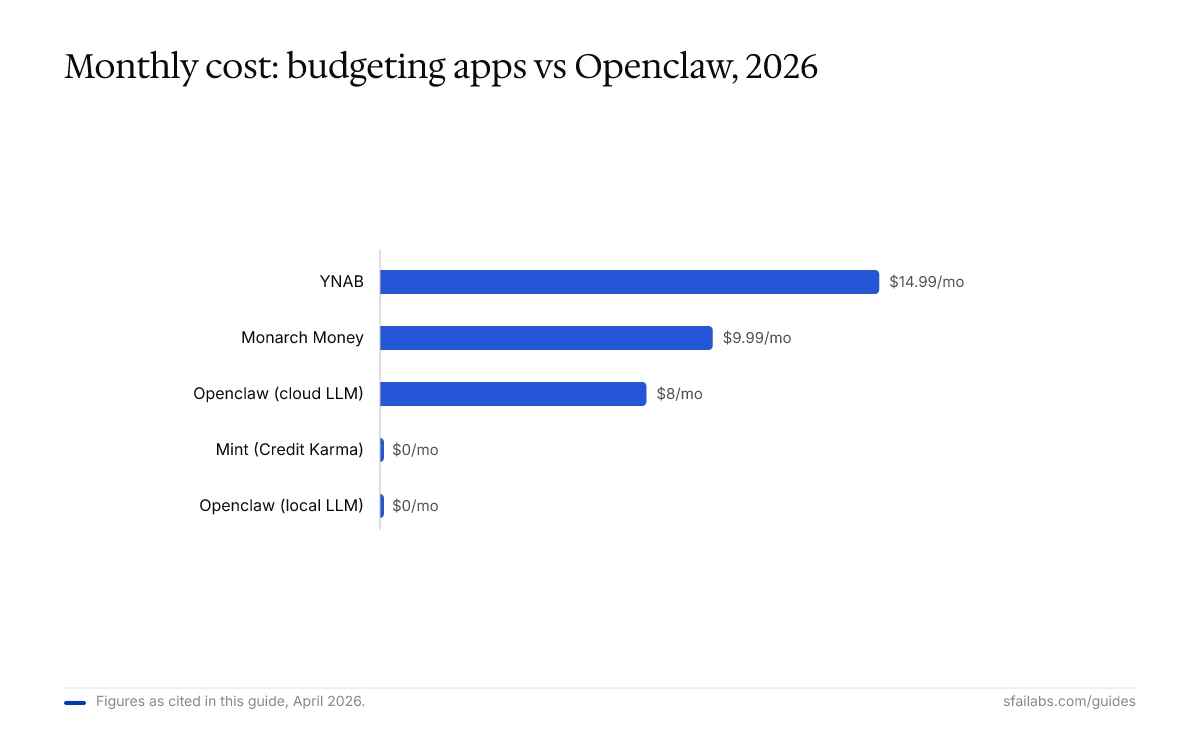
Here is what you pay to track your finances with each option:
| Solution | Monthly Cost | Data Location | Automation Level |
|---|---|---|---|
| YNAB | $14.99 | YNAB cloud | Manual categorization |
| Monarch Money | $9.99 | Monarch cloud | Semi-automated |
| Mint (Credit Karma) | Free | Intuit cloud | Automated, ad-supported |
| Openclaw (cloud LLM) | $3 to $15 | Your hardware | Fully automated |
| Openclaw (local LLM) | $0 (electricity only) | Your hardware | Fully automated |
The $3 to $15 range for Openclaw with a cloud LLM assumes 500 to 2,000 transactions per month processed through a model like Claude Sonnet 4.6 or GPT-5.4. If you run a local model through Ollama on a machine with 16GB+ RAM, the API cost drops to zero. You pay only for the electricity.
Six Use Cases That Replace Manual Financial Work
Expense Tracking via Email and Bank API Parsing
This is the foundation. Everything else builds on it.
Openclaw ingests transaction data through two channels: direct bank API connections (via SimpleFIN, Plaid, or your bank’s open banking API) and email receipt parsing. The bank feed provides the raw transactions. Email parsing enriches them with receipt details, line items, and merchant-specific data that bank feeds lack.
Configure a skill that instructs the agent to categorize each transaction into your personal taxonomy: housing, groceries, dining, transportation, subscriptions, healthcare, entertainment, and so on. After a few weeks of corrections, the LLM learns your patterns. YourWebTeam reports 97%+ accuracy after the initial training period, which aligns with what other users report. The first week is messy. By week three, you are mostly reviewing edge cases.
The email parsing is where Openclaw adds value that bank-only apps miss. Forward your receipts to a dedicated inbox the agent monitors. It extracts the merchant, amount, date, and line items, then matches them against the bank transaction. This gives you itemized spending data, not just “Amazon $87.43” but what you bought.
For the bank connection setup, our connect email to Openclaw guide covers the email integration, and the Openclaw setup guide handles the base installation.
Budget Alerts That Actually Reach You
Static budgets fail because nobody checks them. Openclaw flips the model: instead of you checking a dashboard, the agent messages you when something needs attention.
Set category-level budget thresholds in your skill configuration. When your dining spend hits 80% of your monthly limit by the 20th, the agent sends a message to your phone. When a subscription renews that you flagged for review, you get a reminder the day before it charges. When an unusually large transaction posts (say, anything over $200 that is not rent or a known recurring charge), the agent flags it immediately.
The difference from app-based alerts: Openclaw’s messages are conversational. You can reply “What have I spent on dining this month?” and get an itemized breakdown in the same chat thread. With a traditional app, you tap a notification, wait for the app to load, navigate to the category, and scroll through transactions. That extra friction is why most people swipe away budget alerts without acting on them.
For automated alert scheduling, Openclaw’s heartbeat scheduling feature lets you configure checks at whatever interval makes sense: hourly for anomaly detection, daily for budget progress, weekly for category summaries.
Monthly Spending Summaries
At the end of each month, Openclaw can generate a comprehensive spending report and deliver it to your inbox or messaging app. This replaces the manual spreadsheet review that most people skip entirely.
A well-configured monthly summary skill produces a report that includes: total income vs. total expenses, spending by category with month-over-month comparison, top five largest individual transactions, subscriptions that renewed, savings rate as a percentage of income, and any budget categories that exceeded their limit.
Configure this as a heartbeat task that runs on the first of every month. The agent queries all transactions from the previous month, runs the analysis, formats the report, and sends it. The entire process takes under 60 seconds of LLM processing time and costs roughly $0.03 to $0.08 per report depending on transaction volume.
The monthly summary is also where Openclaw’s ability to interpret data, not just present it, makes a difference. A good skill prompt instructs the agent to highlight trends: “Your grocery spending increased 23% this month compared to the 3-month average. The increase appears driven by 4 transactions at Whole Foods totaling $340.” That interpretation is something a spreadsheet never provides.
Bill Reminders and Subscription Management
The average American pays for 12 subscriptions but actively uses only 4. That gap represents $50 to $200 per month in wasted spending that most people do not notice because the charges are small and automatic.
Openclaw tracks recurring charges by analyzing transaction patterns. When it identifies a recurring charge (same merchant, similar amount, monthly or annual cadence), it adds it to your subscription registry. You can then tag each subscription as “keep,” “review,” or “cancel.” The agent reminds you about “review” items before they renew and alerts you to any new recurring charge it detects.
For bills with variable amounts (electricity, water, credit card minimums), the agent sends a reminder 3 to 5 days before the due date with the expected amount based on historical patterns. If the actual charge deviates significantly from the prediction, it flags that too.
Savings Goal Tracking
Openclaw can track progress toward specific savings goals and give you a running update on whether you are on pace.
Define your goals in the skill configuration: emergency fund target of $10,000, vacation fund of $3,000 by August, or a general savings rate target of 20% of take-home pay. The agent calculates your current progress each month, projects whether you will hit the target at your current savings rate, and tells you the specific weekly savings amount needed to stay on track.
This is a simple calculation, but the value is in the delivery. Getting a message on the 15th of the month that says “You are 62% through your emergency fund goal, $6,200 of $10,000. At your current savings rate you will reach it by October” is more motivating than logging into a dashboard and doing the math yourself.
Tax Preparation Support
Tax prep is the use case nobody else covers well, and it is the one where Openclaw can save the most time.
Throughout the year, the agent categorizes transactions into tax-relevant buckets: business expenses, charitable donations, medical costs, home office expenses, and estimated tax payments. At year-end (or quarterly for estimated payments), it generates a summary report with totals by category and the underlying transaction list.
The agent does not file your taxes or provide tax advice. What it does is organize the raw data so that when you sit down with TurboTax or your accountant, you have clean categorized totals instead of a year’s worth of bank statements to sort through.
For freelancers and self-employed individuals, this is especially valuable. The agent can separate business and personal expenses, track mileage-related charges, and flag transactions that might qualify as deductions. Connect it to QuickBooks through Openclaw to sync categorized data directly to your accounting software.
One caution: tax rules vary by jurisdiction and change annually. Configure the agent’s tax categories based on current IRS (or your country’s equivalent) guidelines, and review the categorization rules at least once a year. The agent organizes data. A qualified tax professional interprets it.
What Openclaw Cannot Do for Your Finances
Being upfront about limitations saves you time:
- It is not a financial advisor. Openclaw categorizes, summarizes, and alerts. It does not recommend investments, optimize your portfolio, or tell you whether to refinance your mortgage. For financial planning decisions, consult a licensed fiduciary.
- Bank connections require technical setup. Connecting to your bank via SimpleFIN or Plaid involves API credentials and configuration. If you have never edited a YAML file, budget 30 to 60 minutes for the initial setup using our setup guide.
- LLM categorization is not 100% accurate. Expect 85 to 90% accuracy in the first week, improving to 95%+ as you correct miscategorized transactions. Edge cases (Venmo payments, generic merchant names) will always need occasional human review.
- Real-time alerts depend on data freshness. Bank APIs typically update transactions with a 1 to 24 hour delay. Openclaw cannot alert you faster than your bank provides the data. Credit card transactions post faster than debit in most cases.
Financial Disclaimer
Openclaw is a data organization and automation tool, not a licensed financial product or advisory service. Nothing in this guide constitutes financial, tax, or investment advice.
Before making financial decisions based on data processed by any AI system, verify the accuracy of transaction categorization, consult qualified professionals for tax filing and financial planning, and understand that AI-generated summaries may contain errors.
The cost estimates and accuracy figures cited in this guide are based on publicly available sources and general usage patterns. Your results will vary based on transaction volume, LLM choice, bank API availability, and the complexity of your financial situation.
Frequently Asked Questions
How does Openclaw connect to my bank account without compromising security?
Openclaw uses read-only API connections through aggregators like SimpleFIN or Plaid. These connections cannot initiate transfers, payments, or any write operations on your account. The credentials are stored locally on your machine, and transaction data is processed on your hardware without passing through any third-party cloud. If you want maximum isolation, run a local LLM through Ollama so that not even the AI provider sees your transaction data.
How much does it actually cost to run Openclaw for personal finance?
Between $3 and $15 per month using a cloud LLM, depending on transaction volume and how often you query the agent. A household with 1,000 transactions per month running Claude Sonnet 4.6 typically lands around $8 per month in API costs. Add $5 to $20 for VPS hosting if you do not run it on a home machine. Running a local model through Ollama eliminates API costs entirely.
Can Openclaw fully replace YNAB or Monarch Money?
For automated tracking, categorization, and reporting, yes. For the envelope budgeting methodology that YNAB teaches, not directly. YNAB’s value is partly educational, teaching you to assign every dollar a job. Openclaw’s value is operational, doing the categorization and alerting work for you. Some users run both: YNAB for budgeting philosophy, Openclaw for automation and data collection.
Is the AI accurate enough for tax preparation?
For organizing and categorizing transactions, yes, with review. Openclaw can correctly tag the majority of recurring business expenses, charitable donations, and medical charges after an initial training period. Reviewing the tax category report quarterly rather than waiting until year-end is strongly recommended. The agent organizes data for your accountant or tax software. It does not interpret tax law.
Can my partner and I use the same Openclaw finance agent?
Yes. A single Openclaw instance can ingest transactions from multiple bank accounts and credit cards. You configure which accounts belong to which person and set up shared categories (housing, utilities, groceries) alongside individual ones. Budget alerts can go to different messaging channels per person.
What happens to my financial data if Openclaw stops running?
Your data stays on your machine. Openclaw stores everything locally. If the agent process stops, your historical transaction data, categories, and reports remain in your file system. Restart the agent and it picks up where it left off. There is no vendor lock-in and no risk of losing access to your own data.
Do I need to be technical to set this up?
You need to be comfortable editing text files and running terminal commands. The configuration is YAML and Markdown, not code. If you have set up a Raspberry Pi, configured a home media server, or used Docker before, you can handle Openclaw. Our setup guide and Docker deployment guide walk through every step.
Should I trust an AI agent with my financial decisions?
No, and Openclaw is not designed for that. Use it for data collection, categorization, and alerting. Make decisions yourself or with a qualified financial advisor. The agent tells you that you spent $420 on dining last month. Whether that is too much depends on your income, goals, and values, which is a human judgment.
Key Takeaways
- Openclaw automates the six most time-consuming personal finance tasks: expense categorization, budget monitoring, monthly summaries, bill reminders, savings tracking, and tax prep data organization.
- Self-hosting means your financial data never leaves your hardware. No third-party cloud sees your transactions unless you choose a cloud LLM, and even then you can run locally through Ollama.
- Monthly cost ranges from $0 (local LLM) to $15 (cloud LLM + VPS), compared to $10 to $15 for commercial budgeting apps that offer less automation.
- The agent improves over time. Expect 85 to 90% categorization accuracy in week one, rising to 95%+ by week three as it learns your spending patterns.
- Openclaw organizes financial data. It does not provide financial advice. Pair it with a qualified professional for planning and tax decisions.
Next Steps
If you do not have Openclaw running yet, start with our Openclaw setup guide for base installation. For automating recurring financial tasks, read our heartbeat scheduling guide to configure daily and monthly agent check-ins.
Freelancers managing business finances should also check our connect QuickBooks to Openclaw guide for syncing categorized transactions to accounting software, and the connect Google Sheets to Openclaw guide for custom financial dashboards.
For help building a production-grade personal finance agent with custom skill development and multi-account configuration, SFAI Labs builds these systems.
SFAI Labs


