OpenClaw runs on surprisingly modest hardware. A machine with 2 CPU cores, 4 GB of RAM, and 10 GB of disk space can handle a single text-only agent. But “can run” and “runs well” are different things, and the gap between minimum specs and what you need in practice depends on how you deploy: locally on a laptop, on a VPS with Docker, with browser automation enabled, or running multiple agents in production.
This guide maps OpenClaw’s hardware requirements to five deployment scenarios so you pick the right specs on the first try instead of upgrading after your agent starts swapping to disk at 3 AM.
Minimum System Requirements
These are the absolute floor. OpenClaw will start and handle basic tasks, but you will hit limits quickly under sustained load.
| Component | Minimum Spec |
|---|---|
| CPU | 2 cores (x86_64 or ARM64) |
| RAM | 4 GB |
| Storage | 10 GB free (SSD preferred) |
| OS | macOS 13+, Ubuntu 22.04+, Debian 12+, Windows 11 with WSL2 |
| Runtime | Node.js 22 or higher |
| Network | Stable internet connection for LLM API calls |
The 4 GB RAM floor exists because the OpenClaw gateway process alone consumes 400-800 MB at idle. Add the Node.js runtime overhead, the operating system, and Docker if you use it, and a 2 GB machine is already in trouble. Users who try running OpenClaw on 1 GB VPS instances report OOM (out-of-memory) kills during Docker builds and chronic swapping during normal operation.
The CPU requirement is lenient. OpenClaw itself is not CPU-intensive. It spends most of its time waiting for API responses from LLM providers. Two cores handle the gateway, background heartbeat checks, and occasional skill execution without breaking a sweat. Where CPU becomes a factor is browser automation, which spins up Chromium instances that are significantly more demanding.
Recommended Specs by Deployment Scenario
The right hardware depends on what you are running. A developer experimenting locally needs different specs than a team running three agents with browser automation in production.
Solo Agent, Text Only
For personal use with one agent doing text-based tasks through Telegram, Slack, or WhatsApp. No browser automation, no local LLMs.
| Component | Recommended |
|---|---|
| CPU | 2 cores |
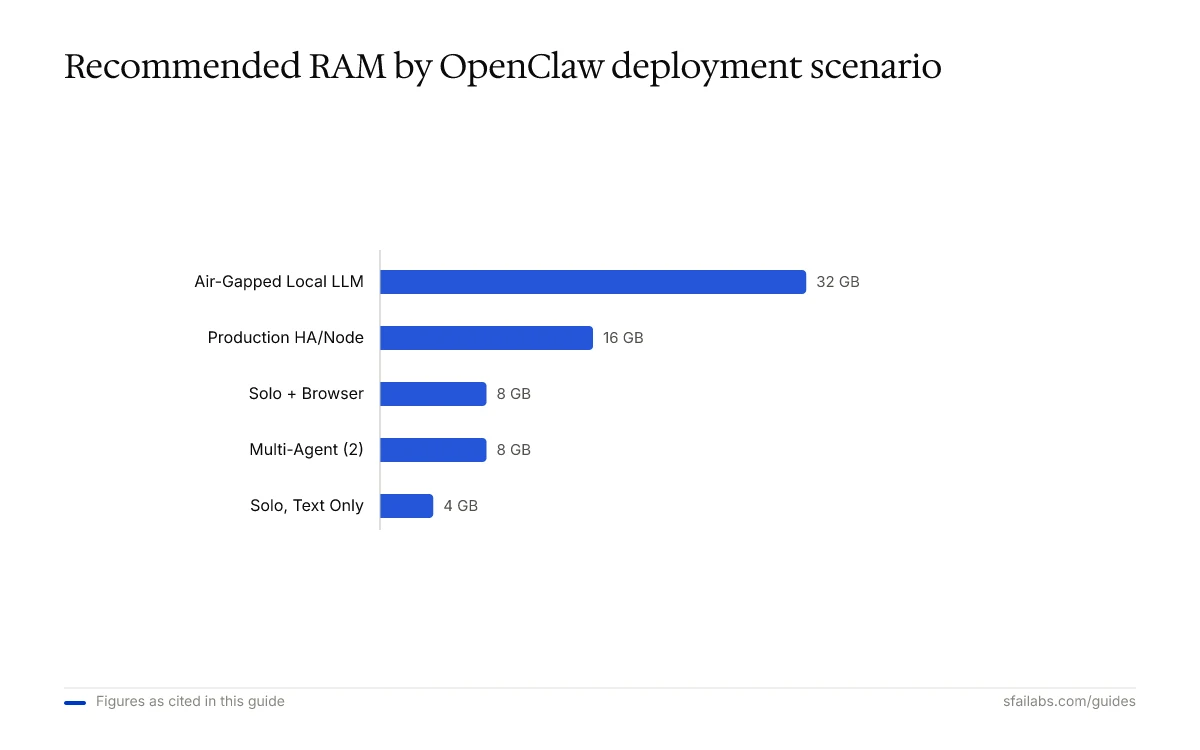
| RAM | 4 GB |
| Storage | 20 GB SSD |
| Network | 10 Mbps+ |
This is the bread-and-butter OpenClaw setup. A Hetzner CX23 at $4.09/month or a Contabo Cloud VPS at $3.96/month handles it comfortably. Most machines from the last five years clear this bar if you are running locally.
The 20 GB storage recommendation (double the minimum) accounts for log accumulation, session files, memory persistence data, and Node.js module cache. OpenClaw generates more disk writes than you might expect from a chat agent, especially if you enable verbose logging or run frequent heartbeat checks.
Solo Agent with Browser Automation
Browser automation is one of OpenClaw’s strongest features. It is also the single biggest hardware multiplier. Each Playwright browser instance consumes 200-400 MB of RAM and is CPU-hungry during page rendering.
| Component | Recommended |
|---|---|
| CPU | 4 cores |
| RAM | 8 GB |
| Storage | 40 GB SSD |
| Network | 25 Mbps+ |
The jump from 4 GB to 8 GB is not optional if you enable browser mode. A 4 GB machine running the OpenClaw gateway (400-800 MB) plus one browser instance (200-400 MB) plus the OS and Docker overhead is already at 70-80% memory utilization before any tasks start. Two concurrent browser instances on 4 GB cause swapping, which tanks response times and can crash the container.
Hetzner’s CX33 at $6.59/month and Hostinger’s KVM 2 at $8.99/month both deliver 8 GB RAM with 4 cores. Data from community benchmarks indicates these are the sweet spots for browser-enabled deployments.
Multi-Agent Setup
Running two or more OpenClaw agents on the same server. Each agent runs its own gateway process with separate configuration, memory, and session state.
| Component | Recommended |
|---|---|
| CPU | 4-8 cores |
| RAM | 2-3 GB per agent (8 GB minimum for 2 agents, 16 GB for 4+) |
| Storage | 50-100 GB SSD |
| Network | 50 Mbps+ |
Budget 2-3 GB of RAM per agent for comfortable headroom. Two agents on a 4 GB VPS will run, but both will degrade under concurrent load. Three agents on 4 GB does not work. The gateway processes compete for memory, and the first one to get OOM-killed takes down its entire workflow mid-execution.
DigitalOcean’s 8 GB droplet at $24/month or a Hetzner CX43 at $13.79/month handles two agents well. For four or more agents, move to 16 GB instances or split across multiple servers. For a full breakdown of hosting costs across providers, see our OpenClaw hosting costs comparison.
Production with High Availability
For teams that depend on OpenClaw for business-critical workflows: customer message routing, automated reporting, time-sensitive CRM updates.
| Component | Recommended |
|---|---|
| CPU | 4+ cores per node |
| RAM | 8-16 GB per node |
| Storage | 80+ GB NVMe SSD |
| Network | 100 Mbps+, low-latency to LLM API endpoints |
| Redundancy | 2+ nodes behind a load balancer |
Production deployments need headroom for traffic spikes and enough resources that a single runaway task does not destabilize the entire system. NVMe storage matters here because session file writes and log I/O create sustained disk load. HDD-backed instances add 20-100 milliseconds per write operation, which compounds across a busy agent.
Network location also matters more than people expect. A VPS in Singapore connecting to Anthropic’s US-based API endpoints adds roughly 180 milliseconds of round-trip latency per request. For multi-step agent tasks making 5-10 sequential API calls, that compounds to nearly 2 seconds of pure network overhead. Choose a VPS region close to your LLM provider’s endpoints, which for Anthropic and OpenAI means US East Coast or Western Europe.
For high-availability configuration details, see our OpenClaw high availability guide.
Air-Gapped with Local LLMs
Running OpenClaw without internet access using locally hosted models through Ollama or llama.cpp. This is the most hardware-intensive scenario by a wide margin because you are running model inference on the same machine.
| Component | Recommended |
|---|---|
| CPU | 8+ cores |
| RAM | 16-32 GB (depends on model size) |
| GPU | Optional but recommended: 8+ GB VRAM for 7B models, 24+ GB for 13B+ |
| Storage | 100+ GB NVMe SSD (model weights are large: 7B = ~4 GB, 13B = ~8 GB, 70B = ~40 GB) |
| Network | Not required (air-gapped) |
GPU is the dividing line. Without a GPU, a 7B parameter model runs on CPU with acceptable but slow inference (5-15 seconds per response). A 13B model on CPU alone is painful. Anything larger than 13B without GPU acceleration is impractical for interactive use.
With an NVIDIA GPU (RTX 3060 12 GB or better), a 7B model responds in 1-3 seconds. A 13B model is usable. For 70B models, you need 48+ GB of VRAM (A6000 or multiple consumer GPUs), which puts the hardware cost well above cloud API pricing for most use cases.
For full air-gapped deployment instructions, see our OpenClaw air-gapped deployment guide.
What Consumes Resources and Why
Understanding where the resources go helps you right-size your hardware instead of guessing.
Gateway process (400-800 MB RAM): The core Node.js process that handles message routing, skill execution, and heartbeat scheduling. Memory usage scales with the number of active sessions and the size of loaded workspace files. A lean configuration stays near 400 MB. Complex setups with many skills and large MEMORY.md files push toward 800 MB.
Browser instances (200-400 MB RAM each): Every Playwright browser instance spins up a Chromium process. These do not always clean up properly. Orphaned instances are the most common cause of gradual memory exhaustion on long-running deployments. Two simultaneous browser instances on a 4 GB VPS is the practical ceiling. If you are seeing resource issues, our OpenClaw performance optimization guide covers diagnosis and fixes.
Docker overhead (~200-500 MB): Running OpenClaw in Docker adds a fixed memory overhead for the container runtime. Docker builds specifically require about 2 GB of available RAM. If your VPS has 2 GB total, the build will fail with an OOM error before the container even starts.
Session and log I/O: OpenClaw writes session files, daily logs, and memory updates to disk continuously. SSD storage is the recommendation because HDD-backed instances introduce write latency that affects how quickly the agent can persist state between tasks.
Software Prerequisites
Beyond hardware, OpenClaw requires specific software to run.
Node.js 22+ is mandatory. Earlier versions cause compatibility errors with OpenClaw’s dependency tree. Check your version with node --version.
Docker and Docker Compose are recommended for production deployments. Docker handles process isolation, restart policies, health checks, and clean upgrades. It is not strictly required (OpenClaw runs directly on bare metal with systemd), but most production users prefer Docker for operational simplicity.
Operating system support covers macOS 13 or later, Ubuntu 22.04+, Debian 12+, and Windows 11 with WSL2. Older Linux distributions may work but are not tested. Windows without WSL2 is not supported.
Here’s how to get started: follow our OpenClaw setup guide for the complete walkthrough from install to first task.
Frequently Asked Questions
Can I run OpenClaw on a Raspberry Pi?
OpenClaw supports ARM64, so it runs on a Raspberry Pi 4 or 5 with 4+ GB of RAM. Performance is adequate for light text-only tasks. The Pi 5 with 8 GB handles browser automation marginally. The limitation is disk I/O: microSD cards are slow for the persistent writes OpenClaw makes. Use an NVMe SSD via USB or the Pi 5’s M.2 slot for meaningful improvement.
Does OpenClaw need a GPU?
Not for standard operation. OpenClaw calls cloud LLM APIs (Anthropic, OpenAI, Google) for inference, so all heavy computation happens on the provider’s servers. A GPU only matters if you run local LLMs through Ollama or llama.cpp for air-gapped deployments. For that, an NVIDIA GPU with 8+ GB VRAM makes 7B models practical.
How much bandwidth does OpenClaw use?
API calls to LLM providers are the primary bandwidth consumer. Each request sends the full conversation context (which can reach 150K+ tokens in long sessions) and receives a response. For a typical user running 20-40 tasks per day, expect 500 MB to 2 GB of monthly bandwidth. Browser automation adds more if it loads media-heavy pages.
What happens if I run OpenClaw on hardware below the minimum specs?
On a 1 GB RAM machine, Docker builds fail with OOM errors and the gateway process enters a swap-thrash cycle that makes it effectively unusable. On a single-core machine, heartbeat scheduling competes with task execution and response times double or triple. OpenClaw will technically start on 2 GB RAM without Docker, but any sustained workload pushes it into swapping.
Should I use SSD or HDD storage?
SSD. OpenClaw writes session data, logs, and memory updates continuously. HDD-backed VPS instances add 20-100 milliseconds per write. Over a busy day with hundreds of write operations, that latency compounds into noticeable agent sluggishness. NVMe is better than SATA SSD but not required for most setups. Avoid HDD-only hosting tiers.
Key Takeaways
- Minimum specs are 2 cores, 4 GB RAM, 10 GB SSD, and Node.js 22+. This handles a single text-only agent.
- Browser automation doubles the RAM requirement. Budget 8 GB if you enable Playwright-based skills.
- Multi-agent setups need 2-3 GB per agent. Two agents on 4 GB works. Three does not.
- Air-gapped deployments with local LLMs are the most hardware-intensive scenario, requiring 16-32 GB RAM and ideally a GPU with 8+ GB VRAM.
- SSD storage is a practical requirement, not a suggestion. HDD write latency degrades agent performance over sustained use.
- Pick a VPS region close to your LLM provider’s API endpoints to minimize network latency across sequential API calls.
SFAI Labs


