Los Alamos National Laboratory stopped sending prompts to cloud APIs in January 2025 and started self-hosting every model on isolated infrastructure. They are not alone. Defense contractors, intelligence agencies, and pharmaceutical R&D teams all face the same constraint: the data cannot leave the building, and neither can the queries about it. If you need Openclaw running in an environment with zero internet connectivity, this guide walks through every step from transferring the software to a disconnected machine to validating compliance with frameworks like ITAR and NIST 800-171.
The process is not difficult, but it is unforgiving of shortcuts. Miss one dependency during the transfer phase and your agent will not start. Forget to disable a webhook skill and your logs will fill with timeout errors. This guide covers those pitfalls and how to avoid them.
What Air-Gapped Actually Means for Openclaw
An air-gapped deployment is not the same as “running offline.” Offline mode assumes the machine once had internet and might reconnect. Air-gapped means the production machine has never touched a network outside your security perimeter and never will. No DNS resolution, no NTP sync to external servers, no package manager reaching out for updates.
Openclaw handles this well because it runs as a self-contained Node.js process. Once the binary, dependencies, and model weights are on the machine, the runtime has no hard dependency on external services. The challenge is getting everything there in the first place.
Three things break in a naive air-gapped attempt:
- npm dependency resolution tries to reach the registry at install time
- Ollama model pulls require downloading multi-gigabyte files from ollama.com
- Certain built-in skills assume HTTP access to external services (webhooks, web scraping, API integrations)
Each of these has a clean solution.
The Sneakernet Install: Transferring Openclaw to an Isolated Machine
“Sneakernet” refers to transferring data by physically carrying storage media between machines. Here is the procedure.
Step 1: Prepare on a Connected Staging Machine
On a machine with internet access, install Openclaw normally and verify it works. Then package everything for transfer.
# Install Openclaw and all dependencies
npm install -g openclaw

# Find the global install location
npm root -g
# Typically: /usr/lib/node_modules or ~/.nvm/versions/node/v22/lib/node_modules

# Create a portable archive of the full installation
tar czf openclaw-portable.tar.gz -C $(npm root -g) openclaw

# Also archive Node.js itself if the target machine lacks it
tar czf node-v22-linux-x64.tar.gz -C /usr/local node
Step 2: Pre-Download Models
Download every model you plan to use while you still have network access.
# Pull models via Ollama
ollama pull llama4-scout
ollama pull qwen3:8b
ollama pull deepseek-coder-v2:16b

# Package the Ollama model directory
tar czf ollama-models.tar.gz -C ~/.ollama .
Llama 4 Scout at Q4 quantization takes roughly 26 GB. Qwen3 8B sits around 5 GB. Plan your transfer media accordingly. A 128 GB USB drive handles most two-model configurations with room for the Openclaw installation and Node.js runtime.
Step 3: Transfer and Install
Carry the USB drive to the air-gapped machine. Copy and extract.
# Extract Node.js
sudo tar xzf node-v22-linux-x64.tar.gz -C /usr/local

# Extract Openclaw
sudo mkdir -p /usr/lib/node_modules
sudo tar xzf openclaw-portable.tar.gz -C /usr/lib/node_modules
sudo ln -s /usr/lib/node_modules/openclaw/bin/openclaw /usr/local/bin/openclaw

# Extract Ollama models
mkdir -p ~/.ollama
tar xzf ollama-models.tar.gz -C ~/.ollama

# Start Ollama (install Ollama binary via the same sneakernet process)
ollama serve &

# Verify
openclaw --version
ollama list
Step 4: Configure for Air-Gapped Operation
The configuration must explicitly disable every feature that assumes network access.
# ~/.openclaw/config.yaml
models:
  primary: ollama/llama4-scout
  fallback: ollama/qwen3:8b
  cloud_fallback: false  # Critical: prevents any cloud API attempts

network:
  mode: "offline"
  dns_resolution: false
  ntp_sync: false

gateway:
  bind: "loopback"
  discovery:
    mdns:
      mode: "off"

security:
  sandbox:
    mode: "all"
  tools:
    deny: ["group:web", "group:api"]
Setting cloud_fallback: false is the single most important line. Without it, Openclaw will attempt to reach OpenAI or Anthropic APIs when the local model returns a low-confidence response, generating connection timeout errors that pollute your logs and could trigger security monitoring alerts.
Choosing the Right Local Model
Model selection in air-gapped environments is a one-way decision. You cannot experiment with new models by pulling them on demand. Pick carefully before you burn the transfer to USB.
For general-purpose agent work, Llama 4 Scout handles the widest range of tasks. It manages code generation, document analysis, email drafting, and multi-step reasoning at a level that covers the majority of what teams use cloud models for. The gap shows up in edge-case reasoning where GPT-5.4 or Claude Opus 4.6 would outperform, but that tradeoff is inherent to air-gapped operation.
For code-heavy environments, pair Llama 4 Scout with DeepSeek Coder V2 16B. Route coding tasks to the specialized model and general tasks to Scout using Openclaw’s model routing configuration.
Hardware minimums for production use:
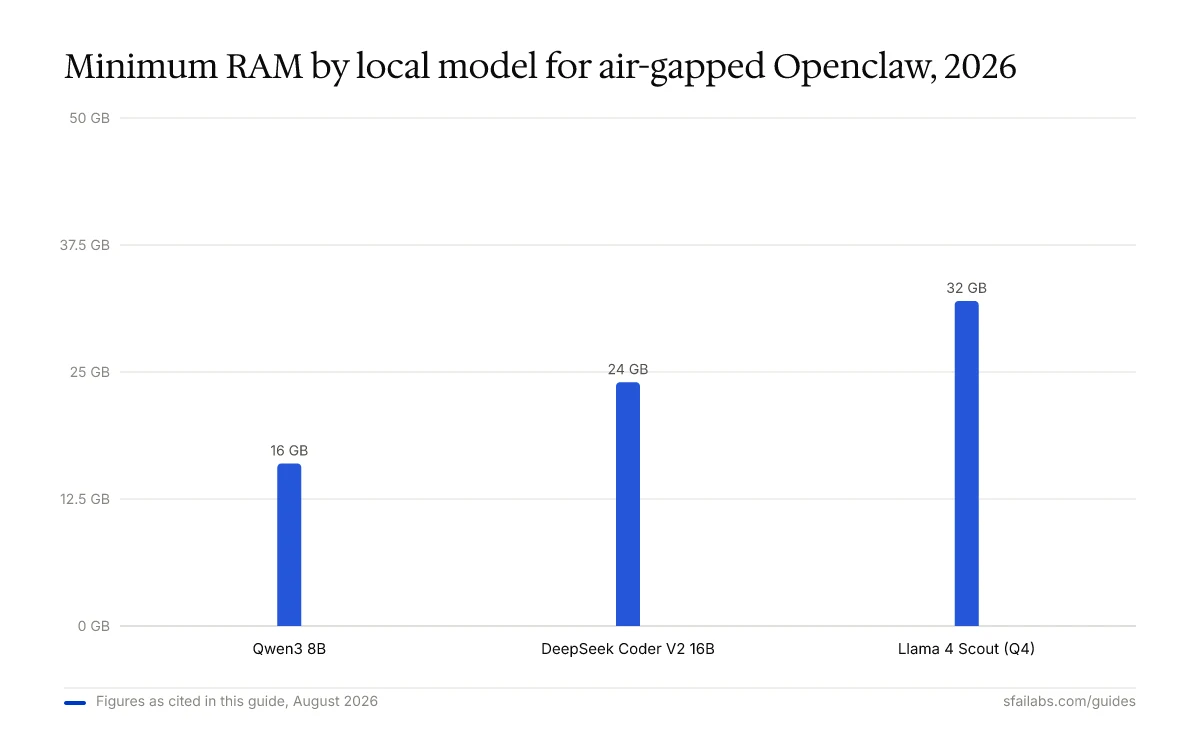
- Llama 4 Scout (Q4): 32 GB RAM, 8 CPU cores, or an NVIDIA GPU with 24 GB VRAM (RTX 4090, A5000)
- Qwen3 8B: 16 GB RAM, 4 CPU cores. Runs comfortably on Apple M3 Pro with unified memory
- DeepSeek Coder V2 16B: 24 GB RAM or 16 GB VRAM
Token generation speed on consumer hardware ranges from 15 to 60 tokens per second depending on model size and quantization. For reference, a typical email draft takes 3-5 seconds on Llama 4 Scout running on an RTX 4090. That is fast enough for interactive use but noticeably slower than cloud API responses.
Building Skills Without External APIs
This is where air-gapped deployments get interesting. Openclaw’s 3,200+ ClawHub skills include many that depend on internet access: web scraping, API integrations, cloud storage connectors. In an air-gapped environment, these simply will not work.
Skills fall into three tiers:
Works offline without modification:
- File system operations (read, write, search, organize)
- Code generation and review
- Document analysis and summarization
- Data transformation and formatting
- Local database queries
- Regex and text processing
Needs adaptation for offline use:
- Email skills (redirect to local SMTP relay within the secure network)
- Calendar skills (point to local CalDAV server)
- Knowledge base skills (use local vector store instead of cloud embeddings)
Requires internet, no offline substitute:
- Web scraping and browsing
- Cloud API integrations (Slack, GitHub, Jira cloud)
- Real-time market data or news feeds
For skills in the second category, Openclaw’s skill configuration accepts endpoint overrides. Point the email skill at your internal Exchange server or local Postfix relay. Point the knowledge base skill at a local ChromaDB instance with embeddings generated by nomic-embed-text running on the same Ollama instance.
Building custom skills for air-gapped environments follows the same patterns as standard Openclaw skill development, with one rule: every external dependency must be bundled at transfer time. No npm install at runtime. No fetching packages. Package your skill’s node_modules alongside the skill code and include it in the sneakernet archive.
Data Handling in Isolation
Air-gapped does not mean careless. The same data governance that motivated the air gap must extend to how Openclaw stores session data, logs, and memory.
Session Transcripts
Every Openclaw interaction is logged to ~/.openclaw/agents/<agentId>/sessions/*.jsonl. In classified environments, these transcripts contain exactly the kind of data the air gap is protecting. Treat session storage with the same classification level as the source data.
Encrypt the filesystem where Openclaw stores its data. LUKS on Linux or FileVault on macOS. Openclaw’s built-in AES-256-GCM encryption at rest adds a second layer, but it protects against file-level extraction, not full disk imaging.
Memory Persistence
Openclaw’s memory system stores context across sessions. In air-gapped environments, this memory cannot be synced to any cloud service. Set memory.sync: "local" and ensure the memory store lives on encrypted local storage. Periodically audit memory contents for data that should have been purged per your retention policy.
Backup and Restore
Backing up an air-gapped Openclaw instance follows the same sneakernet principle. Export the configuration, session data, and memory to encrypted removable media using the backup and restore procedures. Store the backup media with the same physical security controls as the machine itself.
Never connect backup media from an air-gapped system to an internet-connected machine without sanitization. Model weights are large binary blobs that could theoretically carry steganographic payloads, though the practical risk is low.
Compliance Mapping for Classified Environments
Air-gapped Openclaw deployments align naturally with several compliance frameworks because the architecture eliminates entire categories of risk.
ITAR (International Traffic in Arms Regulations)
ITAR requires that technical data related to defense articles not be accessible to foreign persons or transmitted outside approved channels. An air-gapped Openclaw instance satisfies this by design: no data leaves the machine, no cloud provider processes the prompts, and no foreign-hosted infrastructure is involved. The model weights themselves are not ITAR-controlled (they are publicly available open-weight models), but the prompts and outputs containing ITAR-controlled technical data remain within your security boundary.
NIST 800-171 (CUI Protection)
For Controlled Unclassified Information, NIST 800-171 requires access controls (3.1), audit and accountability (3.3), and system and communications protection (3.13). Openclaw’s air-gapped configuration addresses these:
- Access control: Gateway bound to loopback, token authentication required, RBAC via the enterprise deployment configuration
- Audit: Command logger captures every action with user ID, timestamp, and result. Forward logs to your SIEM
- Communications protection: No external communications exist. The air gap is the ultimate network boundary control
FedRAMP and CMMC
FedRAMP authorization is irrelevant for air-gapped systems since it governs cloud service providers. CMMC (Cybersecurity Maturity Model Certification) Level 2 maps directly to NIST 800-171 controls, so the same configuration applies. Level 3 adds additional assessment requirements but does not change the technical deployment.
Updating Models and Software on Air-Gapped Systems
The hardest part of maintaining an air-gapped deployment is keeping it current. Models improve, security patches ship, and new skills become available, but you cannot run openclaw update or ollama pull.
Establish a regular update cycle using the same sneakernet workflow:
- On a connected staging machine, pull the latest Openclaw version and model weights
- Run your full test suite against the new version to catch regressions
- Generate SHA-256 checksums for every file in the transfer archive
- Transfer to the air-gapped machine via approved removable media
- Before installing, verify checksums match. Any mismatch means the media may have been tampered with or corrupted
- Install the update and run
openclaw security audit --deepto validate the configuration
Monthly update cycles for model weights and weekly cycles for security patches are a reasonable starting point. Track model versions in your configuration management system the same way you track software versions. When an auditor asks “what model processed this data on March 15th?” you need an answer.
Frequently Asked Questions
Can Openclaw run completely offline with no internet connection?
Yes. Pair Openclaw with Ollama and a locally stored model like Llama 4 Scout or Qwen3 8B, and the entire stack operates without network access. Set cloud_fallback: false and network.mode: "offline" in the config. No prompts, responses, or telemetry leave the machine.
What hardware do I need for an air-gapped Openclaw deployment?
It depends on the model. Qwen3 8B runs on 16 GB RAM and 4 CPU cores, suitable for lightweight tasks. Llama 4 Scout at Q4 quantization needs 32 GB RAM or a GPU with 24 GB VRAM for production-quality performance. Budget 50 GB of SSD space for model storage plus 10-20 GB for Openclaw session data over time.
How do I transfer Openclaw and models to a machine with no internet?
Use the sneakernet method: install on a connected staging machine, archive the full installation plus Ollama model directory, transfer via USB drive to the air-gapped machine, extract, and configure. A 128 GB USB drive handles a two-model setup comfortably.
Which local models work best with Openclaw offline?
Llama 4 Scout is the strongest general-purpose option and handles the majority of typical agent tasks. For coding, add DeepSeek Coder V2 16B. For resource-constrained hardware, Qwen3 8B offers the best capability-per-GB ratio. All are open-weight models that can be freely distributed to air-gapped systems.
Does air-gapped Openclaw satisfy ITAR compliance?
The architecture supports ITAR requirements by keeping all technical data within your controlled boundary. No prompts or outputs leave the machine. However, ITAR compliance involves more than technical controls. You still need proper marking, access controls, personnel screening, and organizational procedures. The air-gapped deployment eliminates the cloud data transmission risk entirely.
Can I still use Openclaw skills without internet access?
File operations, code generation, document analysis, and local database queries work without modification. Skills that depend on external APIs (web scraping, cloud integrations) will not function. Skills that talk to internal network services (email, calendar, databases) work if you redirect their endpoints to local servers within your secure perimeter.
How do I update Openclaw on an air-gapped system?
Use the same sneakernet process as the initial install. Download updates on a connected machine, verify checksums, transfer via approved removable media, and install on the air-gapped system. Establish a monthly cycle for model updates and weekly for security patches.
What is the performance difference between local models and cloud APIs?
Local models on consumer GPUs generate 15-60 tokens per second. Cloud APIs like GPT-5.4 return responses faster because inference runs on optimized data center hardware. For most agent tasks, the difference is 2-5 seconds versus sub-second. Complex multi-step reasoning is where local models fall behind most noticeably, producing weaker chains of thought on tasks that GPT-5.4 or Claude Opus 4.6 handle cleanly.
Key Takeaways
- Air-gapped Openclaw deployment requires a sneakernet workflow: package the runtime, dependencies, and model weights on a connected machine, then transfer via removable media
- Set
cloud_fallback: falseandnetwork.mode: "offline"to prevent any outbound network attempts - Llama 4 Scout covers most agent tasks offline; pair with DeepSeek Coder V2 for code-heavy workloads
- Classify Openclaw skills into works-offline, needs-adaptation, and requires-internet before deploying to an air-gapped environment
- The architecture maps cleanly to ITAR, NIST 800-171, and CMMC Level 2 compliance requirements
- Establish a regular sneakernet update cycle with checksum verification for both models and software
If your organization needs Openclaw running in a classified or air-gapped environment and wants help with the deployment architecture, compliance mapping, or skill adaptation, SFAI Labs provides air-gapped AI consulting for defense, intelligence, and regulated enterprise clients.
SFAI Labs


