Groq runs LLM inference on custom LPU hardware that delivers 276 tokens per second for Llama 3.3 70B, according to independent benchmarks by Artificial Analysis. That is roughly 3-5x faster than most GPU-based providers. Getting a Groq API key takes about two minutes, and the free tier requires no credit card. This guide covers account setup, key generation, pricing, supported models, and how to connect the key to tools like Openclaw.
One thing to clarify before we start: Groq and Grok are different products. Groq (with a Q) is an inference hardware company at console.groq.com. Grok (with a K) is xAI’s chatbot. The names cause confusion, and search results regularly mix them up. This guide is about Groq, the fast inference platform.
Step 1: Create Your Groq Console Account
Go to console.groq.com and click Sign up. You can register with an email address or use Google single sign-on.
After signing up, Groq asks you to verify your email. Complete the verification and you land on the GroqCloud dashboard. This is where you manage API keys, monitor usage, and check rate limits.
No payment information is required. The free tier is immediately active.
Step 2: Generate Your API Key
Navigate to API Keys in the left sidebar, or go directly to console.groq.com/keys.
Click Create API Key. A dialog asks you to name the key. Use something descriptive: “Openclaw Agent” or “Dev Testing” works well. If you are part of a team, note that only team owners or users with the developer role can create keys.
Click Submit and your key appears.
Copy it immediately. Groq displays the full key exactly once. After you close this dialog, the key is masked and cannot be retrieved. If you lose it, you need to create a new one.
Store the key in a password manager, a .env file, or your platform’s secrets manager. Never paste it into code that gets committed to a repository.
Step 3: Verify Your Key Works
Open a terminal and run this curl command (replace your-key-here with the actual key):
curl https://api.groq.com/openai/v1/chat/completions \
  -H "Authorization: Bearer your-key-here" \
  -H "Content-Type: application/json" \
  -d '{"model": "llama-3.3-70b-versatile", "messages": [{"role": "user", "content": "Say hello"}]}'
If you get a JSON response with a message, the key works. Notice the base URL: api.groq.com/openai/v1. Groq uses an OpenAI-compatible API, which means any tool or SDK that works with OpenAI can point to Groq by changing the base URL and API key.
A common gotcha: if you get a 429 Too Many Requests error on a brand-new key, you have hit the free tier rate limit. Wait a minute and try again. The free tier caps at 30 requests per minute.
What Models Can You Run on Groq
Groq supports a range of open-weight models running on their LPU inference engine. Here are the main options with current pricing:
| Model | Input Cost | Output Cost | Speed | Context |
|---|---|---|---|---|
| Llama 3.1 8B Instant | $0.05/M tokens | $0.08/M tokens | 840 tok/s | 128K |
| Llama 4 Scout (17Bx16E) | $0.11/M tokens | $0.34/M tokens | 594 tok/s | 128K |
| Qwen3 32B | $0.29/M tokens | $0.59/M tokens | 662 tok/s | 131K |
| Llama 3.3 70B Versatile | $0.59/M tokens | $0.79/M tokens | 394 tok/s | 128K |
| GPT OSS 20B | $0.075/M tokens | $0.30/M tokens | 1,000 tok/s | 128K |
Groq also supports Whisper v3 for speech-to-text ($0.111/hour) and Whisper v3 Turbo ($0.04/hour).
To put the pricing in perspective: sending 1,000 short prompts through Llama 3.1 8B costs roughly $0.05 in input tokens. For personal projects and prototyping, the free tier covers most use cases without spending anything.
Free Tier Limits and What You Can Build
The free tier gives you access to every model with no credit card required. The constraint is rate limits, not model access.
| Model | Requests/Min | Tokens/Min | Requests/Day | Tokens/Day |
|---|---|---|---|---|
| Llama 3.1 8B Instant | 30 | 6,000 | 14,400 | 500,000 |
| Llama 3.3 70B Versatile | 30 | 12,000 | 1,000 | 100,000 |
At 30 requests per minute, you can build a personal chatbot, run batch analysis scripts (with pacing), or power an AI agent that handles a few dozen tasks per hour. The daily cap of 14,400 requests on Llama 3.1 8B is generous for development and personal use.
For production workloads, the Developer tier removes most of these limits and offers a 25% cost discount. There is no fixed monthly fee; you pay per token consumed.
We have used Groq’s free tier during development to validate prompt chains before switching to paid models for production. The speed makes iteration cycles noticeably faster, because you spend less time waiting for responses.
Why Groq Is Fast: The LPU Advantage
Most cloud inference runs on NVIDIA GPUs. Groq built a custom chip called the Language Processing Unit (LPU) specifically for sequential token generation. The result is deterministic latency and throughput that GPU clusters struggle to match.
Artificial Analysis independently benchmarked Groq at 276 tokens per second for Llama 3.3 70B. For smaller models, Groq hits 840+ tokens per second on Llama 3.1 8B. That is not a theoretical peak; it is what the API delivers in production.
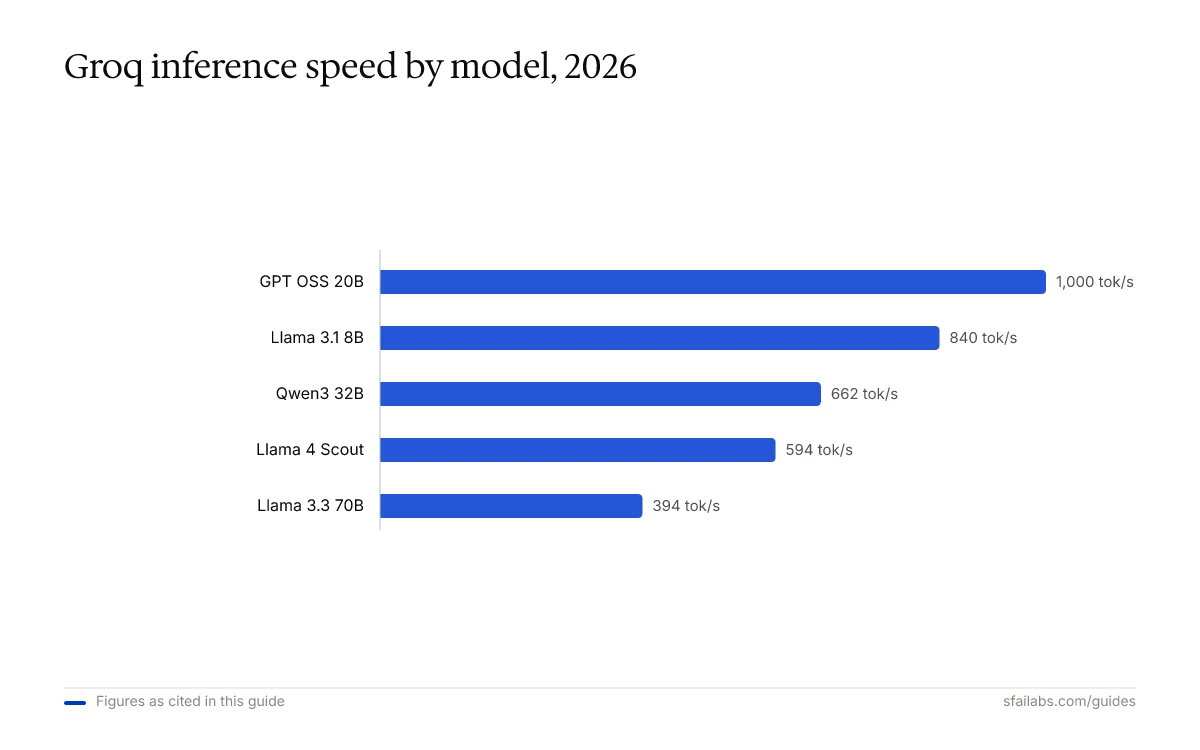
The practical impact: a 500-word response from Llama 3.3 70B generates in roughly 2 seconds. On a typical GPU provider, the same response takes 6-10 seconds. For interactive use cases like chatbots or agent loops, that difference compounds fast.
What to Do With Your Key Next
Use Groq With Any OpenAI-Compatible Tool
Because Groq’s API is OpenAI-compatible, you can use it with the OpenAI Python SDK:
from openai import OpenAI

client = OpenAI(
    base_url="https://api.groq.com/openai/v1",
    api_key="your-groq-api-key"
)

response = client.chat.completions.create(
    model="llama-3.3-70b-versatile",
    messages=[{"role": "user", "content": "Explain LPU inference in one sentence"}]
)
print(response.choices[0].message.content)
The same pattern works with LangChain, LiteLLM, and any framework that accepts a custom base URL.
Connect Groq to Openclaw
Openclaw is a personal AI agent that runs on your machine and handles tasks through Telegram or WhatsApp. Groq works well as a fast fallback model provider in Openclaw, particularly for tasks where speed matters more than maximum reasoning depth.
To connect Groq to Openclaw, add your key to the environment configuration:
GROQ_API_KEY=your-groq-api-keyThen configure Openclaw to use a Groq model for specific task types. We cover the full configuration in our Openclaw Setup Guide.
If you also need keys for other providers, see our guides for OpenAI and Anthropic.
Keeping Your Key Secure
Three rules that prevent most problems:
-
Never commit your key to version control. Add
.envto your.gitignorefile. If you accidentally push a key, revoke it at console.groq.com/keys and generate a new one. -
Use environment variables, not hardcoded strings. Store the key in a
.envfile and load it at runtime. The curl and Python examples above both follow this pattern. -
Create separate keys for separate projects. If one key gets compromised, you can revoke it without breaking everything else. Groq lets you create multiple keys at no cost.
Frequently Asked Questions
Is the Groq API free to use?
Creating an account and generating a key is free with no credit card required. You get access to all models on the free tier, but with rate limits (30 requests per minute, daily token caps). For production workloads, the Developer tier charges per token with a 25% discount and higher limits.
What are the rate limits on Groq’s free tier?
The free tier allows 30 requests per minute across most models. Token limits vary by model: Llama 3.1 8B gets 6,000 tokens per minute and 500,000 per day, while Llama 3.3 70B gets 12,000 tokens per minute but only 1,000 requests and 100,000 tokens per day.
How fast is Groq compared to OpenAI or other providers?
Groq’s LPU hardware generates tokens 3-5x faster than typical GPU providers. Artificial Analysis independently measured 276 tokens per second for Llama 3.3 70B and 840+ tokens per second for Llama 3.1 8B. For comparison, most GPU-based providers deliver 50-150 tokens per second on similar models.
What is the difference between Groq and Grok?
Groq (with a Q) is an inference hardware company that runs open-weight models on custom LPU chips. You access it at console.groq.com. Grok (with a K) is xAI’s conversational AI chatbot, associated with Elon Musk. They are completely separate companies and products.
Can I use the OpenAI Python SDK with Groq?
Yes. Set the base URL to https://api.groq.com/openai/v1 and pass your Groq API key. The API is OpenAI-compatible, so any tool or library that supports a custom base URL works with Groq without code changes beyond the URL and key.
Does Groq support vision or audio models?
Groq supports Whisper v3 and Whisper v3 Turbo for speech-to-text transcription. The platform also lists OCR and vision capabilities. Check the Groq docs for the latest model availability.
What happens if I lose my API key?
You cannot retrieve a key after closing the creation dialog. Generate a new key at console.groq.com/keys, update your environment variables, and delete the old key to prevent unauthorized use.
Key Takeaways
- Groq API keys are free to create at console.groq.com with no credit card required. The free tier includes access to all models.
- Copy your key the moment it appears. Groq shows it exactly once.
- Groq’s LPU hardware delivers 276-840+ tokens per second depending on the model, making it one of the fastest inference providers available.
- The API is OpenAI-compatible. Change the base URL and key, and existing code works with Groq.
- Connect your key to Openclaw as a fast fallback model provider for agent workflows.
SFAI Labs


