Most developers connect Supabase to their frontend and stop there. But Supabase exposes a full REST API (PostgREST) and a realtime WebSocket layer on top of vanilla Postgres, which means an OpenClaw agent can do anything your backend code does: query tables, insert rows, listen for changes, and run scheduled maintenance. With this integration, an agent can handle the majority of routine database tasks that previously required a developer to SSH into a server.
This guide walks through the complete setup: getting your Supabase credentials, writing a custom OpenClaw skill for database CRUD and monitoring, and connecting database webhooks for event-driven automation. If OpenClaw is already running on your machine, this takes about 25 minutes.
What This Integration Does
Once connected, your OpenClaw agent becomes a natural-language interface to your Supabase Postgres database. Instead of writing SQL in the Supabase dashboard or building one-off scripts, you message your agent and it handles the API calls.
Here is what you can do after setup:
- Query any table by name, filter, or raw SQL
- Insert, update, and delete rows through conversational commands
- Monitor tables for anomalies like stale records, missing fields, or threshold breaches
- Run scheduled reports via OpenClaw’s heartbeat or cron jobs
- Trigger automations when new rows appear (user signups, orders, support tickets)
- Clean up data on a schedule: archive old records, deduplicate entries, reset test data
The skill uses Supabase’s REST API with a service role key for full database access. No middleware, no paid connectors, no third-party platforms between your agent and your data.
Before You Start
You need three things before connecting Supabase to OpenClaw:
-
OpenClaw installed and running on your machine or VPS. If you have not set this up yet, follow our OpenClaw setup guide. For 24/7 availability, you can run OpenClaw on Hostinger.
-
A Supabase project with at least one table you want to manage. The free tier works for everything in this guide. You do not need a paid plan.
-
Your Supabase project URL and service role key. We will grab these in the next step.
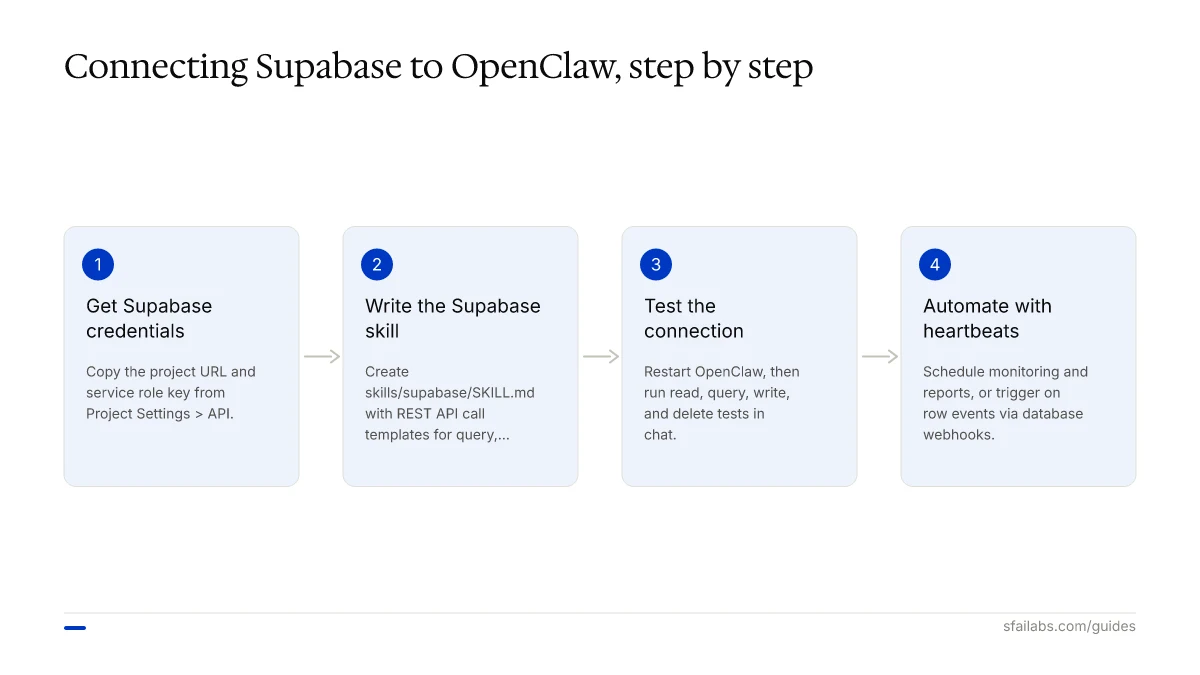
Step 1: Get Your Supabase Credentials
Every Supabase project comes with two API keys: the anon key (safe for client-side code, respects Row Level Security) and the service role key (bypasses RLS, full database access). For an OpenClaw backend automation agent, you want the service role key because the agent needs unrestricted access to read and write data across all tables.
Find Your Credentials
- Open your Supabase project at supabase.com/dashboard
- Go to Project Settings > API
- Copy two values:
| Credential | Where to Find It | Example Format |
|---|---|---|
| Project URL | Under “Project URL” | https://abcdefghij.supabase.co |
| Service Role Key | Under “Project API keys” > service_role |
eyJhbGciOiJIUzI1NiIs... (long JWT) |
When to Use Anon Key Instead
If your agent only needs to read public data or operate within RLS policies, use the anon key. This is safer but limits what the agent can access. We recommend starting with the service key for backend automation and restricting later if needed.
| Key Type | RLS Bypassed | Use When |
|---|---|---|
| Service role | Yes | Backend automation, full CRUD, admin tasks |
| Anon | No | Read-only public queries, user-scoped operations |
Store Credentials Safely
Never paste keys directly into your skill file. Store them in a .env file:
# ~/.env or ~/openclaw/.env
SUPABASE_URL=https://abcdefghij.supabase.co
SUPABASE_SERVICE_KEY=eyJhbGciOiJIUzI1NiIsInR5cCI6IkpXVCJ9...
OpenClaw reads environment variables at runtime. This keeps secrets out of any file your agent might log or share.
Step 2: Write the OpenClaw Supabase Skill
OpenClaw skills are Markdown files that tell your agent what a tool does, when to use it, and how to call external APIs. The skill file lives in your workspace’s skills/ directory.
Create the Skill Directory
mkdir -p ~/.openclaw/workspace/skills/supabaseWrite the SKILL.md File
Create ~/.openclaw/workspace/skills/supabase/SKILL.md with this content:
---
name: supabase
description: Query, insert, update, and delete data in the Supabase Postgres database. Monitor tables, run reports, and manage backend data.
tools:
  - shell
---

# Supabase Database Skill

## Authentication

Use environment variables for all API requests:
- `SUPABASE_URL` — your project endpoint
- `SUPABASE_SERVICE_KEY` — service role key for full access

All requests use the header:
Authorization: Bearer $SUPABASE_SERVICE_KEY
apikey: $SUPABASE_SERVICE_KEY

Base URL for REST API: $SUPABASE_URL/rest/v1/

## Available Operations

### Query a Table

Fetch rows from any table with optional filters:

curl -s \
  -H "Authorization: Bearer $SUPABASE_SERVICE_KEY" \
  -H "apikey: $SUPABASE_SERVICE_KEY" \
  "$SUPABASE_URL/rest/v1/TABLE_NAME?select=*&order=created_at.desc&limit=50"

Add filters with query params: ?column_name=eq.value, ?amount=gt.1000, ?status=neq.archived

### Insert a Row

curl -s \
  -H "Authorization: Bearer $SUPABASE_SERVICE_KEY" \
  -H "apikey: $SUPABASE_SERVICE_KEY" \
  -H "Content-Type: application/json" \
  -H "Prefer: return=representation" \
  -X POST "$SUPABASE_URL/rest/v1/TABLE_NAME" \
  -d '{"column1": "value1", "column2": "value2"}'

### Update Rows

curl -s \
  -H "Authorization: Bearer $SUPABASE_SERVICE_KEY" \
  -H "apikey: $SUPABASE_SERVICE_KEY" \
  -H "Content-Type: application/json" \
  -H "Prefer: return=representation" \
  -X PATCH "$SUPABASE_URL/rest/v1/TABLE_NAME?id=eq.ROW_ID" \
  -d '{"column1": "new_value"}'

### Delete Rows

curl -s \
  -H "Authorization: Bearer $SUPABASE_SERVICE_KEY" \
  -H "apikey: $SUPABASE_SERVICE_KEY" \
  -X DELETE "$SUPABASE_URL/rest/v1/TABLE_NAME?id=eq.ROW_ID"

### Run Raw SQL via RPC

For complex queries, create a Postgres function and call it:

curl -s \
  -H "Authorization: Bearer $SUPABASE_SERVICE_KEY" \
  -H "apikey: $SUPABASE_SERVICE_KEY" \
  -H "Content-Type: application/json" \
  -X POST "$SUPABASE_URL/rest/v1/rpc/FUNCTION_NAME" \
  -d '{"param1": "value1"}'

### List All Tables

curl -s \
  -H "Authorization: Bearer $SUPABASE_SERVICE_KEY" \
  -H "apikey: $SUPABASE_SERVICE_KEY" \
  "$SUPABASE_URL/rest/v1/?select=*" 2>/dev/null | jq 'keys'

## Rules

- Always confirm before deleting rows. Show what will be deleted and ask for approval.
- When inserting data, validate required fields before executing.
- For bulk operations (more than 10 rows), warn the user about the scope.
- Respect Supabase rate limits: 500 requests per minute on the free tier.
- Never log the service key in responses or memory files.
- When a query returns no results, state that clearly instead of guessing.
What Each Section Does
The frontmatter registers the skill with OpenClaw. The shell tool permission lets the agent execute curl commands against the Supabase REST API.
The operations section provides API call templates. When you ask “Show me all users who signed up this week,” the agent reads the query template, adapts the table name and filter, runs the curl command, and parses the JSON response.
The rules section prevents the agent from doing damage. The deletion confirmation rule is non-negotiable when your agent has a service role key that bypasses Row Level Security.
Step 3: Test the Connection
Restart OpenClaw to load the new skill:
openclaw gateway restartOpen your chat with OpenClaw (Telegram, WhatsApp, or terminal) and run these tests:
Read test:
“List all tables in my Supabase database”
The agent should return your table names by querying the REST API root.
Query test:
“Show me the 5 most recent rows from the users table”
The agent should return structured data with column names and values.
Write test:
“Insert a test row into the users table: name is Test User, email is test@example.com”
The agent should ask you to confirm before executing the insert. If it does not ask, strengthen the confirmation rule in your SKILL.md.
Delete test:
“Delete the test row we just created”
The agent should show the row it plans to delete and wait for your approval.
If any test fails, check these common issues:
| Symptom | Likely Cause | Fix |
|---|---|---|
| 401 Unauthorized | Wrong key or missing apikey header | Verify both headers are present in curl |
| Empty response | Table has RLS enabled and anon key used | Switch to service role key |
| 404 Not Found | Wrong table name or URL | Check project URL and table name spelling |
| Connection timeout | Supabase project paused (free tier) | Wake it from the dashboard |
Backend Automation Use Cases
After the connection works, here is where the real value starts. These four patterns cover the most common backend automation tasks developers hand off to OpenClaw.
Database Monitoring
Add this to your OpenClaw heartbeat.md to run automatically:
## Database Health Check (every 6 hours)
Query the Supabase orders table for orders older than 48 hours with status "pending."
If any exist, send me a summary with order ID, customer email, and created_at timestamp.
Also check for any users table rows where email_verified is false and created_at is older than 7 days.
This replaces the monitoring scripts that sit in cron jobs and send cryptic emails nobody reads. The agent formats results in plain English and sends them to your preferred chat channel.
Automated Data Cleanup
## Weekly Cleanup (runs Sunday 2:00 AM)
Delete all rows from the sessions table where last_active is older than 30 days.
Archive orders with status "cancelled" older than 90 days by moving them to the orders_archive table.
Report how many rows were deleted and archived.
We recommend running cleanup operations during off-peak hours. Add a row count check first: if the cleanup would affect more than 1,000 rows, have the agent notify you before proceeding.
User Onboarding Triggers
When a new user signs up, your agent can handle the downstream tasks:
## New User Onboarding
When I tell you a new user has signed up, or when you detect a new row in the users table:
1. Check if their profile row in the profiles table is complete
2. If the company field is empty, look up the company by email domain
3. Create a welcome task in the tasks table assigned to the onboarding team
4. Send me a summary of what was created
For fully automated triggers without manual prompting, use Supabase database webhooks (covered in the next section).
Scheduled Reports from Postgres
## Monday Morning Report (runs Monday 8:00 AM)
Run these queries against Supabase and send me a formatted summary:
1. Total new users this week vs last week
2. Orders placed this week, total revenue, average order value
3. Top 5 products by units sold
4. Any error_logs entries from the past 7 days with severity "critical"
This pattern works because OpenClaw’s heartbeat scheduling can trigger SQL queries through the Supabase skill on a recurring basis. The agent handles the query, the math, and the formatting.
Database Webhooks for Event-Driven Automation
Supabase database webhooks fire HTTP requests when rows are inserted, updated, or deleted. You can point these at an endpoint that your OpenClaw agent monitors, creating fully automated event-driven workflows.
How Database Webhooks Work
Supabase uses the pg_net Postgres extension under the hood. When a table event occurs (INSERT, UPDATE, DELETE), the webhook sends a POST request with the affected row data to a URL you specify. This is asynchronous and does not block your database operations.
Setting Up a Webhook
- Open your Supabase project dashboard
- Go to Database > Webhooks
- Click Create a new hook
- Configure:
| Setting | Value |
|---|---|
| Name | new-user-signup |
| Table | users |
| Events | INSERT |
| Type | HTTP Request |
| Method | POST |
| URL | Your webhook receiver endpoint |
The webhook sends a JSON payload containing the new row data, the event type, and a timestamp.
Connecting Webhooks to OpenClaw
The simplest approach: point the webhook at an Edge Function that posts to your OpenClaw agent’s Telegram group or API endpoint. The Edge Function acts as a bridge:
// supabase/functions/notify-agent/index.ts
import { serve } from "https://deno.land/std@0.168.0/http/server.ts";

serve(async (req) => {
  const payload = await req.json();
  const { type, record } = payload;

  // Forward to your OpenClaw Telegram group via bot API
  const message = `New ${type} in ${payload.table}: ${JSON.stringify(record)}`;

  await fetch(`https://api.telegram.org/bot${Deno.env.get("TELEGRAM_BOT_TOKEN")}/sendMessage`, {
    method: "POST",
    headers: { "Content-Type": "application/json" },
    body: JSON.stringify({
      chat_id: Deno.env.get("TELEGRAM_CHAT_ID"),
      text: message,
    }),
  });

  return new Response("OK", { status: 200 });
});
When a new user signs up, the webhook fires, the Edge Function notifies your OpenClaw agent, and the agent executes the onboarding workflow from its skill instructions. No polling, no cron delays.
Security Considerations
Your Supabase service role key bypasses Row Level Security entirely. This is more powerful than a CRM API token, and the consequences of misuse are more severe. Treat it like a database superuser password.
Least-privilege scoping. If your agent only needs to read certain tables and write to others, consider creating a custom Postgres role with specific table-level grants and generating a JWT for that role instead of using the service key. This requires more setup but limits blast radius.
Token storage. Keep credentials in a .env file outside your workspace. Never put them in agents.md, soul.md, or memory files. If the agent writes the key into a log or memory snapshot, rotate it immediately.
Confirmation rules. The SKILL.md rules should require confirmation before any DELETE or bulk UPDATE. This is your safety net against misunderstood instructions. The biggest risk is not prompt injection but ambiguous commands like “clean up the users table” when the agent interprets “clean up” differently than you intended.
Row Level Security. Even with a service key, consider enabling RLS on sensitive tables as a defense-in-depth measure. If you later switch to the anon key for read operations, RLS policies will already be in place.
For more on OpenClaw security practices, see Step 9 in our OpenClaw setup guide.
Frequently Asked Questions
Do I need a paid Supabase plan to connect OpenClaw?
No. The free tier includes full REST API access, database webhooks, and Edge Functions. You get 500 MB of database storage, 50,000 monthly active users for auth, and 500,000 Edge Function invocations. For most backend automation use cases, the free tier is sufficient. Paid plans add more storage, bandwidth, and priority support.
Should I use the anon key or the service role key?
Use the service role key for backend automation where the agent needs unrestricted table access. Use the anon key if the agent only queries public data or operates within existing RLS policies. When in doubt, start with the service key and restrict access later once you know which tables the agent needs.
Can OpenClaw run scheduled SQL queries on my Supabase database?
Yes. Combine the Supabase skill with OpenClaw’s heartbeat scheduling. Write a heartbeat instruction like “Every Monday at 8 AM, query the orders table for weekly totals and send me a summary.” The agent runs the query through the Supabase REST API and formats the results.
How do I set up automated database monitoring?
Add monitoring instructions to your OpenClaw heartbeat.md file. Specify which tables to check, what conditions to flag (stale records, missing fields, threshold breaches), and how often to run the check. The agent queries Supabase on schedule and alerts you when it finds issues. See the Database Monitoring section above for a working example.
What happens if OpenClaw hits Supabase rate limits?
The free tier allows 500 requests per minute. For conversational use, you will not hit this. Aggressive automated scans (querying hundreds of tables every few minutes) could trigger a 429 response. Add a note to your skill’s Rules section: “If you receive a 429 rate limit error, wait 30 seconds and retry once.” Pro plans have higher limits.
Can I use database webhooks to trigger OpenClaw actions automatically?
Yes. Set up a Supabase database webhook that fires on INSERT, UPDATE, or DELETE events. Point it at an Edge Function that forwards the event to your OpenClaw agent (via Telegram bot API or a custom endpoint). The agent then executes the relevant automation. See the Database Webhooks section for the full setup.
Key Takeaways
- Connect Supabase to OpenClaw by storing your project URL and service role key in
.env, then writing a custom SKILL.md with REST API call templates - Use the service role key for backend automation (bypasses RLS) and the anon key for read-only public queries
- Start with read-only queries, then add writes, then automate with heartbeat scheduling
- Set up database webhooks for event-driven automation: new signups, order updates, and error alerts trigger agent actions without polling
- Store credentials in
.envfiles, never in workspace files, and require agent confirmation before destructive operations
SFAI Labs


