Most OpenClaw guides walk you through connecting a single AI provider and call it done. In practice, you want at least two: a primary model for complex reasoning tasks and a faster, cheaper model for routine operations. Running three providers simultaneously and switching between them depending on the task takes about 30 minutes once you understand how OpenClaw’s auth system works.
This guide covers the full OpenClaw OAuth setup for OpenAI, Anthropic, and Google Gemini. If you have not installed OpenClaw yet, start with our OpenClaw setup guide first. Each provider uses a different authentication method in 2026, which is the main source of confusion. OpenAI still supports OAuth via the Codex flow. Anthropic dropped OAuth in January 2026 and now requires API keys or setup tokens. Google Gemini uses API keys with optional OAuth scopes for Gmail and Calendar integrations. We will walk through each one, show you the complete configuration file, and explain how to switch between providers during daily use.
How OpenClaw Authentication Works
OpenClaw stores credentials in a file called auth-profiles.json, located at ~/.openclaw/agents/<agentId>/agent/auth-profiles.json. Each profile has an ID in the format <provider>:<name>, so you might have anthropic:default alongside openai-codex:work@company.com.
Three credential types exist:
- API Key stores a static key string. Used by Anthropic (post-January 2026) and Google Gemini.
- OAuth stores access tokens, refresh tokens, and an expiry timestamp. Used by OpenAI Codex and Google OAuth scopes.
- Setup Token stores a temporary session token with an expiry. Used by Anthropic’s enterprise proxy flow.
When your agent makes a request, OpenClaw resolves which credential to use based on the provider prefix in your model string. If you have multiple profiles for the same provider, it picks the first healthy one and falls back to the next if that profile is rate-limited or expired.
Setting Up OpenAI (OAuth via Codex)
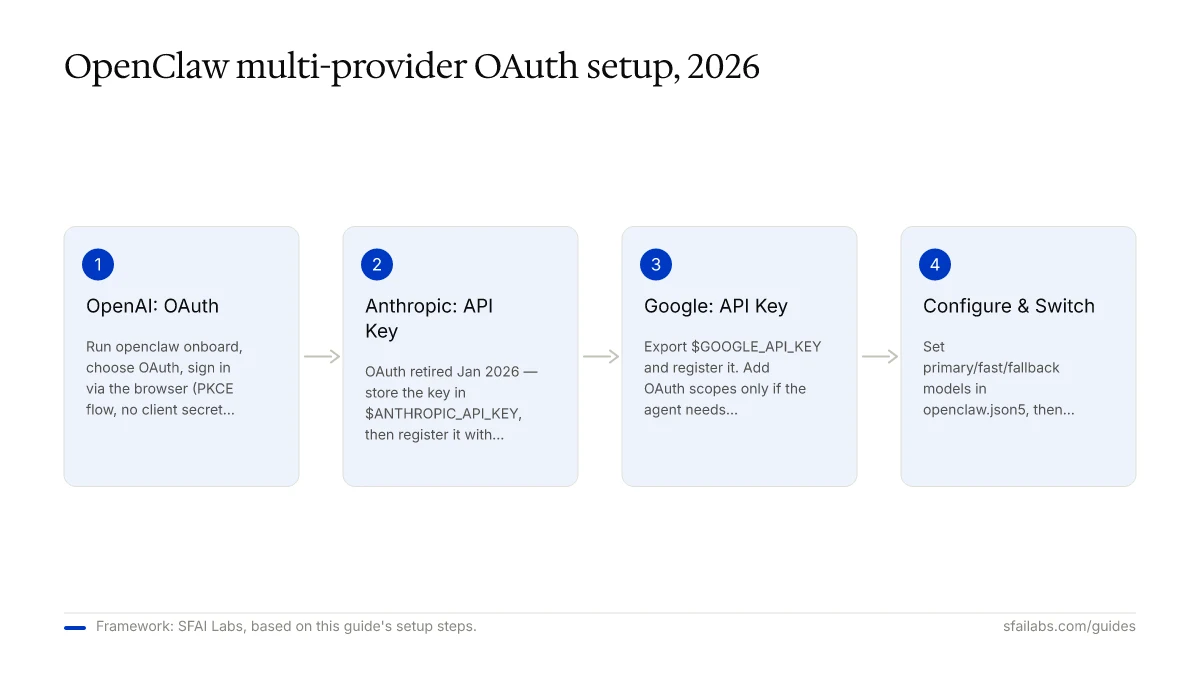
OpenAI is the smoothest provider to connect because OpenClaw’s built-in onboarding handles the OAuth flow automatically. The flow uses PKCE (Proof Key for Code Exchange), which means no client secret is stored on your machine.
Step 1: Run the onboarding command:
openclaw onboardSelect “OpenAI” when prompted for a provider, then choose “OAuth” as the authentication method.
Step 2: A browser window opens to auth.openai.com. Sign in with your OpenAI account. After authorization, the browser redirects to http://127.0.0.1:1455/auth/callback, where OpenClaw captures the tokens.
Step 3: Verify the connection:
openclaw models statusYou should see your OpenAI profile listed with an oauth credential type and an expiry timestamp. OpenClaw refreshes tokens automatically before they expire.
If you are on a headless server (VPS, Docker container), the browser redirect will fail. When this happens, copy the full URL from your browser’s address bar after the login attempt and paste it directly into the OpenClaw terminal prompt. The CLI extracts the authorization code from the URL and completes the exchange.
Setting Up Anthropic (API Key or Setup Token)
Anthropic shut down OAuth access in January 2026. If you previously used OAuth with Claude, those tokens have expired and will not refresh. The current authentication methods are API key (pay-as-you-go) or setup token (for enterprise/subscription plans).
API Key Method
Step 1: Get your API key from the Anthropic Console.
Step 2: Store the key in an environment variable rather than hardcoding it in your config file. Add to your shell profile (~/.zshrc or ~/.bashrc):
export ANTHROPIC_API_KEY="sk-ant-your-key-here"Step 3: Register the key with OpenClaw:
openclaw models auth add --provider anthropic --method api-keyOpenClaw reads the environment variable automatically. You can verify with openclaw models status.
Setup Token Method
If your organization uses Anthropic’s enterprise proxy, the setup token flow is the correct choice:
openclaw models auth setup-token --provider anthropicPaste the token when prompted. Setup tokens have a fixed expiry (typically 30 days for enterprise plans), so you will need to re-authenticate periodically. OpenClaw warns you 48 hours before expiry if heartbeat notifications are enabled.
Setting Up Google Gemini
Google Gemini uses an API key for model access. OAuth is only required if your OpenClaw agent also needs Gmail or Google Calendar permissions.
Step 1: Generate an API key at Google AI Studio. Make sure the Gemini API is enabled in your Google Cloud project.
Step 2: Export the key:
export GOOGLE_API_KEY="AIza-your-key-here"Step 3: Register with OpenClaw:
openclaw models auth add --provider google --method api-keyStep 4: Set Gemini as an available model:
openclaw models set google/gemini-3.1-proAdding Google OAuth Scopes (Optional)
If your agent needs to read Gmail or manage Google Calendar, you need a separate OAuth credential with specific scopes:
- Create OAuth credentials in the Google Cloud Console as a “Desktop application”
- Set the redirect URI to
http://127.0.0.1:5316 - Add the client ID and secret to your OpenClaw config
- Run
openclaw gmail loginto complete the OAuth flow
The Gmail OAuth redirect URI (127.0.0.1:5316) is different from the OpenAI callback port (127.0.0.1:1455). Getting these mixed up is a common setup error.
The Complete Multi-Provider Config
Here is what a working ~/.config/openclaw/openclaw.json5 looks like with all three providers configured. Most guides show isolated snippets rather than the full picture.
{
  "providers": {
    "anthropic": {
      "apiKey": "$ANTHROPIC_API_KEY"
    },
    "openai": {
      "auth": "oauth"
    },
    "google": {
      "apiKey": "$GOOGLE_API_KEY"
    }
  },
  "models": {
    "primary": "anthropic/claude-opus-4-6",
    "fast": "openai/gpt-5.4",
    "fallback": "google/gemini-3.1-pro"
  }
}
The $ANTHROPIC_API_KEY and $GOOGLE_API_KEY references resolve from environment variables at runtime. Your actual keys never appear in the config file. This matters because OpenClaw config files sometimes end up in version control, and hardcoded keys in committed files were flagged as a vulnerability in the CrowdStrike/Cisco security disclosure in early 2026.
Switching Between Providers
Setting up multiple providers only matters if you can switch between them efficiently. Here is how to handle it in daily use.
Per-session override: To use a specific model for an entire session, run:
openclaw models set openai/gpt-5.4This persists until you change it again or start a new agent.
Per-task model selection: In your OpenClaw skills, you can specify which model to use for specific tasks. A research skill might use the cheaper, faster model while a writing skill uses the primary model. This is configured in the skill file itself, not in global config.
Automatic fallback: If your primary model’s profile fails (rate limit, expired token, network error), OpenClaw automatically falls back to the next healthy profile. The order follows your models config: primary, then fast, then fallback.
A practical workflow that works well: Claude Opus 4.6 for complex reasoning and writing, GPT-5.4 for fast iteration and code generation, Gemini 3.1 Pro as a fallback and for tasks requiring large context windows. Expect roughly 70% of API costs on the primary model, with the remaining 30% split between the other two. For a detailed breakdown of what this costs, see our OpenClaw API costs guide.
Credential Security Best Practices
After the CrowdStrike/Cisco disclosure in early 2026, credential management in OpenClaw deserves explicit attention. Three rules to follow:
-
Store keys in environment variables, not config files. Use
$VARIABLE_NAMEreferences inopenclaw.json5. This keeps keys out of version control even if someone accidentally commits the config. -
Rotate API keys every 90 days. Set a calendar reminder. When you rotate, update the environment variable and run
openclaw models statusto verify. No restart required. -
Audit your auth-profiles.json periodically. This file stores OAuth tokens in plaintext. On shared machines, restrict file permissions to your user account:
chmod 600 ~/.openclaw/agents/*/agent/auth-profiles.jsonTroubleshooting Common Auth Failures
“OAuth token expired” for OpenAI: OpenClaw refreshes tokens automatically, but the refresh can fail if your OpenAI account session has been invalidated (password change, MFA update). Re-run openclaw onboard and re-authorize through the browser.
Callback failure on remote servers: The OAuth redirect to 127.0.0.1:1455 requires a local browser. On a VPS, either use SSH port forwarding (ssh -L 1455:localhost:1455 your-server) or copy the redirect URL manually from the browser and paste it into the CLI. For Docker-specific OAuth issues, see our OpenClaw Docker deployment guide.
Anthropic “invalid token” after January 2026: Old OAuth tokens are permanently invalid. Remove the stale profile and re-authenticate with an API key:
openclaw models auth remove --provider anthropic --profile default
openclaw models auth add --provider anthropic --method api-key
Multi-auth routing picks wrong provider: OpenClaw selects profiles by config order. If your primary model keeps hitting the wrong credential, check that the provider prefix in your model string matches the profile key exactly. anthropic/claude-opus-4-6 maps to profiles starting with anthropic:.
Google API key “permission denied”: The Gemini API must be explicitly enabled in your Google Cloud project. Visit the Google Cloud Console APIs dashboard, search for “Generative Language API,” and enable it.
Frequently Asked Questions
Is OAuth still available for all OpenClaw providers in 2026?
No. Anthropic shut down OAuth access in January 2026. OpenAI still supports OAuth through the Codex flow, and Google offers OAuth for service integrations (Gmail, Calendar) but uses API keys for Gemini model access. Each provider has its own authentication path, which is why a single guide covering all three is useful.
Can I use multiple AI providers in the same OpenClaw agent?
Yes. Configure each provider in your openclaw.json5 file and set up auth profiles for each. OpenClaw resolves credentials based on the provider prefix in the model string. You can switch between models with openclaw models set <provider/model> or configure automatic fallback ordering.
Where does OpenClaw store my API keys and OAuth tokens?
Auth profiles live at ~/.openclaw/agents/<agentId>/agent/auth-profiles.json. OAuth tokens (access and refresh) are stored in plaintext in this file. API keys configured via environment variables are resolved at runtime and never written to disk, which is why environment variable storage is the recommended approach.
How do I fix an expired OAuth token in OpenClaw?
For OpenAI, re-run openclaw onboard and re-authorize in the browser. OpenClaw handles refresh automatically, but if the refresh token itself has expired (rare, usually after a password change), you need to re-authenticate from scratch. For Anthropic, old OAuth tokens cannot be refreshed — switch to API key authentication.
What happens if my OAuth callback fails on a remote server?
The OAuth redirect targets http://127.0.0.1:1455, which requires a local browser. On headless servers, use SSH port forwarding to tunnel port 1455, or copy the redirect URL from your browser after the failed callback and paste it into the OpenClaw terminal. The CLI extracts the authorization code from the URL parameters.
How do I switch between models during a session?
Run openclaw models set <provider/model> to change the active model. This takes effect immediately for the current session. You can also specify models per-skill in your skill configuration files, which lets different tasks use different providers without manual switching.
Should I use OAuth or API keys for OpenClaw?
Use OAuth when the provider supports it and you want to use your existing subscription (currently OpenAI only). Use API keys for Anthropic (required since January 2026) and Google Gemini. API keys give you pay-as-you-go billing with direct cost visibility. OAuth uses your subscription quota, which can be harder to track.
How often should I rotate my API keys?
Every 90 days is the standard recommendation, aligned with the security guidance published after the CrowdStrike/Cisco disclosure. Set a calendar reminder, update the environment variable, and run openclaw models status to confirm. No agent restart is needed.
Key Takeaways
- OpenAI uses OAuth (Codex PKCE flow), Anthropic requires API keys or setup tokens since January 2026, and Google Gemini uses API keys with optional OAuth for service integrations.
- Store all credentials in environment variables, never directly in config files. Use
$VARIABLE_NAMEreferences inopenclaw.json5. - Configure multiple providers with primary, fast, and fallback model designations for automatic failover.
- Rotate API keys every 90 days and restrict file permissions on
auth-profiles.jsonon shared machines. - For remote server OAuth, use SSH port forwarding or paste the redirect URL manually into the CLI.
SFAI Labs


