A weekly industry newsletter typically takes four hours to produce. Two hours reading sources, one hour picking what matters, one hour writing intros. An OpenClaw content discovery agent can cut that to under 30 minutes. It monitors 120 RSS feeds, scores every article against configurable relevance criteria, compiles a ranked digest, sends a Telegram preview each Thursday morning, and publishes to ConvertKit with one tap. Total human time per issue: about 18 minutes. The agent handles the discovery; the editor handles the judgment.
This guide walks through every piece of that pipeline: the skills, the cron jobs, the scoring logic, the Telegram preview loop, and the email platform connection. If you have a working OpenClaw installation (start with our setup guide if you do not), you can build this in an afternoon.
How the Newsletter Curation Pipeline Works
Most newsletter automation guides describe a flat pipe: fetch feeds, summarize, email. That misses the step that matters most: deciding what deserves your readers’ attention. An RSS reader gives you everything. A curation agent gives you the ten items worth reading, ranked and annotated.
Here is the weekly cadence for a typical setup:
- Continuous (every 6 hours): OpenClaw monitors RSS feeds, Reddit, X, and Hacker News for new content matching your topic scope. New items land in a workspace digest file with metadata.
- Wednesday night (cron, 11 PM): A scoring skill runs across the week’s collected items, ranking each by relevance, recency, source authority, and engagement signals. The top 10-15 items are pulled into a draft digest.
- Thursday morning (heartbeat, 8 AM): OpenClaw compiles the digest with editorial intros, formats it for your newsletter template, and sends a Telegram preview with approve/revise options.
- Your review (15-20 minutes): You scan the digest, reorder if needed, tweak an intro, and tap approve.
- Post-approval (automated): OpenClaw pushes the final newsletter to your email platform via API, logs what was covered in memory, and archives the issue.
Each step is a separate skill. The cron jobs and heartbeat wire them together. Let us build each one.
Setting Up Multi-Source Content Monitoring
RSS feeds are the backbone, but newsletters that only pull from RSS miss the conversations happening on Reddit, X, and Hacker News. The content monitoring skill watches all four.
The Content Monitor Skill
Create skills/newsletter-monitor.md in your OpenClaw workspace:
## Newsletter Content Monitor

When triggered:

1. Read the list of RSS feeds from workspace/newsletter/sources.md
2. For each feed, fetch new items published since the last check
3. For each new item, extract: title, URL, publication date, source name, summary (first 200 words)
4. Check Reddit for new posts in the subreddits listed in sources.md (last 6 hours)
5. Check Hacker News front page for items matching the topic keywords in sources.md
6. Save all new items to workspace/newsletter/inbox/[date].md with metadata
7. Deduplicate against items already in the inbox (match by URL or title similarity above 85%)
8. Update workspace/newsletter/last-check.md with the current timestamp

Format each item as:
- **Title**: [title]
- **Source**: [source name]
- **URL**: [url]
- **Published**: [date]
- **Summary**: [first 200 words or AI-generated summary]
- **Signals**: [Reddit upvotes, HN points, or "RSS only"]
Configuring Your Sources
Create workspace/newsletter/sources.md:
## Newsletter Sources

### RSS Feeds
- https://techcrunch.com/feed/
- https://thenewstack.io/feed/
- https://blog.pragmaticengineer.com/rss/
- [add your domain-specific feeds here]

### Reddit Subreddits
- r/machinelearning
- r/devops
- r/startups

### Topic Keywords (for Hacker News and X)
- AI agents
- developer tools
- infrastructure automation

### Source Authority Tiers
- **Tier 1 (high trust)**: Pragmatic Engineer, The New Stack, official docs
- **Tier 2 (medium trust)**: TechCrunch, Hacker News top, subreddit top posts
- **Tier 3 (low trust)**: Random blog posts, new accounts, promotional content
The source authority tiers feed into the scoring skill later. Tier 1 content gets a scoring boost; Tier 3 content needs stronger engagement signals to make the cut.
Scheduling the Monitor
Wire the monitor to run every 6 hours:
openclaw cron add --name "newsletter-monitor" \
  --cron "0 */6 * * *" \
  --session isolated \
  --message "Run the newsletter-monitor skill. Check all sources and save new items to the inbox."
The --session isolated flag keeps each monitoring run in its own context, preventing inbox bloat from accumulating in a long-running session. For more on session management, see our cron jobs guide.
After a week of monitoring, you will have 80-200 items in the inbox depending on how many sources you track. The next skill separates signal from noise.
Scoring and Filtering Content
This is the step that separates a newsletter agent from an RSS reader. The scoring skill evaluates every inbox item against four criteria and produces a ranked shortlist.
The Scoring Skill
Create skills/newsletter-score.md:
## Newsletter Content Scorer

When given the path to an inbox folder:

1. Read all items from workspace/newsletter/inbox/ for the current week
2. Read workspace/newsletter/memory/covered-topics.md to check what was featured in previous issues
3. Score each item on a 0-100 scale using these weights:

### Scoring Criteria

**Relevance (40 points)**
- How closely does the item match the topic keywords in sources.md?
- Score 40: direct match to primary topic
- Score 20: tangentially related
- Score 0: off-topic

**Recency (20 points)**
- Published in last 24 hours: 20 points
- Published in last 3 days: 15 points
- Published in last 7 days: 10 points
- Older than 7 days: 0 points

**Source Authority (20 points)**
- Tier 1 source: 20 points
- Tier 2 source: 12 points
- Tier 3 source: 5 points

**Engagement Signals (20 points)**
- Reddit: 100+ upvotes = 20, 50+ = 15, 10+ = 8, no data = 5
- HN: 100+ points = 20, 50+ = 15, 10+ = 8, no data = 5
- RSS only (no social signal): 5 points

4. Apply penalties:
   - Topic covered in last 3 issues: -30 points
   - Same source as another item in this issue: -10 points (prefer diversity)
   - Promotional/sponsored content detected: -40 points

5. Rank all items by final score
6. Select top 10-12 items
7. Save ranked list to workspace/newsletter/drafts/[issue-number]-ranked.md
Why Configurable Weights Matter
It is worth testing several scoring configurations. Early versions that weight recency too heavily tend to fill newsletters with breaking news that ages poorly by the time readers open the email. Shifting weight toward relevance and source authority produced digests that readers forwarded more often.
You should tune these weights for your audience. A daily tech digest needs higher recency weight. A monthly strategy newsletter needs higher relevance and authority weight. The point is that the weights are visible in the skill file, not buried in a black box.
Running the Scorer
Schedule it for Wednesday night, giving the week’s content time to accumulate:
openclaw cron add --name "newsletter-score" \
  --cron "0 23 * * 3" \
  --session isolated \
  --message "Run the newsletter-score skill on this week's inbox. Save the ranked digest to the drafts folder."
Compiling the Digest with Editorial Intros
Raw links with summaries are not a newsletter. Readers subscribe for the editor’s perspective on why each item matters. The compilation skill writes those editorial intros.
The Digest Compiler Skill
Create skills/newsletter-compile.md:
## Newsletter Digest Compiler

When given a ranked content list:

1. Read the ranked list from workspace/newsletter/drafts/[latest]-ranked.md
2. Read workspace/newsletter/voice.md for editorial tone and formatting rules
3. For each of the top 10 items:
   - Read the full article via web browser (if accessible)
   - Write a 2-3 sentence editorial intro that explains WHY this matters to the reader, not just WHAT it says
   - Include one specific detail or quote from the article
   - Add a "Read more" link
4. Group items into 2-3 thematic sections with section headers
5. Write a 2-sentence newsletter intro summarizing the week's theme
6. Generate 3 subject line options
7. Save the compiled digest to workspace/newsletter/drafts/[issue-number]-compiled.md
8. Format a second copy as HTML matching the email template in workspace/newsletter/template.html

Voice rules:
- Write intros as a knowledgeable colleague, not a news anchor
- Take a position: "This matters because..." or "Skip this if you already..."
- Vary intro length: some items get 1 sentence, others get 3
- Do not summarize the article; tell the reader what to think about it
The voice file (workspace/newsletter/voice.md) works the same way as the brand voice file in our content creation guide. Give OpenClaw 3-5 examples of intros you have written manually, and it will match the tone within a few issues.
The Telegram Preview: Review Before You Send
This is the piece that makes the pipeline feel like having a human editorial assistant. Every Thursday morning, instead of a newsletter going straight to 5,000 subscribers, it lands in your Telegram first.
Configuring the Preview in heartbeat.md
Add this to your heartbeat.md:
## Newsletter Preview (Thursday Morning)

If today is Thursday and the time is between 07:30 and 08:30 in my timezone:

1. Check workspace/newsletter/drafts/ for the latest compiled digest
2. If a compiled digest exists and is not yet approved:
   - Extract: subject line options, item count, total word count
   - List the first 3 items with their editorial intros (truncated to 100 words each)
   - Send me a Telegram message in the Newsletter group:
     "Newsletter #[N] ready for review.
      Subject: [top subject line option]
      Items: [count] | Words: [word count]

      Preview of top 3 items:
      1. [title] - [truncated intro]
      2. [title] - [truncated intro]
      3. [title] - [truncated intro]

      Reply: APPROVE to publish, or tell me what to change."
3. If I reply APPROVE: trigger the publishing skill
4. If I reply with changes: apply edits and send updated preview
For more on heartbeat intervals and Telegram group configuration, see our heartbeat scheduling guide.
What the Preview Looks Like in Practice
The Thursday morning message arrives around 8 AM. You see the subject line, a count of items, and the top three picks with intros. Most weeks, you reply “approve” and the newsletter sends within five minutes. Occasionally you reply “swap item 4 for something about Kubernetes” or “rewrite the intro for item 2, it is too vague.” OpenClaw processes the feedback, regenerates, and sends a new preview.
The review takes 15-20 minutes on a phone. That is the entire human time investment for a curated industry newsletter.
Publishing to Email Platforms
After approval, OpenClaw pushes the newsletter to your email platform. The skill depends on which platform you use.
Mailchimp
## Mailchimp Publishing Skill

When given an approved newsletter digest:

1. Read the HTML version of the compiled digest
2. Create a new campaign via Mailchimp API:
   - Endpoint: POST /campaigns
   - Type: regular
   - List ID: from .env (MAILCHIMP_LIST_ID)
   - Subject line: the approved subject from the digest
3. Set the campaign content to the HTML digest
4. Schedule or send immediately based on the digest metadata
5. Log the campaign ID and send time to workspace/newsletter/memory/issues.md
Store your Mailchimp API key in .env, never in workspace files. OpenClaw reads environment variables at runtime. The Mailchimp integration guide covers the full connection setup.
ConvertKit / Kit
The process is similar but uses ConvertKit’s broadcast API:
## ConvertKit Publishing Skill

When given an approved newsletter digest:

1. Read the HTML digest
2. Create a new broadcast via ConvertKit API:
   - Endpoint: POST /broadcasts
   - Auth: API secret from .env (CONVERTKIT_API_SECRET)
   - Subject: approved subject line
   - Content: HTML digest body
3. Set published_at to the scheduled send time
4. Log to memory
Buttondown
Buttondown’s API is the simplest of the three:
## Buttondown Publishing Skill

When given an approved digest:

1. POST to https://api.buttondown.email/v1/emails
2. Auth: API key from .env (BUTTONDOWN_API_KEY)
3. Body: { "subject": "[subject]", "body": "[markdown digest]", "status": "draft" }
4. Status "draft" lets you do a final check in Buttondown's UI before sending
5. Log to memory
Starting with "status": "draft" for the first few issues is recommended so you can verify formatting in the email platform’s preview. Once confident, switch to "status": "published" for fully automated sends.
Preventing Repeat Coverage with Memory
A newsletter that features the same Kubernetes article three weeks in a row loses readers fast. OpenClaw’s memory system prevents this, but you need to configure it deliberately.
The Covered Topics Memory File
Create workspace/newsletter/memory/covered-topics.md:
## Covered Topics Log

### Issue #47 (2026-03-27)
- Kubernetes 1.33 gateway API changes (https://k8s.io/blog/...)
- OpenAI Codex agent release (https://openai.com/blog/...)
- Redis licensing update (https://redis.io/blog/...)
[...all 10 items with URLs]

### Issue #46 (2026-03-20)
- Terraform 2.0 migration guide
- Anthropic Claude Opus 4.6 benchmark results
- Cloudflare Workers AI pricing update
[...all 10 items]
The scoring skill reads this file and applies a -30 point penalty to any topic covered in the last three issues. Topics from four or more issues ago are fair game again, which allows revisiting evolving stories with new developments.
How Memory Compounds Over Time
After 10-15 issues, the memory file becomes a searchable archive of everything your newsletter has covered. OpenClaw uses this not just for deduplication but for continuity. When a story you covered in issue #42 has a major update, the scoring skill can flag it as a “follow-up” rather than a repeat, and the editorial intro can reference the earlier coverage.
This is the advantage OpenClaw has over n8n or Activepieces for newsletter curation. Those platforms can automate the fetch-and-format pipeline, but they have no persistent memory across runs. Every issue starts from zero. For more on configuring persistent memory, see our memory configuration guide.
What This Costs to Run
Honest numbers, based on a weekly newsletter monitoring 120 RSS feeds plus Reddit and HN (approximate):
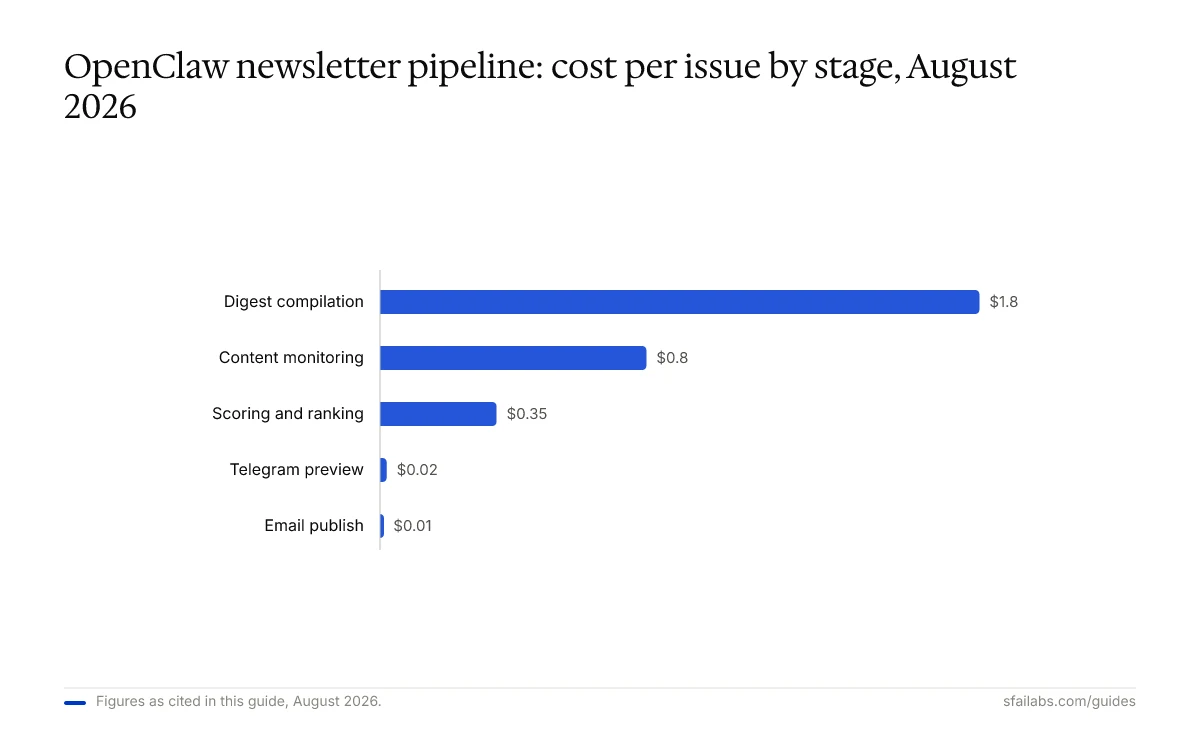
| Pipeline Stage | Model Used | Tokens Per Run | Cost Per Issue |
|---|---|---|---|
| Content monitoring (4x daily) | Claude Sonnet 4.6 | 8,000-12,000 per run | ~$0.80/week |
| Scoring and ranking | Claude Sonnet 4.6 | 15,000-20,000 | ~$0.35 |
| Digest compilation | Claude Opus 4.6 | 30,000-45,000 | ~$1.20-1.80 |
| Telegram preview | Claude Haiku | 3,000-5,000 | ~$0.02 |
| Email publish | Claude Haiku | 2,000-3,000 | ~$0.01 |
| Total per issue | $2.40-3.00 |
At one issue per week, that is $10-13 per month in API costs. Add the heartbeat running for the Thursday preview at negligible cost, and you are under $15/month for the full pipeline.
Compare that to the 4 hours per week typically spent on manual curation. At any reasonable hourly rate, the payback period is measured in days.
If you use the OAuth method with an existing Claude or ChatGPT subscription instead of per-token API pricing, costs drop further. The setup guide covers OAuth setup.
Frequently Asked Questions
How many RSS feeds can OpenClaw monitor for a newsletter?
OpenClaw can handle up to 200 feeds without performance issues. The practical limit is not the number of feeds but the context window: monitoring runs need to process all new items in a single session, and 200 feeds with high-volume sources can generate 300-400 items per day. For most newsletters, 50-150 feeds is the sweet spot. Use the --session isolated flag on the monitoring cron to prevent context buildup.
Can OpenClaw write the entire newsletter without me reviewing it?
It can, and some users do this for internal team digests where the stakes are low. For subscriber-facing newsletters, it is not recommended. The editorial intros are where your voice lives, and LLM-generated intros occasionally miss nuance or misread the significance of a story. The Telegram preview takes 15 minutes and is the highest-leverage review step you can add.
What if I want a daily digest instead of weekly?
Change the scoring cron to run nightly and the heartbeat preview to trigger every morning. Lower the item count to 3-5 per issue to avoid overwhelming daily subscribers. Daily cadence increases API costs roughly 5x (to $50-65/month) because the compilation skill runs more often.
How does this compare to using n8n or Activepieces for newsletters?
n8n and Activepieces are strong at the fetch-and-format pipeline. They connect RSS to email with visual workflows. Where they fall short is memory and editorial judgment. They cannot remember what you covered last week, take a position on why an article matters, or adapt intros to match your voice across issues. OpenClaw handles all three because skills are stateful through workspace files, not stateless workflow nodes.
Can I add sources that are not RSS feeds?
Yes. The monitoring skill can be extended to check any source OpenClaw can browse: specific Substack publications, X accounts (via web search), Hacker News, Product Hunt, GitHub trending, or even competitor newsletters. Add the source to sources.md with a check method, and the monitor skill handles the rest.
Does OpenClaw format the newsletter HTML for me?
The compilation skill generates both markdown and HTML versions. You provide an HTML template in workspace/newsletter/template.html matching your email platform’s design, and OpenClaw populates it. For simple layouts (header, items with intros, footer), this works out of the box. Complex layouts with multi-column grids or heavy CSS may need manual template refinement.
How do I handle images or thumbnails in the newsletter?
OpenClaw extracts Open Graph images from the linked articles and includes them in the HTML digest. If an article lacks an OG image, the skill skips the thumbnail for that item. You can also point the compilation skill to a folder of stock images categorized by topic, and it selects the closest match.
Key Takeaways
- An OpenClaw newsletter curation agent is five skills wired together: monitor, score, compile, preview, publish. Each skill is a markdown file in your workspace, fully editable and transparent.
- The scoring skill with configurable weights is what separates curation from aggregation. Tune relevance, recency, source authority, and engagement signals for your audience rather than relying on a black-box algorithm.
- The Telegram preview with approve/revise is the highest-value step. It takes 15 minutes and prevents every “why did we send that?” moment.
- Memory-based deduplication across issues is OpenClaw’s structural advantage over stateless automation platforms like n8n or Activepieces. Your newsletter gets smarter with each issue instead of starting from zero.
- Total cost runs $10-15 per month in API fees for a weekly newsletter monitoring 120+ sources, compared to 16+ hours of manual curation per month.
Related Resources
- How to Set Up OpenClaw the Right Way: 10 Steps – prerequisite installation and model selection
- OpenClaw Cron Jobs: Schedule Recurring Agent Tasks – deep dive on cron configuration for all pipeline stages
- OpenClaw Heartbeat Scheduling: Configure Proactive Agent Behavior – interval tuning for the Telegram preview
- OpenClaw Memory Configuration: Make Your Agent Remember Everything – persistent memory for cross-issue deduplication
- How to Use OpenClaw for Content Creation: Automated Writing Workflows – the companion guide for full article generation
- How to Connect Mailchimp to OpenClaw – email platform integration setup
- OpenClaw for Competitive Intelligence – uses similar multi-source monitoring architecture
SFAI Labs


