The OpenClaw gateway token is the credential your client uses to authenticate against the OpenClaw API gateway. It is not the same thing as your Anthropic or OpenAI key. Confusing the two is the single most common source of 401 errors and accidental credential leaks we see from teams putting OpenClaw behind a proxy or using a managed endpoint. This guide explains what the token is, how to get one, how to pass it, and — more importantly — how to operate it: scopes, rotation, environment isolation, and what to do when one leaks.
Gateway Token vs Provider API Key: Two Tokens, Two Jobs
This distinction is where most teams get tangled, so we lead with it.
- The gateway token authenticates your client to the OpenClaw API gateway. It says “this caller is allowed to talk to this OpenClaw instance.”
- The provider API key (Anthropic, OpenAI, Google) authenticates OpenClaw to the model vendor. It says “OpenClaw is allowed to call Claude or GPT on your behalf.”
Two different credentials, two different trust boundaries.
| Property | Gateway Token | Provider API Key |
|---|---|---|
| Authenticates | Your app → OpenClaw | OpenClaw → model vendor |
| Issued by | OpenClaw (managed) or you (self-hosted) | Anthropic, OpenAI, Google, etc. |
| Where it lives | Client .env, CI secrets |
OpenClaw server .env |
| Scope model | OpenClaw scopes (read, run, admin) | Provider-defined (often unscoped) |
| Typical lifetime | Short-lived (managed) or long-lived (self-hosted) | Long-lived |
| Who sees it | Anyone calling your OpenClaw endpoint | Only the OpenClaw process |
If you are sending an Anthropic key in the Authorization header to your OpenClaw gateway, that is wrong. Anthropic does not know your OpenClaw gateway exists. Your OpenClaw gateway does not accept Anthropic keys. You need a gateway token.
How to Get an OpenClaw Gateway Token
There are two paths, depending on how you run OpenClaw.
Managed OpenClaw endpoint
- Sign in at openclaw.ai and open Settings → Gateway Tokens.
- Click Create Token. Give it a descriptive name that identifies the consumer (for example,
ci-runner-prodorinternal-dashboard). - Select a scope set (see Scopes and Least Privilege).
- Optionally set an expiry (we recommend 30 or 90 days for human-operated tokens).
- Copy the token immediately. The managed dashboard shows it exactly once.
Self-hosted OpenClaw
If you run OpenClaw on your own server (Docker, VPS, or bare metal), you generate tokens locally using the admin CLI:
openclaw auth create-token \
  --name "ci-runner-prod" \
  --scope "run:jobs" \
  --scope "read:agents" \
  --expires-in 90d
The CLI prints the token once. Copy it to your client’s secret store. Self-hosted tokens are stored in the OpenClaw database (hashed) and can be revoked at any time with openclaw auth revoke <token-id>.
Whichever path you take, the output is a single opaque string that starts with an identifier prefix (for example, openclaw_gw_live_... in managed, or a shorter prefix in self-hosted). We will refer to it as {{GATEWAY_TOKEN}} in examples below — never paste a real token into code or documentation.
How to Pass the Token in Requests
OpenClaw accepts the gateway token as a bearer credential in the Authorization header:
curl https://gateway.openclaw.ai/v1/agents \
  -H "Authorization: Bearer {{GATEWAY_TOKEN}}" \
  -H "Content-Type: application/json"
A successful call returns a JSON list of agents. A missing or invalid token returns 401 Unauthorized. An insufficient-scope token returns 403 Forbidden.
In Node.js:
const res = await fetch(`${process.env.OPENCLAW_GATEWAY_URL}/v1/agents`, {
  headers: {
    Authorization: `Bearer ${process.env.OPENCLAW_GATEWAY_TOKEN}`,
    "Content-Type": "application/json",
  },
});
In Python:
import os, httpx

headers = {
    "Authorization": f"Bearer {os.environ['OPENCLAW_GATEWAY_TOKEN']}",
    "Content-Type": "application/json",
}
res = httpx.get(f"{os.environ['OPENCLAW_GATEWAY_URL']}/v1/agents", headers=headers)
One gotcha: OpenClaw expects Bearer with a capital B and a single space. Lowercase bearer works in most clients but not all middleware between you and the gateway — we have seen reverse proxies drop the header when the scheme is lowercased.
Storing the Token: .env and Secret Managers
The gateway token is a long-lived-ish credential. Treat it like a password.
For local development:
# .env — never commit this file
OPENCLAW_GATEWAY_URL=https://gateway.openclaw.ai
OPENCLAW_GATEWAY_TOKEN={{GATEWAY_TOKEN}}
Add .env to .gitignore. Load it at runtime with dotenv (Node), python-dotenv (Python), or the equivalent in your framework. Never hardcode the token in source files.
For CI/CD: use the platform’s secret store — GitHub Actions encrypted secrets, GitLab CI variables (masked + protected), or your runner’s secret backend. Reference it as an environment variable in the job; do not echo it to logs.
For production servers: use a managed secret manager (AWS Secrets Manager, HashiCorp Vault, Doppler, 1Password Secrets Automation). Mount the secret as an environment variable at container start. Avoid baking it into images or writing it to disk.
One file, one environment. A .env.production that gets copied to a developer laptop is a leak waiting to happen. Keep environment-specific files on the machines that need them.
Scopes and Least Privilege
Gateway tokens carry scopes that limit what the bearer can do. Apply the least privilege needed.
| Scope | What it allows | Typical consumer |
|---|---|---|
read:agents |
List and inspect agents | Read-only dashboards |
read:jobs |
Read job status and output | Monitoring, observability |
run:jobs |
Submit and cancel jobs | Application backends, CI |
write:agents |
Create and update agent configs | Ops consoles, admin tooling |
admin:tools |
Register, update, and remove custom tools | Platform admins only |
admin:* |
Full control including token management | Break-glass only |
Guidelines we follow:
- CI tokens get
run:jobsonly. They do not need to inspect or modify agent configs. - Application backends get
run:jobsplusread:jobs. Enough to submit work and poll for results. - Dashboards get
read:*scopes only. Never give a read-only surface write access. - Admin scopes belong on human-operated tokens issued to a specific engineer, not shared secrets in a pipeline.
- Never reuse an
admin:*token as a service credential. If a CI pipeline needs admin actions, generate a scoped, short-lived admin token for that specific deploy and revoke it immediately after.
A scope you do not grant cannot leak.
Environment Isolation: Dev, Stage, Prod
Use separate tokens per environment. We recommend naming them to make the environment visible at a glance:
openclaw_gw_dev_<random>openclaw_gw_stage_<random>openclaw_gw_live_<random>
Two reasons:
- Blast radius. A compromised dev token should not touch production data.
- Audit clarity. When you see a token in a log or a request trace, the prefix tells you immediately whether the call is hitting the right environment.
Point each environment’s token at its own OpenClaw gateway URL (gateway-dev.openclaw.ai, gateway.openclaw.ai). Do not let a staging client reach production data with a staging token — the gateway URL and the token should match.
Rotating Tokens Without Downtime
Rotate on a schedule and rotate on suspicion. The zero-downtime pattern is dual-active:
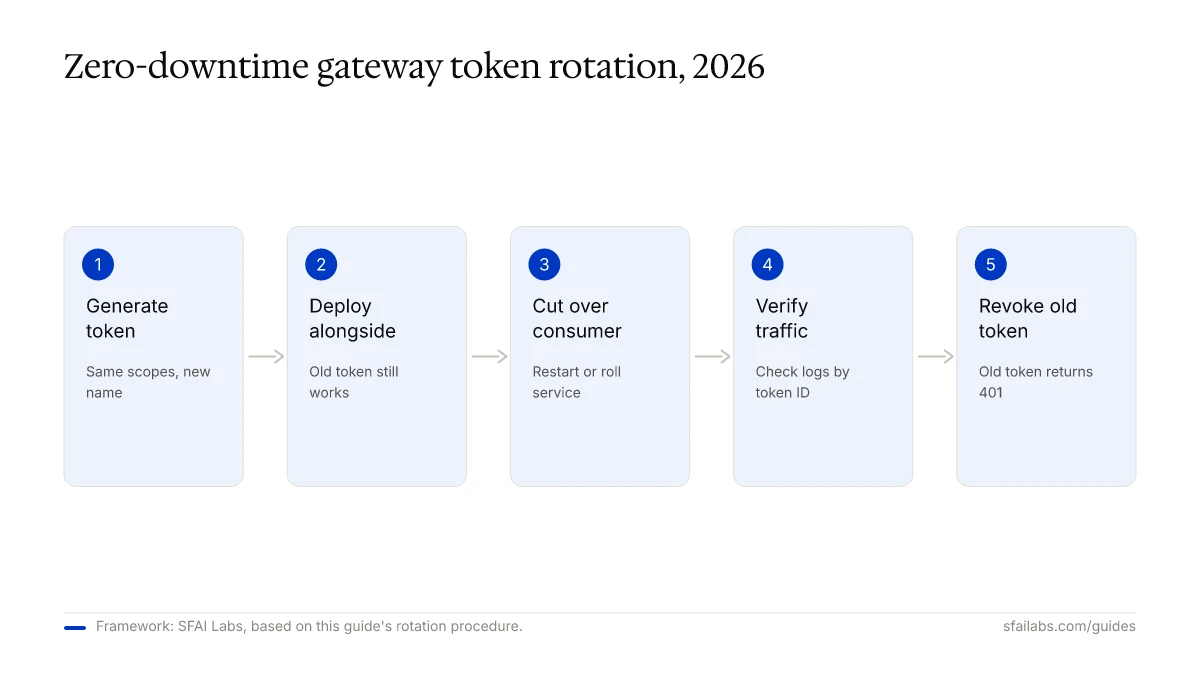
- Generate a new token with the same scopes and a clear new name (
ci-runner-prod-2026-q2). - Deploy the new token to the consumer’s secret store without removing the old one. The consumer now has both available.
- Cut over the consumer to read the new token. Restart or roll the service.
- Verify that production traffic is flowing under the new token (check request logs by token ID).
- Revoke the old token in the OpenClaw dashboard or via
openclaw auth revoke <old-id>.
For managed tokens with expiry, rotate at 80% of the TTL to avoid last-minute expirations. Recommended cadence:
| Consumer | Cadence |
|---|---|
| CI/CD pipelines | Monthly |
| Production backends | Quarterly |
| Human-operated admin tokens | Quarterly + on offboarding |
| Anything suspicious | Immediately |
Common Failure Modes and Fixes
The error most people hit is 401. The second most is 403. They mean different things.
| Symptom | Likely cause | Fix |
|---|---|---|
401 Unauthorized, body says “invalid token” |
Token is mistyped, missing Bearer prefix, or does not exist in the gateway |
Check header format, regenerate token, confirm you copied all characters |
401 Unauthorized, body says “token expired” |
Managed token passed its TTL | Generate a new token; enable rotation |
401 Unauthorized only in production |
Loading a dev or stage token by mistake | Confirm env-specific .env is being read; check prefix (openclaw_gw_live_...) |
403 Forbidden, body says “insufficient scope” |
Token is valid but lacks the scope for this endpoint | Grant the needed scope or use a different token; do not broadly upgrade to admin:* |
401 intermittently |
Reverse proxy stripping or lowercasing the Authorization header |
Inspect the proxy config; preserve header case and value |
502 or 504 right after token rotation |
Service cached the old token | Roll the service so it reloads secrets |
401 on self-hosted after restart |
Token DB not persisted across container restarts | Ensure the OpenClaw database volume is mounted |
401 after a successful curl test |
Copied the token from a truncated terminal display | Recopy in full; managed tokens are >40 characters |
When in doubt, call GET /v1/auth/whoami with your token. OpenClaw returns the token ID, scope list, and expiry. That single endpoint resolves most “is my token even working?” questions in ten seconds.
What to Do When a Token Leaks
If a gateway token is committed to a public repo, pasted in a support ticket, or printed in a shared log — treat it as compromised. The recovery sequence takes about a minute:
- Revoke immediately. Managed: dashboard → tokens → revoke. Self-hosted:
openclaw auth revoke <token-id>. - Confirm revocation by calling
/v1/auth/whoamiwith the old token. Expect401. - Audit recent activity for that token. Check request logs for calls you did not make.
- Generate a replacement with the same scopes and a new name.
- Deploy the replacement through the rotation procedure above.
- Rotate dependent secrets if the leaked token could have been used to read provider keys or admin configs.
- Post-mortem. How did it leak — source control, a log file, a chat message? Close that path.
Do not try to edit git history to remove the token and call it done. Assume the moment it hit a public surface, it was scraped. Revoke first, investigate second.
Frequently Asked Questions
What is the OpenClaw gateway token used for?
It authenticates your client to the OpenClaw API gateway. Every request to the OpenClaw API must include a valid gateway token in the Authorization: Bearer header. The token tells the gateway which caller you are and what scopes you hold.
How is the OpenClaw gateway token different from an Anthropic or OpenAI API key?
The gateway token authenticates you to OpenClaw. A provider API key authenticates OpenClaw to the model vendor. They live in different places (gateway token in your client, provider key on the OpenClaw server) and serve different trust boundaries. Confusing them is the top source of 401 errors.
Where should I store the OpenClaw gateway token?
In a .env file locally, in encrypted secrets for CI, and in a managed secret manager (Vault, AWS Secrets Manager, Doppler) for production. Never commit it to source control, never bake it into container images, and never echo it in logs.
How often should I rotate my gateway token?
Rotate CI tokens monthly, production backend tokens quarterly, and any token immediately if you suspect exposure. Use the dual-active pattern: deploy the new token, cut over, verify, then revoke the old one.
What scopes should I give a CI pipeline token?
run:jobs and nothing else. A CI token needs to submit jobs, not manage agents or tools. If your pipeline also needs to poll for results, add read:jobs. Never give CI tokens admin:*.
What does 401 invalid gateway token mean?
The gateway does not recognize the token you sent. Four common causes: the token was mistyped, the Bearer prefix is missing or malformed, the token was revoked or expired, or you loaded a token from a different environment (dev token hitting prod gateway). Call /v1/auth/whoami to isolate which one.
Can I use one gateway token for multiple services?
You can, but do not. One token per consumer gives you clean audit logs, independent rotation, and blast-radius containment if one service is compromised. Tokens are free to create — use that.
Do gateway tokens expire?
Managed OpenClaw tokens can have an expiry that you set at creation (we recommend 30 to 90 days). Self-hosted tokens are indefinite by default but support --expires-in at creation. Rotate on a schedule regardless of expiry.
Key Takeaways
- The gateway token authenticates your client to OpenClaw. It is not an Anthropic or OpenAI key.
- Generate it from the managed dashboard or the self-hosted
openclaw auth create-tokenCLI. - Pass it as
Authorization: Bearer {{GATEWAY_TOKEN}}and store it in.envor a secret manager. - Grant least-privilege scopes. CI gets
run:jobs, dashboards getread:*, admins get admin tokens separately. - Use separate tokens per environment with visible prefixes (
openclaw_gw_live_...). - Rotate on a schedule with the dual-active pattern. Revoke within 60 seconds on suspected leak.
- When a call fails, hit
/v1/auth/whoamifirst. It resolves most auth confusion in one request.
SFAI Labs


